



File Information
| File | Details |
|---|---|
| Name | Simplewall – Open Source Windows Firewall Tool |
| Version | v3.8.7 (Stable) |
| File Size | 1MB |
| Platforms | Windows 7 SP1 • 8 • 8.1 • 10 • 11 (x86 / x64 / ARM64) |
| License | Open Source (GPL-3.0 License) |
| Official Repository | GitHub SimpleWall |
| Developer | Henry++ |
Table of contents
Description
Simplewall is a powerful, lightweight, open-source network filtering tool for Windows designed for advanced users who want precise control over network activity at the system level. Instead of acting as a traditional firewall UI, Simplewall operates directly on Windows Filtering Platform (WFP), a low-level Microsoft networking API used by the Windows operating system itself.
With a binary size of less than 1 MB, Simplewall offers exceptional performance with minimal resource usage. It allows users to define strict allow/block rules, monitor dropped and allowed packets, block Windows telemetry, and control traffic for system services, Windows Store apps, and even WSL.
Simplewall works independently of Windows Firewall and continues filtering traffic even when the application is not running. For correct operation, administrator privileges are required.
Use Cases
Simplewall is best suited for users who need fine-grained, system-level network control:
- Portable Security Setup: Run Simplewall in portable mode without installation.
- Privacy-Focused Users: Block Windows telemetry, tracking services, and background connections.
- Advanced Power Users: Create custom global or app-specific network rules.
- Developers & Sysadmins: Monitor allowed and dropped packets with logging for debugging.
- WSL Users: Control Linux subsystem network access directly from Windows.
- Offline / Restricted Environments: Enforce strict outbound network policies.
Screenshots
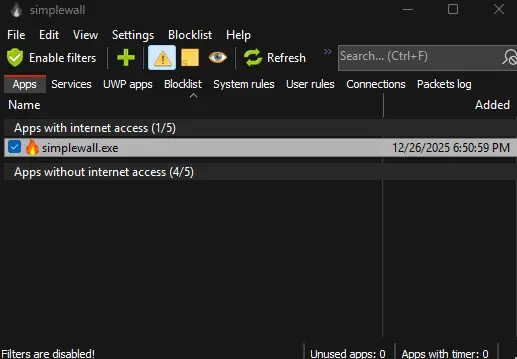
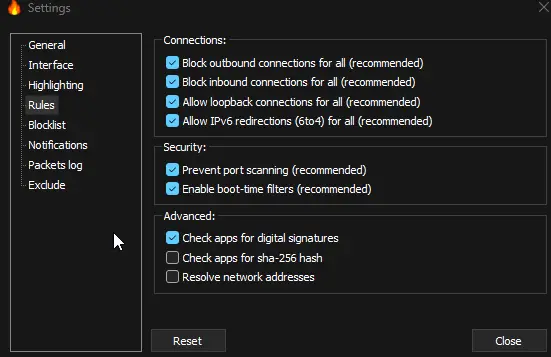
Features of SimpleWall
| Feature | Description |
|---|---|
| Minimal Interface | Clean UI with no annoying popups or distractions |
| Rules Editor | Create global or application-specific rules |
| Internal Blocklist | Block Windows telemetry |
| Packet Logging | Log dropped and allowed packets to file |
| WFP-Based Filtering | Uses Windows Filtering Platform for low-level control |
| WSL Support | Works with Windows Subsystem for Linux |
| Windows Store Support | Control UWP / Store applications |
| Windows Services Support | Manage traffic for system services |
| IPv6 Support | Full IPv6 compatibility |
| Portable Mode | Run without installation |
| Localization | Multi-language support |
| Open Source | Fully transparent and community-auditable |
System Requirements
| Requirement | Specification |
|---|---|
| Operating System | Windows 7 SP1, 8, 8.1, 10, 11 |
| Architecture | 32-bit / 64-bit / ARM64 |
| CPU | SSE2-capable processor |
| Permissions | Administrator rights required |
How to Install SimpleWall??
- Download the portable Simplewall archive.
- Extract it to any folder using any file archiver (You can also use 7-Zip or PeaZip).
- Enter the folder based on your system (32, 64 or ARM64)
- Run simplewall.exe file
- Enable filtering.
Download Simplewall: Lightweight Open-Source Firewall Control for Windows
Rule Installation Modes
When installing rules, you can choose:
- Permanent Rules – Active until manually disabled.
- Temporary Rules – Automatically removed after reboot.
Uninstall Notes
Uninstalling Simplewall does not remove active filters automatically.
To remove all filters:
- Launch Simplewall.
- Click Disable Filters.
- Then uninstall the application.
Conclusion
Simplewall is a ultra-lightweight firewall solution for Windows users who demand absolute control over network traffic. By leveraging Windows Filtering Platform directly, it delivers powerful filtering capabilities without the overhead of traditional firewall software.
If you value privacy, performance, and precision, and don’t mind a tool built for advanced users, Simplewall is one of the most effective open-source network control utilities available for Windows today.




