

Text rendering in AI generated images has been the hard part for years. You ask for a poster with three words on it and get back something that looks like a font had a stroke. Logos come out scrambled. Product labels turn into decorative nonsense. Most image generation models treat text as another visual texture rather than something that needs to be accurate.
That’s finally starting to change. A handful of open source models have gotten genuinely good at this, not just generating images but rendering legible text inside them, editing existing images without destroying the surrounding context, and handling the kind of product and marketing visuals that actually require precision.
These four are the ones worth knowing about right now.
1. HiDream-O1-Image

Most image generation models are built from multiple components stitched together. A text encoder reads your prompt. A VAE compresses the image into a latent space. A diffusion model does the actual generation. Each handoff between components is a place where information gets lost or distorted, which is part of why text has been so hard to get right.
HiDream-O1-Image throws out that architecture entirely. No VAE, no separate text encoder. Raw pixels, text, and task conditions all processed in one shared token space from the start. The result is a model that understands text as part of the image rather than as instructions fed into a separate system.
On DPG-Bench, which tests how well a model follows dense, detailed prompts, HiDream-O1-Image scores 89.83 overall ahead of FLUX.2 Dev at 87.57 and Qwen-Image at 88.32, both of which run on significantly more parameters. On GenEval it scores 0.90 overall, leading every open source model on the chart and beating GPT Image 1 at 0.84.
The position score on GenEval specifically 0.93 is the number worth highlighting. Getting objects in the right spatial position relative to each other is one of the hardest things for image models to do consistently. That score leads the entire benchmark including closed source models.
It handles text-to-image, instruction-based editing, and multi-reference subject personalization all in one model at 8B parameters. The Dev variant runs in 28 steps instead of 50 if inference speed matters more than maximum quality.
One thing worth knowing, it needs a CUDA GPU to run. No CPU fallback, no Apple Silicon optimized path currently. The Reasoning-Driven Prompt Agent that ships with it uses Gemma-4-31B-it as a backend which adds another dependency if you want the full pipeline.
MIT licensed, weights on Hugging Face, #8 on the Artificial Analysis Text to Image Arena at launch.
Where it leads: Text rendering accuracy, dense prompt following, spatial positioning Where it’s limited: GPU required, heavier setup
2. Qwen-Image-Edit
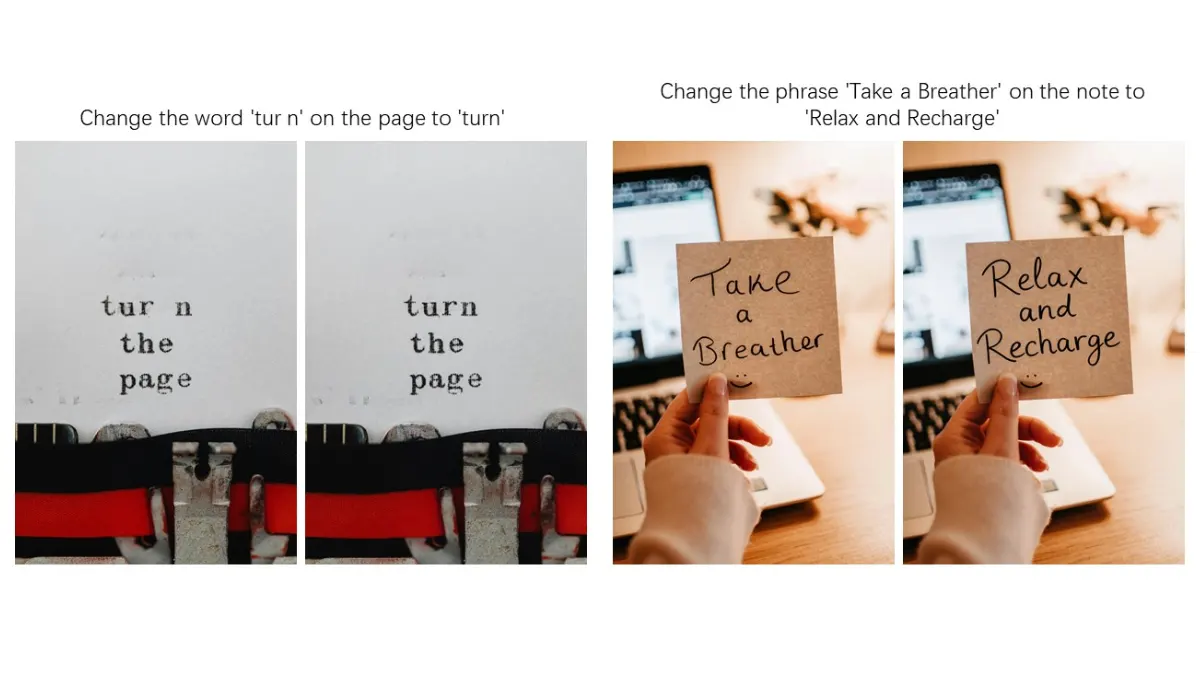
Qwen-Image-Edit gives you two distinct editing approaches and knows when to use which one.
Appearance editing keeps everything outside your edit completely unchanged. Remove a hair strand, swap a background, change the color of one specific letter in a sign, the untouched regions stay pixel-perfect. Semantic editing takes the opposite approach, most pixels change but the meaning and identity stay consistent. Rotate an object 180 degrees, transfer a portrait to Studio Ghibli style, create IP variations of a character, the model understands what should stay the same even when the pixels don’t.
The text editing capability is where it genuinely stands out in this list. It can add, delete, and modify text in images while preserving the original font, size, and style. Bilingual, Chinese and English both handled. If a generated image has a character error in a calligraphy piece, you can draw a bounding box around the specific stroke that’s wrong and correct it in isolation. That level of precision is unusual.
It’s built on the 20B Qwen-Image model underneath, which is what gives it the text rendering foundation. Apache 2.0 licensed, available on Hugging Face, works through the standard diffusers library.
The honest limitation is hardware, 20B base model means you need serious VRAM for local inference. Most people will find Qwen Chat’s Image Editing feature the more practical entry point before committing to local deployment.
Where it leads: Precise text editing, bilingual support, dual-mode editing control
Where it’s limited: Heavy local hardware requirement, 50 inference steps on the full model
3. Z-Image-Turbo
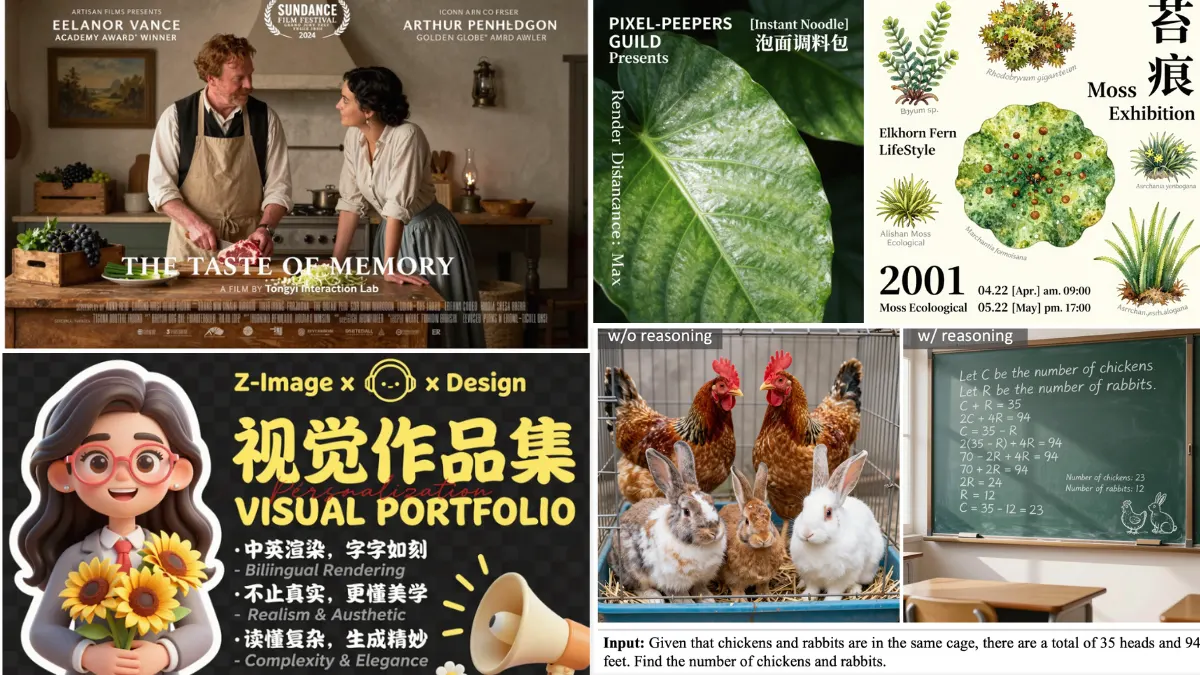
This is the one if you’re looking for a really decent Model that can fit on a consumer grade hardware as well as keep up with the quality.
Eight inference steps. Sub-second latency on enterprise GPUs. Fits within 16GB VRAM on consumer hardware. And the output quality sits at the top of open source leaderboards on human preference evaluations.
The speed comes from a distillation approach called DMDR, a combination of few-step distillation and reinforcement learning working together. The distillation process gets the model to high quality output in fewer steps. The RL stage then pushes semantic alignment, aesthetic quality, and structural coherence further without breaking what the distillation built. Eight steps that produce results most 50-step models can’t match.
On bilingual text rendering specifically English and Chinese both, Z-Image-Turbo is one of the strongest performers in this list. Complex characters, mixed scripts, intricate layouts. It handles them without the scrambled output.
The honest tradeoff is diversity. The Turbo variant optimizes hard for quality and consistency which means it’s less varied across generations than the base Z-Image model. If you need high diversity for creative exploration, the base model is the better pick. If you need fast, high quality, accurate output for production workflows, Turbo is what you want.
6B parameters, fits on consumer hardware, available on Hugging Face.
If you are comfortable with ComfyUI. Here’s a full Guide for Z-Image-Turbo Installation
Where it leads: Speed, bilingual text rendering, photorealistic quality at 8 steps
Where it’s limited: Lower generation diversity than the base model, no editing capability in this variant
Realted: Open Source AI Image Editing Models That Challenge Google’s Nano Banana
4. SenseNova-U1

We covered SenseNova-U1 in depth in a separate article but it earns a spot here specifically for text rendering, which is one of the clearest strengths this model demonstrates.
The architecture removes the VAE and visual encoder entirely, processing pixels and text in one unified space. That design choice pays off most visibly when the image needs to contain accurate text. CVTG-2k, which specifically tests complex visual text generation, scores 94.1 ahead of dedicated editing models including Flux-Kontext-dev at 87.4 and Qwen-Image-Edit at 82.9.
Beyond text rendering it handles image editing natively in the same model, no separate editing variant needed. Feed it an instruction alongside a reference image and it edits directly. The interleaved generation capability, producing text and images together in one output flow, is still experimental but points at where the model is headed.
The practical limitation is hardware. The 8B understanding parameters plus 8B generation parameters means 18B total weights on disk. Plan accordingly before pulling from Hugging Face.
Its licensed Apache 2.0. Available now on HuggingFace.
Where it leads: Complex text rendering accuracy, unified understanding and generation, image editing
Where it’s limited: 18B total weights, interleaved generation still experimental, 32K context only
Related: Open Source AI Video Models for Editing and Generation
Which one is actually for you
If text accuracy in generated images is your primary requirement, HiDream-O1-Image and Z-Image-Turbo are your starting points. HiDream for compositional precision at any resolution, Z-Image-Turbo when you need that quality fast on consumer hardware.
If you’re working with existing images that need editing rather than generation from scratch, Qwen-Image-Edit’s dual-mode approach and bilingual text editing capability is hard to match at any parameter count.
If you need one model that handles generation, editing, and text rendering without switching between tools, SenseNova-U1 is the most architecturally ambitious of the four, just plan for the 18B weight requirement before pulling it.
All four are actively developed and are available on Hugging Face.