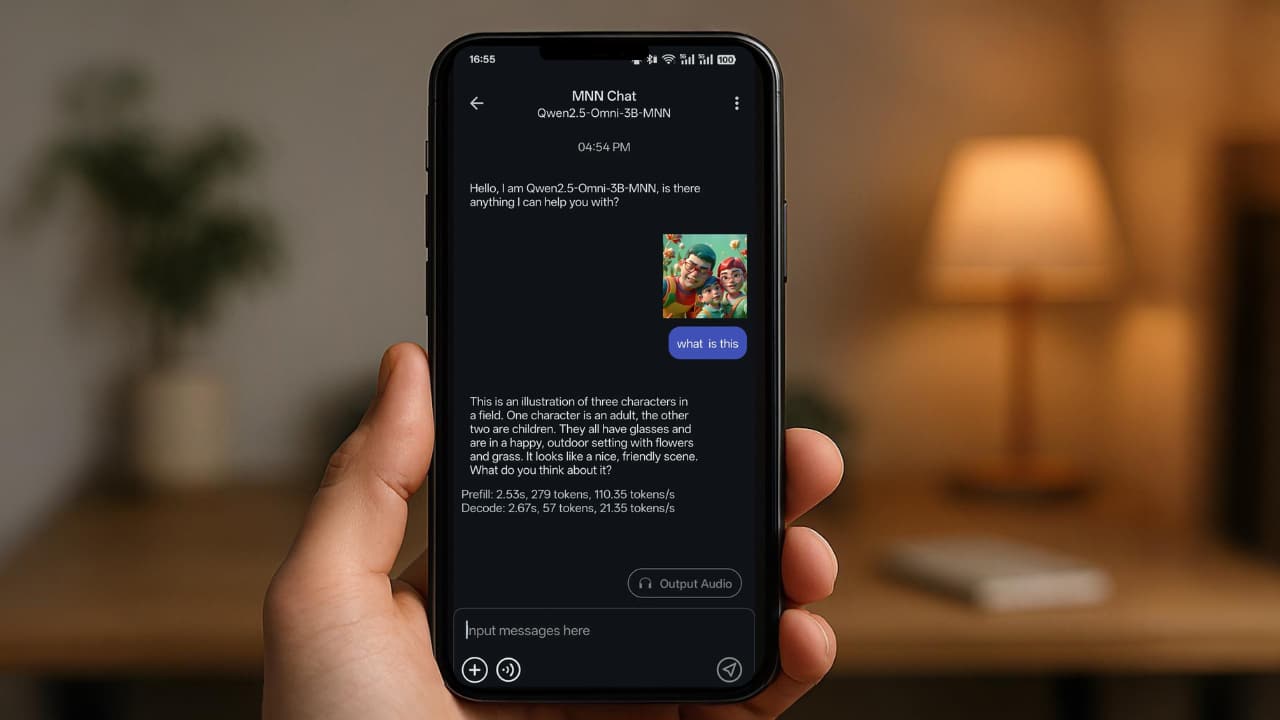

A few days ago, I opened a chat with an online LLM I use often. We were talking about an idea I’d been working on.
The next day, I came back to continue the conversation & it greeted me with something like:
“Cold morning, huh? Perfect weather for coffee while thinking about that idea from earlier.”
That stopped me.
I don’t remember telling it my location. I definitely didn’t mention the weather. And yet it sounded… aware.
Now, I know how this works in theory. IP-based location, Context retention & Behavioral patterns. I’m not naive about it. But theory feels different when the bot casually references your environment.
So I asked it directly how it knew.
It replied that it had “inferred” the context based on available data.
Inferred.
That word lingered.
Because here’s the thing, even saying “hi” online reveals more than we think. Your IP address, device fingerprint, session behavior, The time you’re active & much more.
Individually, that data seems harmless. But combining it , paints a picture.
I wasn’t angry. It just felt strange. If I’m going to use something every day, I don’t want it knowing more about me than I intentionally share.
Cloud models still make sense for complex tasks. But for smaller sessions, why not use something that runs entirely on my own device?
That’s when I started looking for something different like an AI that only knows what I choose to tell it & my data stays on my phone.
That search is what led me to running a local model directly on my phone. And eventually, to an app called MNN Chat.
Table of contents
Not the Most Powerful. Still Useful.
When I started looking for alternatives, I wasn’t searching for a better chatbot. I was searching for one that can simply work on my machine while being useful for me.
Most AI apps on Android are just front-ends. You type something. It leaves your phone. A server processes it. A reply comes back. That’s not what I call Private AI.
MNN Chat does something different. It is an Open Source Android App that runs LLMs directly on your device.
You download a model inside the app, and your phone handles the rest. The prompts don’t leave or gets processed by any server. It’s just your device doing the work.
Under the hood it uses an engine optimized for CPU inference, which matters more than people think. Phones don’t have desktop GPUs sitting around waiting for 70B models. Efficiency is the difference between “interesting demo” and “actually usable.”
It even supports multimodal models like text, image analysis, speech-to-text, & lightweight diffusion image generation. All locally.
The first time I saw that working, I paused. Because it wasn’t a portal anymore.
It was self-contained.
What It’s Actually Like To Use
It feels… normal.
That’s the surprising part.
You open the app, download a model, and start typing. Responses aren’t instant like cloud models, but they’re fast enough to feel usable. On a decent phone, replies come in a few seconds.
I’ve used it for rough notes, rewriting paragraphs, basic questioning & because it’s local, I don’t hesitate before pasting something sensitive. There’s a different kind of comfort in knowing the conversation isn’t going anywhere online.
It’s definitely not as powerful as the biggest cloud models. It doesn’t need to be.
For everyday thinking, drafting, and experimenting, it’s more than enough.
Also Read: 5 Privacy-First AI Apps That Run Directly on Your Android
Diverse Model Support
Inside the app, you can browse and download different open models depending on what you want. It supports names you’ve probably heard before: Qwen, Gemma, Llama variants like TinyLlama and MobileLLM, DeepSeek, Phi, InternLM, Yi, Baichuan, SmolLM, and a few others.
On an 8GB+ RAM phone, you have room to experiment. On older devices, you’ll want smaller models.
Also Read: 8 Free Android Apps That Feel Too Good to Be Free
Closing thoughts
I’m not deleting my cloud accounts. They’re useful. Sometimes I need the scale.
But I don’t like relying on one doorway for everything.
Running a local model changed the relationship slightly. The AI on my phone only knows what I tell it. It just responds to what’s in front of it.
That small boundary feels healthy.
We can’t pretend online tools don’t collect context. That’s how they work. But we can decide where we draw the line.
For me, that line now includes one AI model that works without WiFi.