back to top
HomeAppsAndroid AppsToolkit Tiles: Android Quick Settings Tools App (Utilities & System Controls)

Toolkit Tiles: Android Quick Settings Tools App (Utilities & System Controls)

- Advertisement -

File Information

FileDetails
NameToolkit Tiles
Versionv2.0
PlatformAndroid
Format.apk
Size2.15MB
CategorySystem Tools • Utilities
LicenseOpen Source (Apache-2.0 License)
Github RepositoryGithub/Toolkit-Tiles

Description

Most utility apps usually sit in your app drawer like a normal app. Toolkit Tiles takes a different approach.

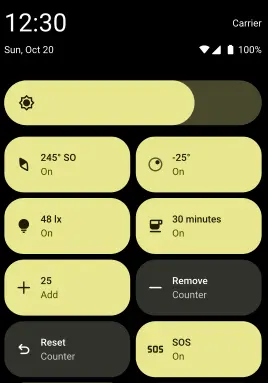
It adds practical tools directly to Android’s Quick Settings panel, the same place where you toggle Wi-Fi, Bluetooth, and Flashlight. That means no extra apps to open.

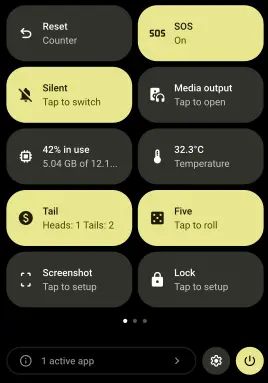
It provides with a quick measurement, A coin flip, A system toggle & more. The app is designed to be lightweight and focused.

Screenshots
Features of Toolkit-Tiles

FeatureWhat It Does
Quick Settings IntegrationAdds tools directly into Android’s Quick Settings panel.
Lightweight DesignNo heavy background processes or unnecessary features.
Instant AccessOne swipe access without opening full apps.
Practical ToolsCombines measurement, system controls, and utilities.
Modular TilesAdd only the tiles you actually need.

System Requirements

ComponentRequirement
OSAndroid (modern versions recommended)
PermissionsSome tiles require system permissions

Recommended For You: SuperImage – AI Image Upscaling App for Android

How to Install Toolkit-Tiles??

  1. Install the APK.
  2. Swipe down twice to fully open Quick Settings.
  3. Tap the edit (pencil) icon.
  4. Drag Toolkit Tiles into your active panel.
  5. Tap any tile to use it instantly.

Download Toolkit-Tiles App For Android

Important Notes

  • If a required permission or hardware feature is missing, the tile may not function.
  • Some tiles require specific hardware (e.g., compass sensor, flash, light sensor).
  • Certain features may request permissions before working.
  • Behavior can vary slightly depending on Android version and manufacturer customization.

Recommended For You: 8 Free Android Apps That Feel Too Good to Be Free

Conclusion

Instead of installing five separate utility apps you can install Toolkit Tiles to get practical tools integrated directly into Quick Settings. Measurement tools. System toggles. Quick utilities. Even an SOS signal.

It’s simple. It’s lightweight. And it keeps useful features exactly where they should be.

LEAVE A REPLY

Please enter your comment!
Please enter your name here

YOU MAY ALSO LIKE
PDF Toolkit A Privacy-First Offline PDF App for Android

PDF Toolkit: A Privacy-First Offline PDF App for Android

0
PDF Toolkit is one of those Android apps that feels simple but very useful. You install the APK, open it, and everything runs directly on your device. The app covers most of the stuff people actually need including merging PDFs, splitting files, compressing documents, converting images to PDF, extracting pages, signing files, adding annotations, and even scanning documents with automatic edge detection. It does not require internet permission. Most alternatives push everything through cloud APIs or lock basic tools behind subscriptions. There is also proper OCR support. The Play Store build uses Google ML Kit for smaller downloads, while the open source builds use Tesseract OCR so the entire stack stays fully offline and open source.
Google AI Edge Gallery App to Run LLMs Offline on Android

Google AI Edge Gallery: Run LLMs Offline on Your Phone

0
Google AI Edge Gallery lets you run open-source LLMs straight on your phone. No cloud. Once you download the models, you're offline. You get chat, image analysis, audio transcription, prompt testing. All on-device. Newer models like Gemma 4 mean better reasoning and multimodal stuff on mobile hardware. It’s more like a sandbox where you can test, run, and compare models directly on your device.
MNN Chat: Run AI Models Offline on Android

MNN Chat: Run AI Models Offline on Android (Local LLM App)

0
Most AI chat apps on Android are just thin wrappers around cloud APIs. You type something. It gets sent to a server. A response comes back. MNN Chat does the opposite. It runs large language models directly on your phone. No account or API key needed. Your prompts never leave your device. Under the hood, it uses MNN-LLM, optimized specifically for CPU inference on Android. That matters more than people think. Phones don’t have desktop GPUs. Efficient CPU performance is what makes local AI usable instead of painfully slow. It supports multimodal tasks too. You can run text models, analyze images, transcribe audio, and even generate images using diffusion models. All locally.

Don’t miss any Tech Story

Subscribe To Firethering NewsLetter

You Can Unsubscribe Anytime! Read more in our privacy policy