



File Information
| Property | Details |
|---|---|
| Software Name | ONLYOFFICE Desktop |
| Version | 9.0.4 |
| License | GNU AGPL v3 (Open Source) |
| Platforms Available | Windows, macOS, Linux |
| File Type | EXE (Windows), DMG (macOS), APPIMAGE (Linux) |
| File Size | Windows: ~210 MB, macOS: ~250 MB, Linux: ~230 MB |
| macOS Compatibility | 10.13 or higher for Intel, Apple Silicon DMG, 10.12 Universal DMG |
| Developer | Ascensio System SIA |
| Official Repository | GitHub |
Table of contents
Description
ONLYOFFICE Desktop is a powerful, fully-featured office suite that allows you to create, edit & collaborate on documents, spreadsheets & presentations with ease. Available for Windows macOS & Linux, ONLYOFFICE combines the familiarity of traditional office tools with modern collaborative features. This open-source suite ensures privacy, security & high compatibility with Microsoft Office formats, making it an ideal alternative for users seeking a professional office environment without costly licenses.
Whether you are working on personal projects, professional documents, or collaborative teamwork, ONLYOFFICE provides a seamless experience across platforms. Developed with advanced document processing engines, it supports a wide range of formats, offers cloud integration, and provides a consistent user interface across devices. With powerful editing features, version control, and real-time collaboration, ONLYOFFICE Desktop is suitable for students, professionals, & organizations alike.
Features of OnlyOffice Desktop
| Feature | Description |
|---|---|
| Document Editing | Create & edit text documents with rich formatting & templates |
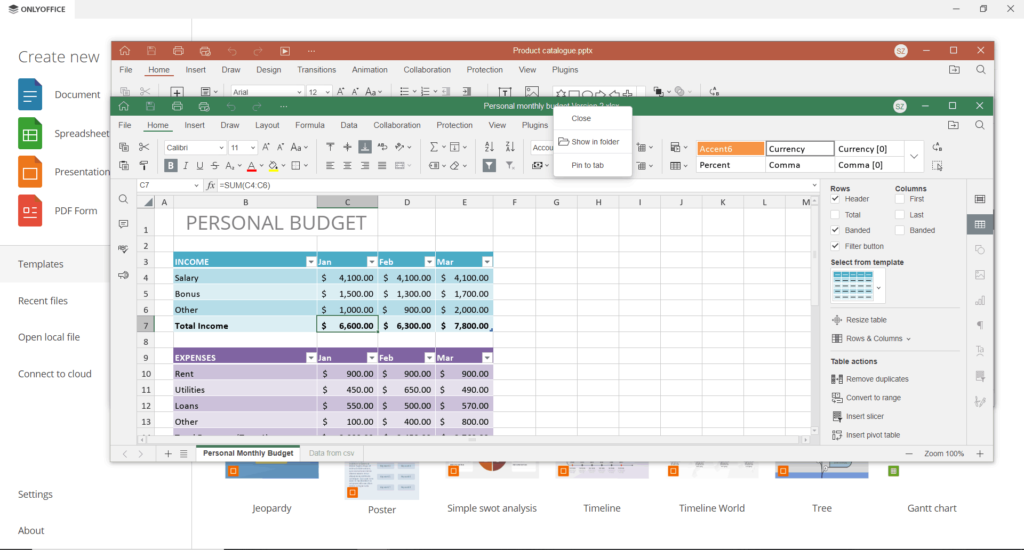
| Spreadsheet Support | Advanced formulas, charts, pivot tables & conditional formatting |
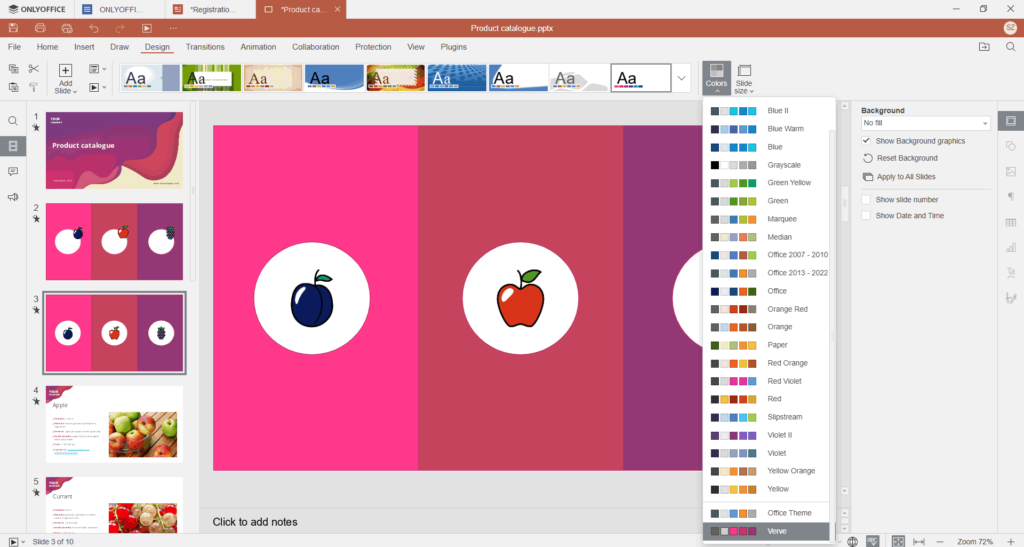
| Presentation Tools | Slide creation, transitions & multimedia support |
| Compatibility | Full support for Microsoft Office formats DOCX, XLSX, PPTX |
| Cloud Integration | Seamless connection with Nextcloud, ownCloud & ONLYOFFICE cloud |
| Collaboration | Real-time co-editing, commenting, version history |
| Cross-Platform | Available for Windows, macOS & Linux |
| Security | Open-source code with privacy-focused collaboration |
| Customization | Interface themes & adjustable toolbars |
| Offline Mode | Fully functional offline editing without internet |
Screenshots
System Requirements
| Platform | Minimum Requirements |
|---|---|
| Windows | Windows 10 64-bit, 4 GB RAM, 1.5 GHz CPU, 1 GB free disk space |
| macOS | 10.13 or higher (Intel), Apple Silicon supported, 4 GB RAM |
| Linux | Any modern 64-bit distro, 4 GB RAM, 1.5 GHz CPU, 1 GB free disk space |
How to Install OnlyOffice Desktop??
Windows (.exe)
- Download the ONLYOFFICE Desktop Editors
.exefile. - Double-click the installer and follow the on-screen instructions.
- Launch ONLYOFFICE from the Start menu or desktop shortcut.
macOS (.dmg)
- Download the appropriate
.dmgfile (Intel, Apple Silicon, or Universal). - Open the
.dmgfile and drag ONLYOFFICE to the Applications folder. - Launch ONLYOFFICE from the Applications folder.
Linux (.AppImage)
- Download the
.AppImagefile. - Make the file executable:
chmod +x ONLYOFFICE.AppImage - Run the app:
./ONLYOFFICE.AppImage
Download OnlyOffice for Windows, macOS & Linux
ONLYOFFICE Desktop Editors offers a robust, open-source alternative for anyone looking to replace traditional office suites. With cross-platform compatibility, real-time collaboration, & cloud integration, it’s the ultimate choice for productivity, whether you are on Windows, macOS, or Linux. Download ONLYOFFICE today & experience a professional office environment for free!




