


File Information
| File | Details |
|---|---|
| Name | ShadeOfColor |
| Version | v1.0.0 |
| Format | .zip |
| Size | 772KB |
| Platforms | Windows |
| License | Open Source (MIT License) |
| Official Repository | GitHub ShadeOfColor |
| Category | Privacy Tool • File Utility • Steganography |
Table of contents
Description
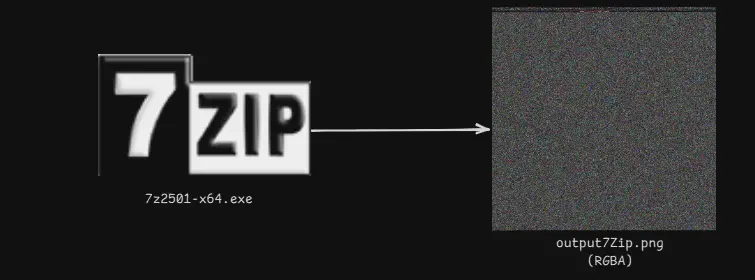
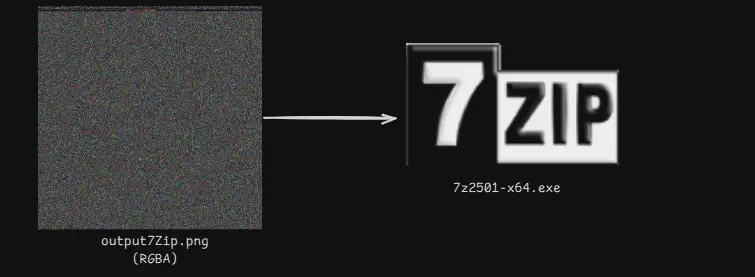
ShadeOfColor is a lightweight utility that lets you turn any file into a PNG image & restore it back later.
The generated image looks completely normal, but it secretly contains your original file embedded inside its pixel data. This makes ShadeOfColor useful for privacy-focused sharing, bypassing file-type restrictions, and secure experimentation without relying on cloud services or online tools.
Everything runs locally on your machine, and the tool is distributed as a portable ZIP, meaning no installation.
Use Cases
- Send files via email providers that block certain file types
- Store restricted files on cloud platforms that only allow images
- Add an extra privacy layer when sharing files publicly
- Preserve sensitive documents in image form
- Share files in environments with strict upload monitoring
Screenshots
Features of ShadeOfColor
| Feature | Description |
|---|---|
| File-to-Image Conversion | Hide any file inside a standard PNG image |
| Image-to-File Recovery | Restore the original file with a single command |
| Embedded Metadata | Stores filename, size, hash, and signature |
| Integrity Verification | SHA1 hash ensures data is not corrupted |
| Offline & Local | No internet, no cloud, no tracking |
| Open Source | Fully transparent and auditable |
System Requirements
| Requirement | Details |
|---|---|
| Operating System | Windows |
| Runtime | .NET (bundled in release) |
| Disk Space | < 50 MB |
How to Install ShadeOfColor??
- Download the ShadeOfColor ZIP file
- Create a new folder (for example:
shade2color) - Extract all ZIP contents into that folder
- Open Command Prompt inside the folder To Access the app.
How to Use ShadeOfColor??
Encrypt (Convert a File into an Image)
- Place the file you want to hide inside the same folder
- Open CMD in that folder
- Run:
ShadeOfColor2.exe -crypt ./yourfile.extension output.png
Example:
ShadeOfColor2.exe -crypt ./document.pdf hidden.png
A normal-looking PNG image named hidden.png will be generated in the same folder.
Decrypt (Restore the Original File)
- Make sure the PNG image is in the same folder
- Run:
ShadeOfColor2.exe -decrypt ./output.png
Here output.png could be any name of the file u provided for example, we provided hidden.png as the name. The original file will be restored automatically in that folder.
Note: ShadeOfColor is intended for privacy, research, and educational use.
Users are responsible for complying with local laws and the terms of service of platforms where the generated images are used.
Download ShadeOfColor: Hide Any File Inside an Image
Conclusion
ShadeOfColor offers a simple yet powerful way to hide files inside images, completely offline and without relying on third-party services.
If you need a portable, open-source tool to convert files into images and recover them later with integrity checks, ShadeOfColor is an excellent choice.




