
File Info
| File | Information |
| Name | FluentCleaner |
| Developer | Builtbybel |
| Category | System Utilities / PC Cleaner |
| Platform | Windows |
| License | Open Source (MIT License) |
| Modern Size | ~140 MB unpacked |
| Classic Size | ~3.57 MB unpacked |
| Github Repository | builtbybel / FluentCleaner |
Table of Contents
Description
FluentCleaner is a free and open-source Windows cleaner built as a modern alternative to traditional PC cleaning tools. It focuses on removing unnecessary files without scareware, spyware, dark patterns, aggressive upsells, or questionable registry magic.
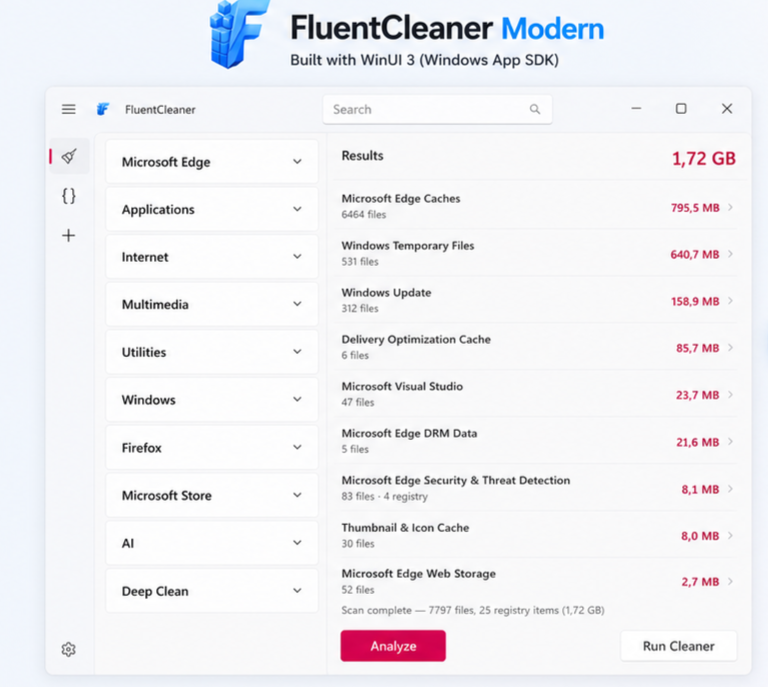
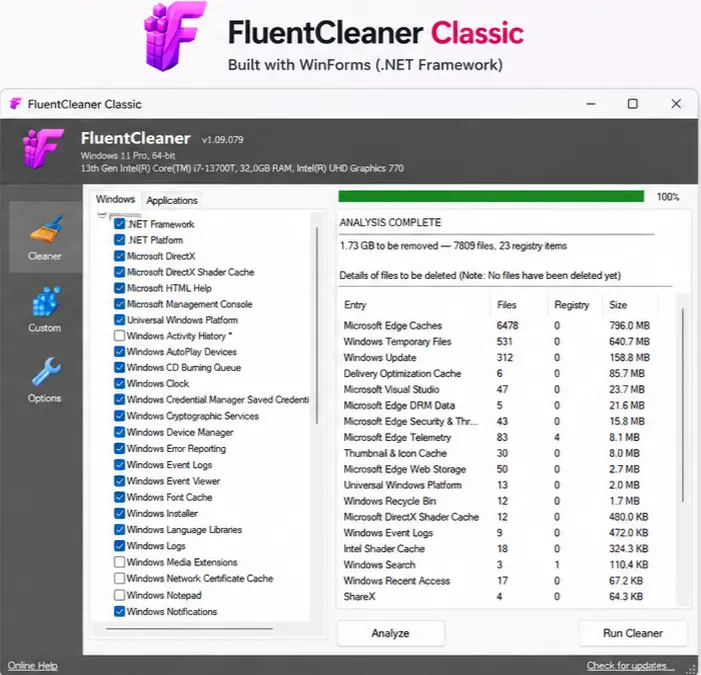
Inspired by the simplicity of the classic CCleaner, FluentCleaner uses the widely known Winapp2.ini cleaning ecosystem while adding its own curated cleaning database, safer exclusions, and a modern Windows interface. It is available in two editions: a modern WinUI 3 version for newer Windows systems and a lightweight Classic edition for users who prefer a much smaller application.
Use Cases
- Clean temporary and unnecessary files from Windows.
- Remove leftover application data and other supported junk files.
- Use Winapp2-style cleaning rules without relying on a commercial cleaner.
- Keep a Windows PC clean without aggressive upgrade prompts or scareware.
- Use the lightweight Classic edition on machines where a smaller footprint matters.
- Create exclusions when you want specific files, folders, or registry locations protected from cleaning.
- Use a transparent, open-source alternative to traditional Windows cleaning utilities.
Screenshots
System Requirements
| Component | FluentCleaner Modern | FluentCleaner Classic |
| Operating System | Windows 10 2004 (Build 19041) or later | Windows systems with .NET Framework 4.8 |
| Architecture | x64 / ARM64 | Broad Windows compatibility |
| Framework | .NET 10 + Windows App SDK | .NET Framework 4.8 |
| Windows App SDK | Required | Not required |
| Deployment | Self-contained | Framework-dependent |
| Approx. Size | ~140 MB unpacked | ~3.57 MB unpacked |
Installation Process
FluentCleaner Modern
- Download the latest FluentCleaner package for your Windows architecture.
- Extract the downloaded ZIP file.
- Install the Windows App SDK 2.0.1 runtime if it is not already installed.
- Launch FluentCleaner.
- Select the areas you want to scan and review the results before cleaning.
FluentCleaner Classic
- Download the latest FluentCleaner Classic package.
- Extract the ZIP file. ( 7-zip recommended)
- Run FluentCleaner Classic.
- Choose the cleaning rules you want to use and start the scan.
You May Like: Best Open Source AI Assistants You Can Run Locally
Which version should you choose?
Choose FluentCleaner Modern if you want the newer WinUI 3 interface and support for modern x64/ARM64 Windows systems. Choose FluentCleaner Classic if you want something extremely lightweight or are working with a system where the additional Windows App SDK runtime is undesirable
Download FluentCleaner
Open Source Alternative to CCleaner
FluentCleaner is a compelling open-source alternative to CCleaner for Windows users who want a simpler and more transparent cleaning tool. Instead of pushing upgrades, displaying exaggerated warnings, or relying on questionable registry-cleaning claims, it focuses on removing unnecessary files using established Winapp2 cleaning definitions.
With a modern WinUI 3 edition, an ultra-lightweight Classic version, thousands of cleaning entries, and safer exclusion handling, FluentCleaner keeps the focus where it belongs: cleaning your PC without unnecessary bloat.