



File Information
| Name | Zen Browser – Privacy First Productivity Browser |
|---|---|
| Version | v1.17.14b |
| File Size | Windows: 86.8MB (.exe) • macOS: 185MB (.dmg) • Linux: 108MB (.AppImage) |
| Platforms | Windows • macOS • Linux |
| License | Open Source (MPL-2.0 License) |
| Official Repository | ZenBrowser Github |
| Official Site | zen-browser |
Table of contents
Description
Zen Browser is a modern, Firefox based desktop browser created with one clear goal in mind: helping users stay focused & productive while browsing the web. Instead of treating attention as a resource to exploit, Zen is built to respect user intent, privacy, & workflow.
Zen emphasizes organization, clarity, & control. Its design philosophy revolves around turning the browser into a true work tool rather than a source of interruption. From clean visuals to thoughtful productivity features, every detail is crafted to improve how you work online.
Because Zen is built on Firefox, it inherits a strong foundation of performance, security, & modern web standards. At the same time, it introduces its own layer of innovation focused on tab management, workspace separation, multitasking, & distraction free browsing across Windows, macOS, & Linux.
Screenshots

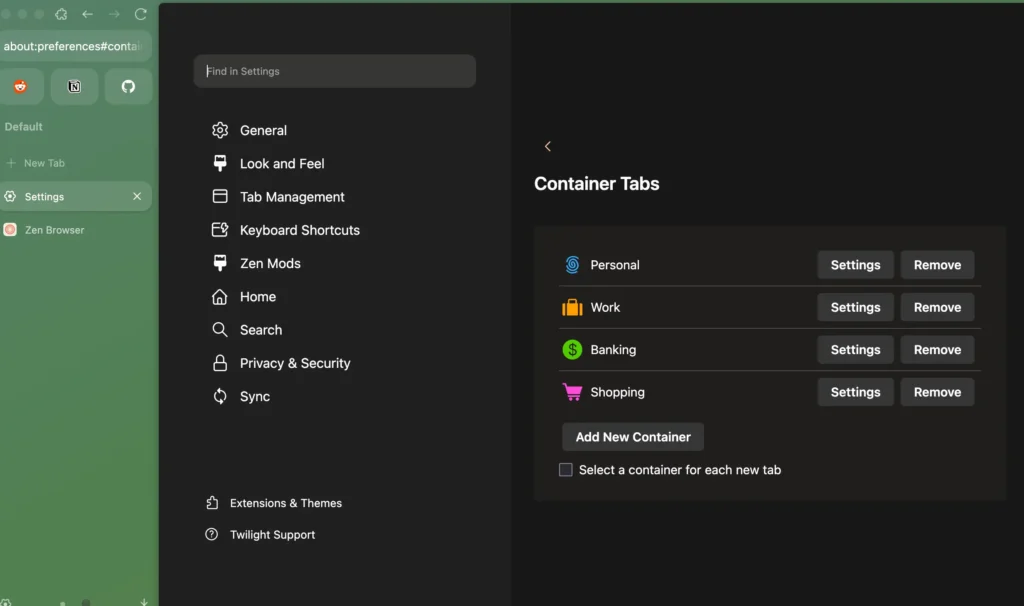
Features of Zen Browser
| Feature | Description |
|---|---|
| Workspace Based Browsing | Organize tabs into separate Workspaces to keep projects, tasks, & contexts neatly isolated. |
| Compact Mode | Automatically hides unnecessary UI elements to give more screen space when you need focus. |
| Glance Navigation | Quickly switch between frequently used tabs without scrolling through large tab lists. |
| Split View | View two tabs side by side, making comparison, research, & multitasking effortless. |
| Privacy First Design | No tracking, no data selling, & no user profiling built into the browser. |
| Firefox Engine | Built on Firefox for reliable performance, security updates, & modern web compatibility. |
| Clean Visual Design | Minimal & distraction free interface that keeps attention on content. |
| Open Source Development | Transparent development backed by a growing community of contributors. |
System Requirements
| Platform | Minimum Specification |
|---|---|
| Windows | Windows 10 or newer, 64 bit processor, 4 GB RAM, 300 MB free disk space |
| macOS | macOS 11 or newer, Intel or Apple Silicon, 4 GB RAM, 300 MB free disk space |
| Linux | Modern Linux distribution, 64 bit processor, 4 GB RAM, 300 MB free disk space |
How to Install Zen Browser??
Before jumping on the installation, scroll down to the Download Section & choose the correct installer for your operating system.
Windows (.exe)
- Download the Windows installer exe file.
- Double click the file to start installation.
- Follow the setup instructions & complete the process.
- Launch Zen Browser from the Start Menu.
macOS (.dmg)
- Download the macOS dmg package.
- Open the file & drag Zen Browser into the Applications folder.
- Open Zen Browser from Applications.
- If Gatekeeper appears, right click & allow the app to open.
Linux (.AppImage)
- Download the AppImage file for Linux.
- Double click on the .AppImage file to launch the application
- Enjoy Browsing Internet!
Download Zen Browser: Privacy-Focused Firefox Based Browser
Advantages of Using Zen Browser
- Fully Free & Open Source
No subscription fees, no locked features, & complete transparency. - Built for Productivity
Features like Workspaces, Compact Mode, & Split View help reduce distraction & improve focus. - Strong Privacy Protection
Your browsing activity stays yours, with no built in tracking or data harvesting. - Cross Platform Availability
Enjoy a consistent experience across Windows, macOS, & Linux. - Firefox Reliability
Built on a trusted browser engine with strong security & performance foundations. - Community Driven Development
Continuous improvements powered by open source contributors.
Conclusion
Zen Browser reimagines what a desktop browser should be in a world full of digital noise. By combining Firefox’s stability with thoughtful productivity tools & a strict privacy first mindset, Zen creates an environment where browsing supports your work instead of disrupting it. Whether you manage multiple projects or simply want a calmer web experience, Zen Browser offers a refreshing & focused alternative.




