
File Information
| File | Details |
|---|---|
| Name | Lore |
| Version | v0.1.0 |
| Type | AI-Powered Personal Knowledge & Note Manager |
| License | MIT License (Open Source) |
| Platforms | Windows • macOS • Linux |
| Size | 130MB (exe) • 158MB (dmg) • 213MB (AppImage) |
| Primary Use | Local AI note capture, smart recall, and todo management |
| Github Repository | Github/Lore |
Description
Lore is a lightweight, privacy-first desktop app that lives quietly in your system tray and gives you a pop-up chat interface to capture thoughts the moment they happen. Powered entirely by a local LLM through Ollama and a local vector database through LanceDB, it stores, understands, and retrieves your information without sending a single byte to the cloud.
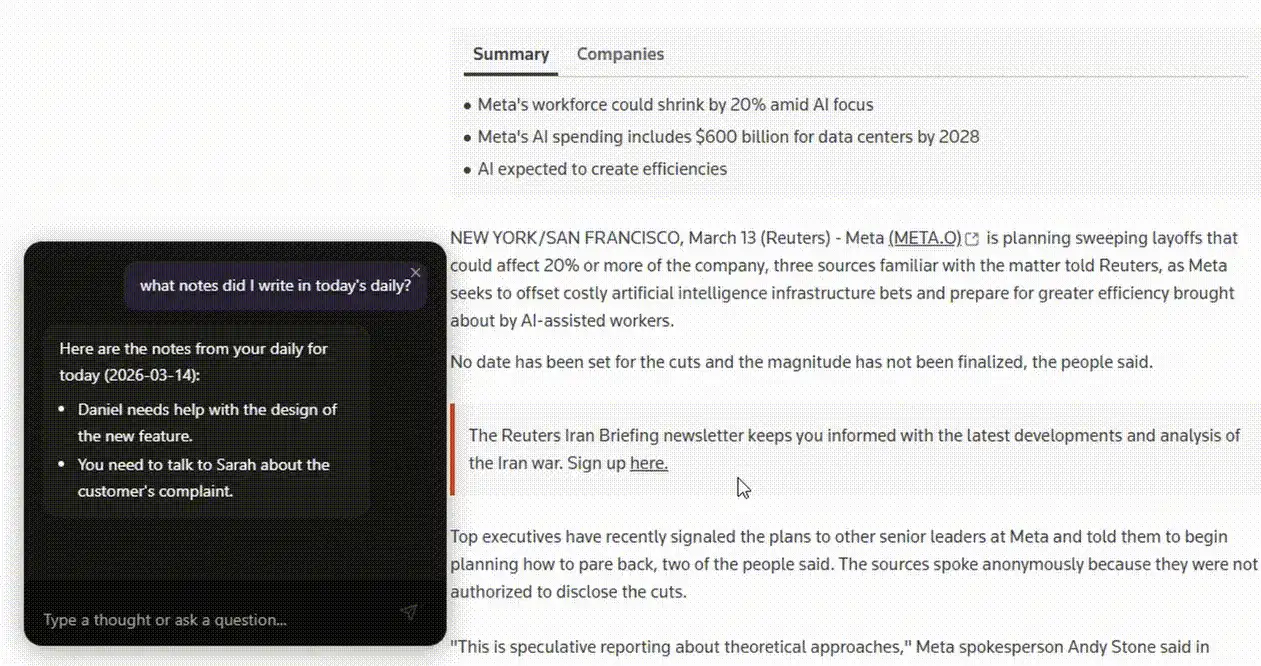
You can store anything like quick notes, decision summaries, URLs, code snippets, bug reproduction steps, todo items and retrieve it all later by simply describing what you need in plain language. Lore classifies your input automatically and uses a RAG pipeline to pull the most relevant context before generating an answer.
If you’re a developer, a knowledge worker, or someone who just wants a smarter way to remember things, Lore is worth a try.
Screenshots


Feature of Lore
| Feature | Description |
|---|---|
| Quick Capture | Press a global shortcut to instantly pop up the chat bar and store a thought |
| Smart Recall | Ask questions in plain language and get answers pulled from your stored notes |
| AI Classification | Automatically classifies input as a thought, question, command, or instruction |
| Todo Management | Add, list, complete, and organize todos with priority levels and categories |
| RAG Pipeline | Retrieval-augmented generation finds relevant context before every response |
| Fully Local | All data and AI processing runs on your machine |
| Custom Instructions | Set persistent behavioral rules for how Lore responds to you |
| System Tray App | Runs silently in the background, accessible anytime with a keypress |
| Model Selection | Choose and download your preferred LLM and embedding models via Ollama |
| Settings Panel | Customize shortcuts, manage models, and control startup behavior |
System Requirements
| Component | Requirement |
|---|---|
| Operating System | Windows 10+, macOS (Intel & Apple Silicon), Linux (modern distros) |
| Processor | 64-bit CPU (Apple Silicon supported via arm64 build) |
| RAM | 8 GB minimum, 16 GB recommended for larger LLMs |
| Storage | ~500 MB for the app + additional space for LLM models |
| Internet | Not required after initial model download |
| Dependencies | Ollama (guided setup during installation) |
Related: Reor: Private & Local AI Knowledge Management & Note-Taking App
How to Install Lore?
Windows (.exe)
- Download the
.exeinstaller. - Double-click the installer file.
- Follow the on-screen setup instructions and choose your directories for LLM models and Ollama.
- Launch Lore from the Start Menu or System Tray.
- Open Settings → Models and download your preferred embedding model and LLM.
macOS (.dmg)
- Download the
.dmgfile, choosearm64for Apple Silicon orx64for Intel. - Open the file to mount it.
- Drag the Lore app into your Applications folder.
- Launch it from Applications, the Lore icon will appear in your menu bar.
- Open Settings -> Models and download your preferred embedding model and LLM.
Linux (.AppImage)
- Download the
.AppImagefile. - Right-click and make it executable
- Double-click to launch the app.
- Open Settings → Models and download your preferred embedding model and LLM.
Global Shortcut Once installed, press Ctrl+Shift+Space on Windows/Linux or Cmd+Shift+Space on macOS to toggle the Lore popup from anywhere on your desktop.
Download Lore AI Note Manager
Your Private Second Memory, Always One Shortcut Away
Lore rethinks personal note-taking by replacing passive storage with active, AI-powered recall. Instead of searching through folders or scrolling through endless notes, you just describe what you need and Lore finds it. Everything runs locally, everything stays private, and the app stays out of your way until you need it. For anyone who values both productivity and privacy, Lore is a genuinely different kind of knowledge tool.