


File Information
| Name | Espanso – Cross-Platform Text Expander |
|---|---|
| Version | v2.3.0 |
| License | Open Source (GPL-3.0 License) |
| Platforms | Windows • macOS • Linux |
| Size | 6.2MB (Windows) , 14.4MB (macOS) , 18.5MB (Linux) |
| Official Website | espanso |
| Repository | GitHub Espanso |
Table of contents
Description
Espanso is a fast, powerful, and privacy-first cross-platform text expander written in Rust. It automatically replaces typed keywords with longer text, emojis, dynamic values, or even script outputs, helping you type smarter & faster.
It runs 100% locally, ensuring maximum privacy with zero tracking. It works system-wide across almost all applications, making it an ideal productivity tool for developers, writers, support teams, medical professionals, and power users. It is created by Federico Terzi & maintained by a dedicated team of contributors.
With support for scripts, forms, regex triggers, images, emojis, and packages, Espanso goes far beyond basic text expansion, turning your keyboard into a productivity powerhouse.
What Is a Text Expander?
A text expander is a tool that detects when you type a specific keyword and automatically replaces it with predefined content.
Espanso can help you:
- Save hours of repetitive typing
- Create reusable system-wide templates
- Insert dynamic dates and emojis
- Execute scripts and shell commands
- Build your own personalized autocorrect system
Screenshots

Features of Espanso
| Feature | Description |
|---|---|
| Cross-Platform | Works on Windows, macOS, and Linux |
| Privacy-First | Fully local, no tracking or cloud sync |
| System-Wide | Works in almost any application |
| Emoji Support 😄 | Insert emojis using custom shortcuts |
| Image Expansion | Expand triggers into images |
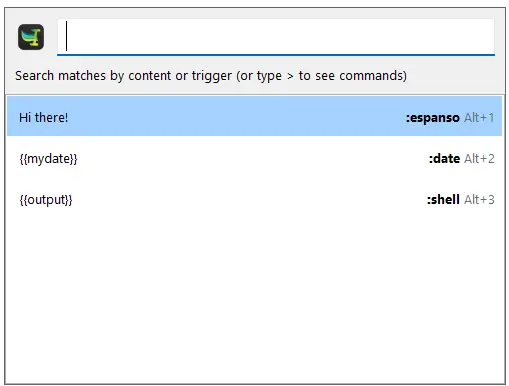
| Powerful Search Bar 🔎 | Press Alt + Space to search snippets |
| Date Expansion | Insert dynamic past or future dates |
| Script & Shell Support | Run scripts and inject output |
| Regex Triggers | Advanced matching and automation |
| App-Specific Config | Customize behavior per app |
| Form Support | Build reusable interactive templates |
| Package System | Extend features via Espanso Hub |
| File-Based Config | Simple YAML configuration |
| Written in Rust | Extremely fast, stable, and reliable |
Quick Start Example
Espanso uses YAML-based configuration. You can organize matches across multiple files.
matches:
  - trigger: ":hello"
    replace: "Hi there!"

  - triggers: [":test1", ":test2"]
    replace: "These both expand to the same thing"
Make sure to maintain proper YAML spacing. You can also visit the official documentation of espanso to know more about YAML Configuration
System Requirements
| Platform | Minimum Requirement |
|---|---|
| Windows | Windows 10 or newer |
| macOS | macOS 10.15 or newer |
| Linux | Modern distribution (X11 supported, Wayland experimental) |
How to Install Espanso text expander??
Before installing Espanso, scroll down to the Download Section and choose the installer that matches your operating system.
Windows (.exe)
- Download the Espanso Windows installer (.exe).
- Double-click the downloaded file to start the setup.
- Follow the on-screen installation wizard.
- Once installed, launch Espanso.
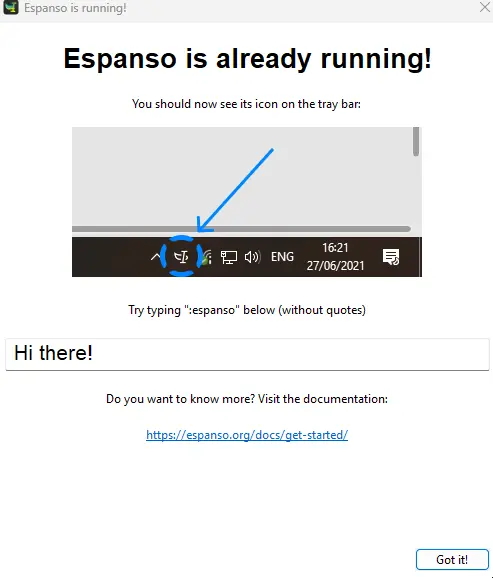
- Espanso will run in the background and appear in the system tray.
Espanso starts automatically on system boot by default.
macOS (.dmg)
- Download the .zip file & Extract it using any file archiver (You can use 7-Zip or PeaZip) .
- Open the extracted
.dmgfile. - Drag Espanso into the Applications folder.
- Launch Espanso from Applications.
- If macOS shows a security prompt, allow Espanso to run from System Settings → Privacy & Security.
Espanso will run in the background and is accessible from the menu bar.
Linux (.deb)
- Download the .deb package for Debian-based systems (Ubuntu, Linux Mint, etc.).
- Install using your package manager:
sudo dpkg -i espanso_*.debResolve any missing dependencies if prompted:
sudo apt -f install
Start Espanso from your application menu or run:
espanso start
Linux (.AppImage)
- Download the Espanso .AppImage file.
- Make it executable:
chmod +x Espanso-*.AppImageRun the file:
./Espanso-*.AppImage
AppImage runs without installation.
Download Espanso: Open Source Text Expander
Support Espanso Project
If you find Espanso useful, consider supporting the project with a small donation on espanso official site, it helps sustain development.
Conclusion
Espanso is one of the most flexible text expanders available today which is open source. With its privacy-first design, blazing-fast performance, and deep customization options, it’s an essential tool for anyone who types regularly.
If you want to type less and do more, Espanso is a must-have.




