


File Information
| Attribute | Details |
|---|---|
| Platform | Windows, Linux, macOS (via zip repo) |
| Version | WanGP v8.992 |
| License | Open Source |
| GPU Requirements | 6 GB VRAM minimum, supports RTX 10XX+ and more |
| Models Supported | Wan, Hunyuan Video, LTV Video |
| Interface | Web-based, user-friendly |
| Installation Type | Manual or Docker |
| Official Repo | WanGP GitHub |
Table of contents
Description
WanGP, developed by DeepBeepMeep, is one of the most powerful open-source AI video generation tools accessible to users with low VRAM GPUs. It supports popular video generative models including Wan, Hunyuan Video, and LTV Video, allowing creators to generate stunning AI-driven videos without expensive hardware.
What makes WanGP exceptional is its low VRAM requirements, GPU flexibility, and web-based interface. Even older GPUs like RTX 10XX and 20XX can run models efficiently, while newer GPUs leverage full speed.
The tool integrates advanced features like mask editors, prompt enhancers, temporal and spatial generation, audio support, pose/depth/flow extractors, and Loras support for model customization. Users can queue multiple videos, use preset accelerator profiles, and share settings easily with the community via Discord.
Whether you are generating animations, AI-assisted videos, or experimenting with Wan 2.2, Wan Animate, or other models, WanGP simplifies the workflow while keeping everything local and private.
Features of WanGP
| Feature | Description |
|---|---|
| Low VRAM Support | Runs efficiently on older GPUs, down to 6 GB VRAM. |
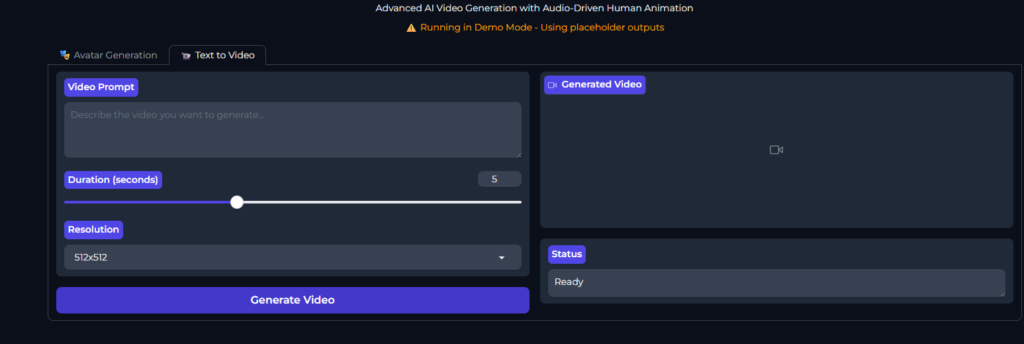
| Web-based Interface | Full-featured interface accessible in the browser. |
| Prompt Enhancer | Improve text prompts for better video quality. |
| Mask Editor | Mask specific areas for selective video generation. |
| Temporal & Spatial Generation | Handles motion and frame consistency for high-quality videos. |
| MMAudio Integration | Add audio tracks or use reference audio. |
| Pose / Depth / Flow Extraction | Extract features from input videos for precise editing. |
| Loras Support | Customize models with Lora files for enhanced results. |
| Queuing System | Generate multiple videos sequentially without manual intervention. |
| Community Support | Discord channel for help, sharing settings, and tips. |
Screenshots
System Requirements
Below are minimum & recommended system requirements to run these AI Video Generation models in your system
| Component | Minimum Requirements | Recommended Requirements |
|---|---|---|
| Operating System | Windows 10, Ubuntu 20.04, macOS 12+ | Windows 11, Ubuntu 22.04, macOS 13+ |
| GPU | 6 GB VRAM (RTX 1060 / 1650 / 2060 / GTX 10XX/16XX) | 12+ GB VRAM (RTX 3060 / 3070 / 4080 / A100 / H100) |
| CPU | Intel i5 / Ryzen 5 | Intel i7 / Ryzen 7+ |
| RAM | 16 GB | 32 GB+ |
| Storage | 20 GB free disk space for models & outputs | 50 GB+ for multiple models and video generation |
| Python | 3.10+ | 3.10+ |
| CUDA (for NVIDIA GPU) | 11.8+ | 12.4+ |
| Docker (optional) | Optional, for running isolated environments | Optional, highly recommended for reproducibility |
| Other Dependencies | PyTorch, torchvision, torchaudio, required Python packages | Full set including MMAudio tools, Mask Editor, Loras support |
How to Install Wan 2.2, Animate or Other Video Generation Model Locally
To run WanGP locally, follow these steps:
- Download the Repo Zip
Get the repository as a zip file from the download section below. - Extract the Zip
Unzip the folder to a location of your choice. - Create and Activate Environment
conda create -n wan2gp python=3.10.9 conda activate wan2gp - Install PyTorch
pip install torch==2.7.0 torchvision torchaudio --index-url https://download.pytorch.org/whl/test/cu128 - Install Dependencies
pip install -r requirements.txt - Run WanGP
python wgp.py - Update WanGP
git pull pip install -r requirements.txt
Optional Docker Installation
For Debian-based systems (Ubuntu, Debian):
./run-docker-cuda-deb.sh
This automated script will detect your GPU, select optimal CUDA architecture, install NVIDIA Docker runtime if needed, build a Docker image, and run WanGP with optimized performance. Docker ensures compatibility across GPU models including RTX 10XX, 20XX, 30XX, 40XX, Tesla V100, A100, H100, and more.
Usage & Advanced Features
- Basic Usage: Generate videos from text prompts using the full web interface.
- Loras Guide: Easily manage and apply Loras for model customization.
- VACE ControlNet: Advanced control over video generation, including pose, depth, and temporal manipulations.
- Queue System: Build a list of videos to generate and process sequentially.
- Embedded Lora URLs: Share and apply Loras automatically from friends’ settings.
- Accelerator Profiles: Pre-configured Lora settings for faster workflow.
WanGP is perfect for creators, researchers, and AI enthusiasts who want:
- Full control over video generation locally.
- Ability to generate high-quality videos with low VRAM GPUs.
- A completely open-source solution with continuous community support.
- Easy setup without dependency on cloud GPUs or paid services.
It is one of the best tools to run Wan 2.2, Wan Animate, and other generative video models efficiently and locally.
Download WanGP To Run AI Video Generators: Wan 2.2, Wan Animate, Hanyuan Video Generator & More
WanGP is an open-source video generative tool designed for users with limited GPU power. This post is for informational purposes and to guide users on how to install and use WanGP locally. We provide the repository zip for easy access, and no proprietary models or generated videos are hosted on our servers.
For the latest official repository and updates, visit WanGP GitHub.




