



File Information
| File | Details |
|---|---|
| Name | Voicebox |
| Version | v0.3.0 |
| Formats | .msi • .dmg |
| Size | 299MB (exe) • 330MB (dmg) |
| Platforms | Windows • macOS |
| License | Open Source (MIT License) |
| Github Repository | VoiceBox Github |
| Official Website | voicebox |
| Category | Voice AI • Speech Synthesis • Audio Tools |
Table of contents
Description
Voicebox is a local-first, open-source voice synthesis studio designed for cloning voices, generating realistic speech, and building voice-powered applications directly on your own machine.
It keeps everything local. Your voice samples, models, and generated audio never leave your system, giving you full privacy, ownership & control.
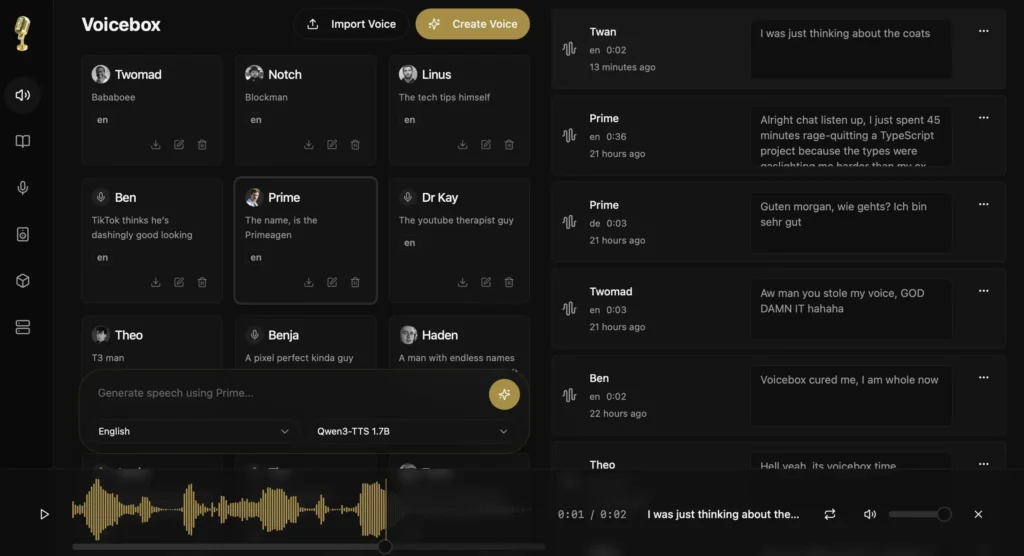
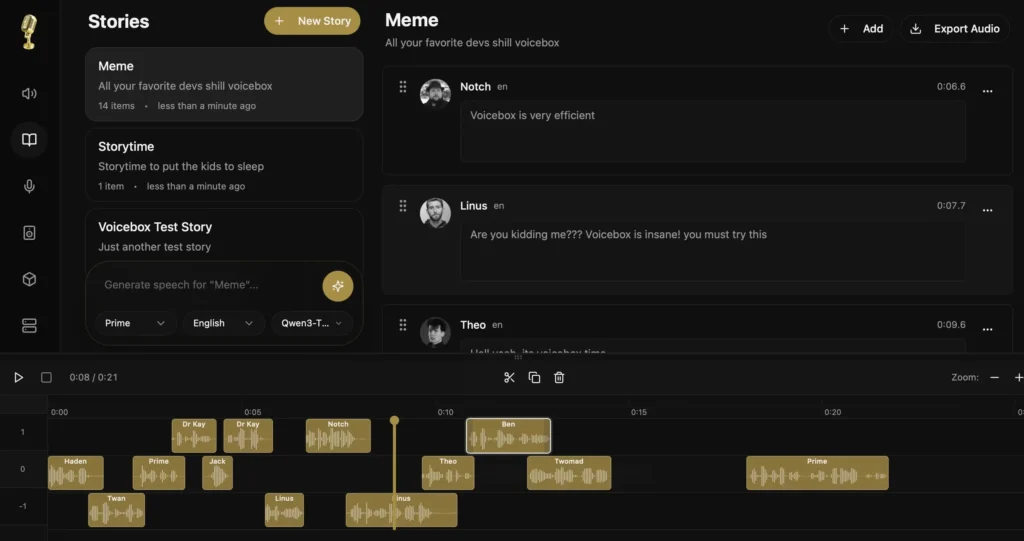
With a DAW-like interface, multi-track editing, and an API-first design, Voicebox is built for creators, developers, and teams who want professional voice tools without usage limits or cloud dependency.
Use Cases
- Clone voices locally for narration or dialogue
- Create podcasts, stories, and multi-speaker conversations
- Build game dialogue and character voice systems
- Automate voice generation in content pipelines
- Develop privacy-focused voice assistants
- Generate speech for accessibility tools
- Integrate voice synthesis into apps via API
- Experiment with open-source TTS models safely
Screenshots
Features of VoiceBox
| Feature | Description |
|---|---|
| Local Voice Cloning | Clone voices from short audio samples completely offline |
| Speech Quality | Natural prosody, emotion, and realistic cadence |
| Studio Editor | Timeline-based, multi-track audio composition |
| Multi-Voice Support | Create conversations with multiple speakers |
| Open Models | Powered by Qwen3-TTS, with more open models planned |
| API Access | Full REST API for automation and integrations |
| Native App | Lightweight, high-performance desktop app (Tauri) |
| Apple Silicon Boost | MLX backend delivers 4–5× faster inference |
| Privacy First | No cloud, subscriptions, limits, or internet required |
System Requirements
Windows
| Requirement | Details |
|---|---|
| Operating System | Windows 10 or later |
| Architecture | 64-bit |
| RAM | 8 GB minimum |
| Disk Space | 5–10 GB |
| GPU | Optional (CPU supported) |
macOS
| Requirement | Details |
|---|---|
| Operating System | macOS (Apple Silicon or Intel) |
| Architecture | ARM64 / x64 |
| RAM | 8 GB minimum (16 GB recommended) |
| Disk Space | 5–10 GB (models + audio) |
| Acceleration | Metal / MLX (Apple Silicon) |
How to Install VoiceBox??
Windows (.exe)
- Download the Voicebox
.msiinstaller - Run the installer
- Follow the setup steps
- Launch Voicebox from the Start Menu
macOS (.dmg)
- Download the Voicebox
.dmgfile - Open the DMG
- Drag Voicebox.app into the Applications folder
- Launch from Applications
- If macOS shows a security warning, go to
System Settings → Privacy & Security → Open Anyway
- If macOS shows a security warning, go to
Linux
According to the developer , it is planned to launch the Linux build soon. So as soon as it will be available , we will update the page. But if you want to build it from source, follow the official guide
Recommended For You: Handy: Offline Open-Source Speech-to-Text AI App For Windows, macOS & Linux
How to Use Voicebox (Simple Steps)
Getting started with Voicebox is straightforward just follow the below steps after installation:
- Launch the Voicebox app on macOS or Windows
- On first launch, select and download a voice model
- Progress, speed, and status are shown clearly
- Once the model is ready, import or record a short voice sample
- Voicebox automatically creates a voice profile
- Enter your text and generate speech locally
- Use the timeline editor to mix voices, trim audio, or build conversations
- Export your audio or reuse it later from generation history
Download Voicebox: Local Voice Cloning & Speech Synthesis Studio For Windows & macOS
Open Source & Development
Voicebox is developed as a fully open-source project, that means users and developers can:
- Inspect and audit the source code
- Contribute features or bug fixes
- Experiment with new voice models
- Build custom voice-powered tools
By using Tauri instead of Electron, Voicebox stays lightweight, fast, and memory-efficient while still offering a modern UI.
Conclusion
Voicebox delivers a powerful, privacy-first approach to voice synthesis, combining voice cloning, speech generation & audio editing into one open-source desktop application.
With local execution, native performance, and an API-driven design, it’s well-suited for creators and developers who want professional voice tools without cloud subscriptions.
If you’re exploring voice AI, audio storytelling, or voice-powered applications with control, transparency & performance, Voicebox is a very useful software.




