
The assumption around multimodal AI has mostly been the same. if you want serious capability, you need serious hardware. Phones get lighter models and stripped-down features.
MiniCPM-V 4.6 is trying to challenge that idea. It’s a 1.3B parameter multimodal model built to run on phones across iOS, Android, and HarmonyOS, while still handling image understanding, video analysis, OCR, and multi-image reasoning workloads that normally push users toward much larger systems.
The interesting part isn’t just that it runs locally. It’s that the efficiency numbers are unusually strong. MiniCPM-V 4.6 scores 13 on the Artificial Analysis Intelligence Index, ahead of Qwen3.5-0.8B’s score of 10 while using lower token cost.
Table of Contents
1.3B parameters doing work that used to need much more
Most small models make the same limitation, shrink the parameters, accept worse performance, hope the use case is simple enough that it doesn’t matter. MiniCPM-V 4.6 is trying to break that limitation.
On vision-language understanding tasks it outperforms Qwen3.5-0.8B across most benchmarks. On OpenCompass, RefCOCO, HallusionBench, MUIRBench, and OCRBench it reaches performance closer to Qwen3.5-2B, a model with significantly more parameters. Surpassing Ministral 3 3B, a model more than twice its size, on the intelligence index is the result that stands out most cleanly.
The efficiency story is equally important. Token throughput runs roughly 1.5x faster than Qwen3.5-0.8B despite stronger benchmark performance. Smaller, faster, and more capable, that combination doesn’t usually happen together and when it does it’s worth paying attention to why.
The compression trick that makes it possible
The visual encoding step is where most multimodal models spend a disproportionate amount of compute. Every image gets converted into tokens the language model can process, and the number of tokens directly affects how expensive each inference is.
MiniCPM-V 4.6 introduces mixed 4x and 16x visual token compression. In 16x mode the model aggressively merges visual tokens, fewer tokens, faster inference, lower memory cost. In 4x mode it keeps more tokens and preserves finer detail for tasks where precision matters, like dense OCR or reading small text in complex images. You switch between them based on what the task actually needs.
The underlying technique comes from LLaVA-UHD v4 and reduces visual encoding computation by more than 50% compared to standard approaches. That reduction is what makes 4GB GPU memory viable and what gives the GGUF variant a 2GB CPU footprint.
It’s a careful engineering decision that compounds, less compute per token, fewer tokens when appropriate, faster throughput as a result.
You May Like: Small But Powerful AI Models You Can Run Locally on Your System
What benchmarks Say
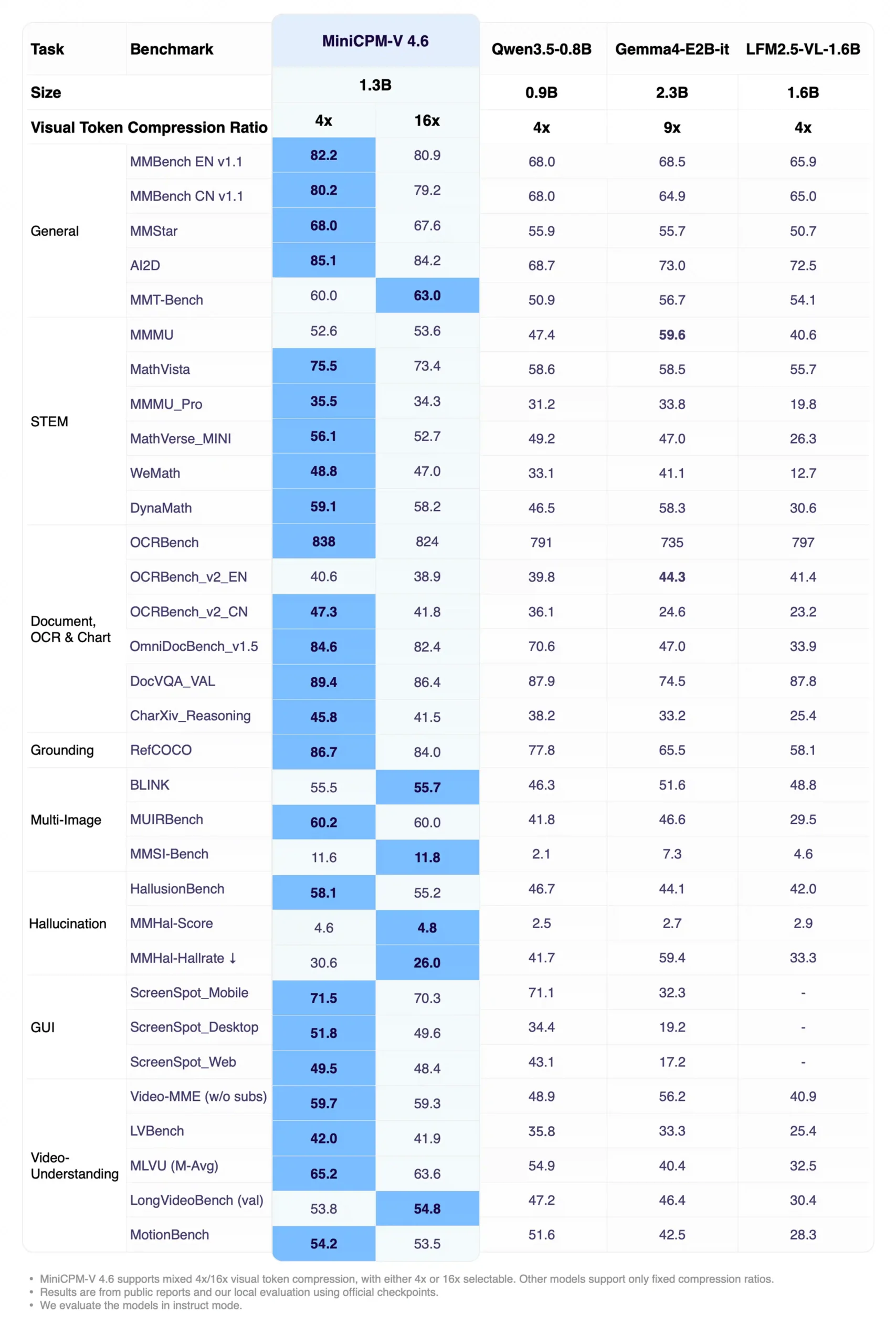
All benchmark comparisons here are against models in the same size class including Qwen3.5-0.8B at 0.9B parameters and Gemma4-E2B at 2.3B plus LFM2.5-VL-1.6B. MiniCPM-V 4.6 runs at 1.3B total.
| Benchmark | What it tests | MiniCPM-V 4.6 | Qwen3.5-0.8B | Gemma4-E2B |
|---|---|---|---|---|
| MMStar | General multimodal reasoning | 68.0 | 55.9 | 55.7 |
| MathVista | Math with visual context | 75.5 | 58.6 | 58.5 |
| OmniDocBench | Document understanding | 84.6 | 70.6 | 47.0 |
| MUIRBench | Multi-image reasoning | 60.2 | 41.8 | 46.6 |
| HallusionBench | Hallucination resistance | 58.1 | 46.7 | 44.1 |
| Video-MME | Video understanding | 59.7 | 48.9 | 56.2 |
The OmniDocBench gap is the most striking 84.6 against Gemma4-E2B’s 47.0. For anyone working with documents, PDFs, or dense text in images, that’s not a marginal difference.
Hallucination resistance is worth noting separately. HallusionBench at 58.1 with a hallucination rate of 30.6% against Qwen3.5-0.8B’s 41.7% means the model is significantly less likely to make things up about what it sees. For a phone-deployed model handling real world inputs that matters practically.
There’s also a Thinking variant of MiniCPM-V 4.6 aimed at slower, reasoning-heavy tasks. That version pushes benchmarks like MathVista to 75.6, MMMU to 55.3, and HallusionBench to 57.2 while keeping the model at just 1.3B parameters.
The split is simple, standard model is built for fast, efficient multimodal workloads on-device, while the Thinking variant is better suited for tasks involving multi-step reasoning, charts, STEM questions, or complex document analysis.
The limitation, as expected, is latency. You gain reasoning depth, but lose some of the lightweight responsiveness that makes the base model interesting for phones.
Also, these benchmarks are self-reported by the MiniCPM team.
Small Enough to Actually Deploy
Full model needs 4GB GPU memory. The GGUF variant runs on CPU at 2GB. Quantized variants, BNB, AWQ, GPTQ, all sit at 3GB GPU memory.
On the software side MiniCPM-V 4.6 runs natively on iOS, Android, and HarmonyOS with all edge adaptation code open sourced. You can reproduce the on-device experience, customize it, and build on top of it.
For server-side inference it supports vLLM, SGLang, llama.cpp, and Ollama. For fine-tuning on your own domain data, LLaMA-Factory and SWIFT both work out of the box on consumer-grade GPUs.
There’s also a bigger sibling
MiniCPM-o 4.5 is the other model in this release worth knowing about. Its a 9B parameters, end-to-end omnimodal.
It sees, listens, and speaks simultaneously without any of those streams blocking each other. Real-time video input, real-time audio input, text and speech output all running at once. Full-duplex live streaming where the model can interrupt, respond, and proactively comment on what it’s observing.
On vision tasks it approaches Gemini 2.5 Flash. On OCR it surpasses GPT-5 and Gemini 3 Flash on OmniDocBench for end-to-end English document parsing. For voice it supports cloning from a reference audio clip.
It needs 19GB GPU memory at full precision or 10GB via GGUF. A different hardware conversation than V 4.6 but worth knowing the family goes that far.
Limitations
MiniCPM-V 4.6 is impressive for its size, but physics still matters. At 1.3B parameters, there are areas where larger multimodal models will do better.
Complex multi-step reasoning, long-horizon video understanding, deeper agentic workflows, and tasks requiring broad world knowledge are still more comfortable territory for larger systems. The Thinking variant helps narrow that gap especially on math and visual reasoning benchmarks but it doesn’t eliminate it.
There’s also the usual benchmark catch. Most of the results here are self-reported, and while they’re directionally impressive, real-world performance will depend heavily on your workload, latency requirements, and how aggressively you quantize the model.
Still, that almost misses the point. MiniCPM-V 4.6 isn’t trying to beat frontier-scale multimodal systems outright. The important part is how much capability it manages to deliver at this size and on actual devices people own.
Who should actually care
If you’re building mobile applications that need vision-language capability, document scanning, image understanding, visual question answering. MiniCPM-V 4.6 is currently one of the most practical open source options at this size. The edge deployment code being open sourced removes a significant barrier that usually makes on-device AI painful to ship.
If you’re a researcher working on efficient multimodal models, the 4x vs 16x compression switching and the LLaVA-UHD v4 visual encoding technique are worth studying.
If you need something that runs on a server with good throughput, the vLLM and SGLang support makes it straightforward.
Overall this can be your another option for a lightweight open weights AI companion or a model which might align with your usecase.