
File Info
| File | Details |
|---|---|
| Name | LLM Wiki |
| Version | v0.6.11 |
| Type | AI-Powered Personal Knowledge Base |
| Size | 40MB (may vary by OS) |
| Developer | nash_su |
| License | GPLv3 (Open Source) |
| Platforms | Windows • macOS • Linux |
| Github Repository | GitHub/nashsu/llm_wiki |
Table of Contents
Description
Most AI tools can answer questions about your documents.
But there’s a problem with the usual approach.
You add a bunch of files, ask a question and the AI searches through them to find an answer. Ask something else later and it does much of the same work again.
LLM Wiki on the other hand, uses an LLM to build a persistent, structured wiki from them.
Add a collection of documents and LLM Wiki analyzes them, creates pages for important entities and concepts, connects related information and keeps the knowledge base updated as you add more sources.
That means your knowledge doesn’t just sit inside a folder waiting to be searched.
It gradually becomes an interconnected collection of information that you can browse, search and ask questions about.
The project is based on Andrej Karpathy’s LLM Wiki methodology, but turns that original idea into a full desktop application with document ingestion, chat, search, knowledge graphs, web research, a browser clipper and integrations for AI agents.
This app is not trying to become another place where you dump PDFs and chat with them.
It’s trying to build something from them.
Use cases
- Build a personal research library that grows as you read.
- Turn a collection of PDFs and documents into an interconnected knowledge base.
- Organize research around a long-term topic instead of keeping everything in separate folders.
- Build a personal wiki while reading books, papers or technical documentation.
- Create a searchable knowledge base for business documents and internal research.
- Clip useful web pages and automatically add them to your existing knowledge base.
- Use local AI models to process documents without relying on cloud APIs.
- Give coding agents access to information stored in your own wiki.
Screenshots
Also Read: Tired of Being a Tenant in Your Own PC? These 7 Open Source Tools Give You Back Control.
Features of LLM Wiki
| Feature | Description |
|---|---|
| Self-building knowledge base | Turn documents into a structured, interconnected wiki using an LLM |
| Two-step ingestion | Analyze sources first, then generate and update wiki pages |
| Source traceability | Generated pages keep references to the source material behind them |
| Multi-format support | Import PDFs, DOCX, PPTX, spreadsheets, EPUB, MOBI, Markdown, images and more |
| Web clipper | Capture web pages from Chrome and automatically add them to your knowledge base |
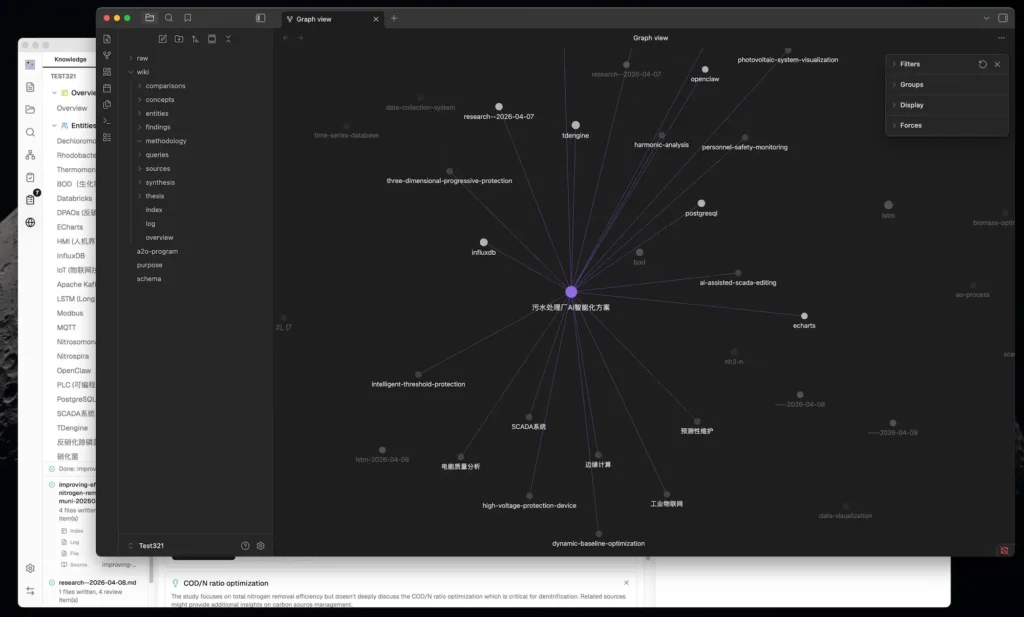
| Knowledge graph | Visualize relationships between entities, concepts and sources |
| Community detection | Automatically discover clusters within your knowledge graph |
| Graph insights | Find surprising connections, isolated pages and potential knowledge gaps |
| Semantic search | Optionally use vector search to find conceptually related information |
| AI chat | Ask questions against your accumulated knowledge |
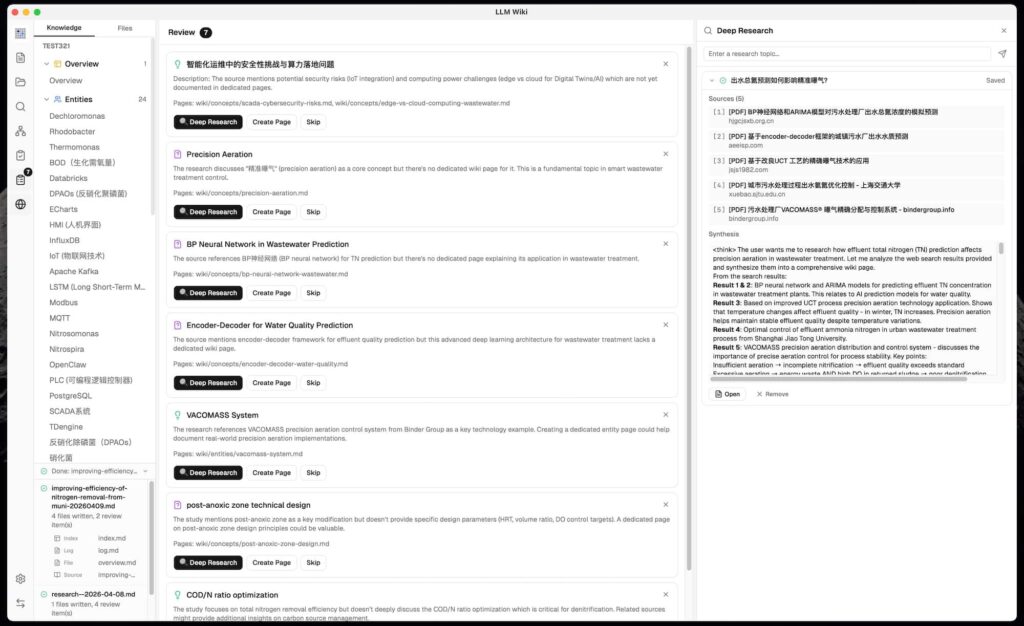
| Deep Research | Research topics on the web and add the results back into the wiki |
| Multiple LLM providers | Connect OpenAI, Anthropic, Google, Ollama and custom providers |
| Local models | Use compatible local model providers such as Ollama |
| Persistent ingest queue | Continue processing sources with progress, retry and crash recovery |
| Source folder watch | Automatically detect changes to files in watched source folders |
| Review system | Flag information that needs human judgment before continuing |
| Obsidian compatibility | Use the generated wiki directory as an Obsidian vault |
| MCP server | Let compatible AI agents access the local knowledge base |
| Agent skills | Connect LLM Wiki with tools such as Claude Code and Codex |
| Project migration | Export and import complete knowledge-base projects |
System Requirements
| Requirement | Details |
|---|---|
| Operating Systems | Windows • macOS • Linux |
| LLM provider | OpenAI, Anthropic, Google, Ollama or a compatible custom provider |
| Web search | Optional, Tavily, SerpApi or SearXNG |
| Vector search | Optional, LanceDB-based semantic search |
| Chrome | Required only for the optional browser extension |
Installation Process
- Download the file according to your operating system.
- Windows users can download the .msi installer and run it to install the app.
- macOS users can download the .dmg file, open it and move LLM Wiki to the Applications folder.
- Linux users can choose between the .deb package and the AppImage file. Install the deb normally, or make the AppImage executable and open it.
- Once installed, launch LLM Wiki and create a new project.
- Open Settings and add your preferred LLM provider and API key. You can also connect a compatible local model through Ollama.
- Go to Sources and add the documents or files you want LLM Wiki to organize.
- Start the ingestion process and let the app analyze your sources and build the wiki.
- Once it’s finished, you can browse the generated pages, search your knowledge base, chat with your sources or explore the knowledge graph.
Download LLM Wiki
You can also visit the official Release page of the LLM Wiki for more versions.
Your knowledge base can finally grow with you
LLM Wiki is an interesting take on personal knowledge management because it doesn’t leave you with another folder full of files to organize.
You give it the information, and it starts turning that information into something you can actually explore, connect and build on.
The idea of having an AI maintain your personal wiki is still far from perfect, but it makes a lot of sense for anyone who regularly collects research, documents, articles or notes.
Instead of asking yourself where you saved something months ago, you can let your knowledge base do the remembering for you.