

I’ve used Figma. I’ve used Adobe XD. And for most design work they do the job fine — if you’re okay with paying for them and okay with your files living on someone else’s server.
I wasn’t looking for a replacement. I just stumbled across OpenPencil while browsing GitHub one evening and the one thing that caught my attention wasn’t the canvas or the components. It was the MCP server built directly into the tool.
An AI agent that can read, create and modify your design files from the terminal. That’s not a plugin. That’s a different way of thinking about design tools entirely.
I installed it, connected it to Claude Code, created a sample design and spent some time with it. Here’s what I actually found.
Table of contents
What is OpenPencil (In a Nutshell)
OpenPencil is an open-source design tool built for developers who’d rather type than click. Describe what you want, and the AI breaks it into spatial chunks and generates them in parallel on a canvas, you watch the layout appear rather than build it by hand.
The MCP server is probably the most interesting part. It’s built in, which means Claude Code, Codex, or any MCP-compatible agent can read and modify your design files.
The part that actually got my attention
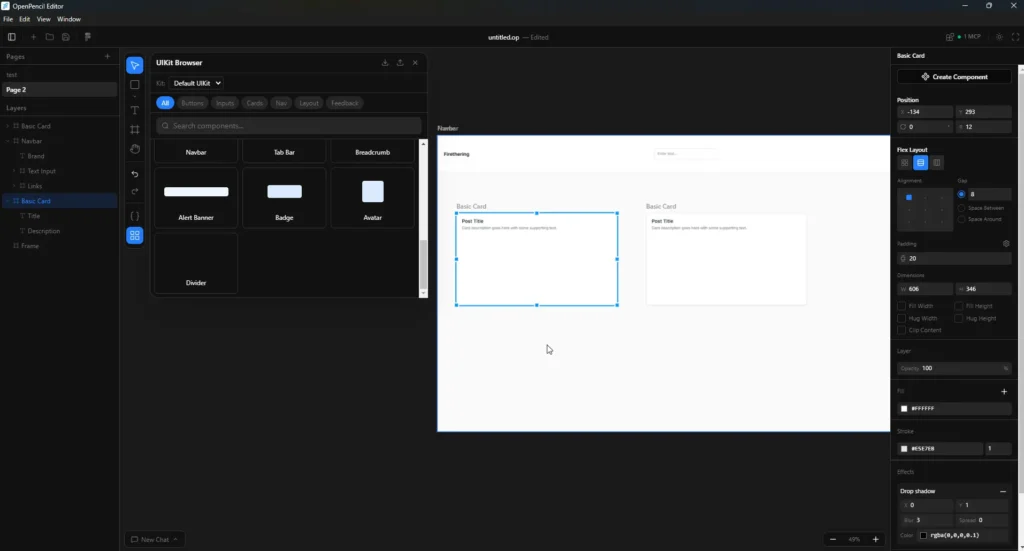
You can use it completely offline as a regular design tool — import your Figma files, tweak layouts, adjust components, work with shapes and UI elements manually. No internet needed for that part. It works like any other desktop design app.
But connect it to Claude Code, Codex, Gemini or OpenCode CLI and it becomes something else entirely. You describe what you want — a login form, a dashboard layout, a settings page — and the AI agent generates it directly on the canvas. You can then manually adjust whatever it gets wrong, which in my experience is always something small.
The part I found genuinely interesting is how it saves files. Everything exports as a .op file. Open it in any text editor and it’s just JSON — clean, readable, Git friendly. No proprietary binary format, no locked ecosystem. Your designs are just data you actually own.
That combination of offline capable, agent powered when you want it, open file format, is what makes it powerful.
How it compares to Figma
I went further and actually compared it against Figma since that’s what most people use.
| Feature | Figma | OpenPencil |
|---|---|---|
| Price | $16-90/month per seat | Free to use |
| Open source | No | Yes (MIT) |
| AI built in natively | Paid AI credits only | Yes via CLI agents |
| MCP server | No | Built in |
| Figma file import | N/A | Yes (.fig files) |
| Code export | Dev seat required ($12-35/mo) | React, Tailwind, HTML free |
| File format | Proprietary | .op (JSON, Git friendly) |
| Works offline | Yes | Yes for manual design |
| Self hostable | No | Yes |
| Desktop app | Yes | Yes (Mac, Windows, Linux) |
The number that stood out to me was the Dev seat on Figma, $12/month on Professional, $35/month on Organization, just to inspect code and hand off to developers. OpenPencil generates React, Tailwind and HTML directly at no extra cost.
One thing worth being honest about is OpenPencil isn’t completely free if you want the AI features. You’ll need an active subscription or API access with Claude, Codex, Gemini or OpenCode to use the agent capabilities. But if you already have a plan with any of those providers, you’re not paying anything extra. You’re just plugging in what you already use.
For solo developers or small teams who just need a design tool that talks to their existing AI setup, the cost difference is still hard to ignore.
Related: I Use Claude Code But Not for My Personal Projects — Here’s What I Use Instead
A few things to know before you try it
First thing you’ll hit, the AI agent features don’t just work out of the box. You need the CLI installed separately first. Claude Code CLI, Codex CLI, Gemini CLI or OpenCode CLI depending on which provider you use. The app tells you clearly when something’s missing but it’s worth knowing before you go in expecting instant AI generation.
The AI features also need internet. If you’re using Claude or Codex for generation you’re still making API calls to cloud servers. The offline part is only for manual design work — shapes, layouts, components, Figma imports. Fully local AI generation isn’t there yet.
Collaborative editing is still on the roadmap. So if you’re expecting a drop-in Figma replacement for a team that works together in real time, this isn’t that yet. It’s currently better suited for solo developers or designers working independently.
Boolean operations — union, subtract, intersect — are also not available yet. For complex vector work that’s a real gap.
It’s a young project. MIT licensed, still actively building. The bones are solid but some features that feel standard in mature design tools are still coming.
None of this is a dealbreaker depending on what you need it for. Just worth knowing upfront.
Related: This Free Tool Let Me Run AI Video, Image and Music Models Locally Without ComfyUI
Closing Thoughts
If you’re a developer who already has Claude or Codex in your workflow, the idea of a design tool that speaks the same language — MCP, agents, code export — is genuinely interesting. I hadn’t seen that combination in an open source tool before.
Import your Figma files, connect your existing AI setup, export clean React and Tailwind. For personal projects or solo work that’s a pretty compelling package.
It’s early. But early is when it’s worth paying attention.