


File Information
| File | Details |
|---|---|
| Name | HandBrake |
| Version | 1.7.3 (Latest Stable) |
| License | Free & Open Source (GPL v2) |
| File Types | .exe, .dmg, .flatpakref |
| Platforms | Windows, macOS, Linux |
| Size | 25MB |
| Developer | The HandBrake Team |
| Official Site | https://handbrake.fr |
Table of contents
Description
HandBrake is a powerful, open-source video transcoder that makes converting, compressing & optimizing videos incredibly easy. Whether you’re ripping DVDs, shrinking huge video files, converting footage for YouTube, or just trying to get your content playable on a mobile device. HandBrake handles it all.
It supports a wide range of input formats, including MP4, MKV, MOV, and AVI, & outputs high-quality video with advanced encoding using modern codecs like H.265 (HEVC), H.264, VP9, & more. It’s lightweight, fast, & packed with tools that video pros and casual users both appreciate.
One of HandBrake’s strongest suits is its presets system, you don’t need to know the technical details of bitrate, frame rates, or codecs. Just pick a preset (e.g., “Fast 1080p30” or “Gmail Large 720p”) and hit encode. It’s that simple.
Since it’s completely open-source, there are no ads, no trials, no paywalls — just 100% free software developed & maintained by a dedicated community. Whether you’re compressing gigabytes of footage or reformatting your favorite shows, HandBrake makes it effortless.
Features of HandBrake
| Feature | Description |
|---|---|
| Wide Format Support | Accepts most common multimedia files & DVDs/Blu-rays that don’t have copy protection |
| Modern Codecs | Includes H.265 (x265), H.264 (x264), VP8, VP9, AAC, MP3, FLAC, & more |
| Device Presets | Built-in presets for devices like iPhones, Androids, Fire TVs, Roku, & web platforms |
| Batch Encoding | Queue up multiple files & process them all at once to save time |
| Constant Quality or Average Bitrate | Choose the perfect balance between size & quality |
| Subtitles & Chapters | Burn in subtitles, import SRTs, or keep original chapter markers |
| Video Filters | Apply deinterlacing, scaling, cropping, denoising, & rotation filters with ease |
| Audio Customization | Downmix, normalize, add tracks, change codecs or tweak bitrate settings |
| Command-Line Mode | Power users can automate HandBrake with CLI support for scripts & batch jobs |
| Open Source | 100% free, constantly updated, secure, and community-backed |
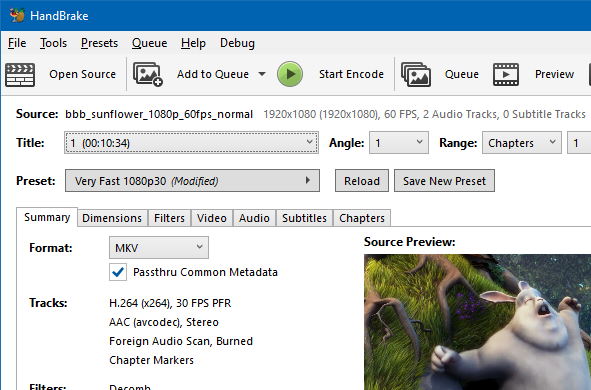
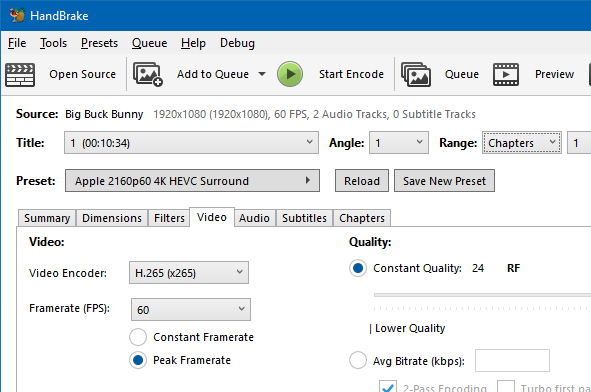
Screenshots
System Requirements
| Platform | Operating System | RAM | Disk Space | Processor (CPU) | Additional Info |
|---|---|---|---|---|---|
| Windows | Windows 10 or later (64-bit) | 4GB (8GB recommended) | 200MB installation | Intel/AMD dual-core or better | .exe installer; supports hardware acceleration |
| macOS | macOS 10.13 or later | 4GB minimum | 200MB free | Intel 64-bit or Apple Silicon (M1/M2) | .dmg available; native Apple Silicon support |
| Linux | Any 64-bit modern Linux distro | 4GB | 200MB space | Dual-core or higher | .flatpakref for best compatibility & updates |
How to Install HandBrake??
Before you install, scroll down to the download section below & grab the appropriate file based on your operating system:
.exefor Windows.dmgfor macOS.flatpakreffor Linux
Windows Installation
- Download the
.exefile from the download section below. - Double-click to launch the installer.
- Follow the on-screen instructions — accept the license & choose install location.
- Launch HandBrake from your Start menu or desktop shortcut.
macOS Installation
- Download the
.dmgfile. - Open it & drag HandBrake into your Applications folder.
- If macOS asks for permission, approve it under System Preferences > Security.
- Open HandBrake via Launchpad or Spotlight search.
Linux Installation (Recommended via Flatpak)
- Make sure you have Flatpak installed. If not, run:
sudo apt install flatpak(Debian/Ubuntu)sudo dnf install flatpak(Fedora) - Download the
.flatpakreffile from the section below. - Install using:
flatpak install flathub fr.handbrake.ghb - Run it using:
flatpak run fr.handbrake.ghb
Why Flatpak? It ensures:
- Seamless updates
- Isolated/sandboxed install
- Cleaner removal
- Runs on nearly all distros




