


File Information
| Name | Ardour |
|---|---|
| Version | v6.8 (Check Official Site for Updates) |
| File Size | Varies by source code archive |
| Platforms | Linux, Windows, macOS |
| License | GNU General Public License Version 2 |
| Official Repository | Ardour GitHub |
| Official Site | Ardour Official |
Table of contents
Description
Ardour is a full-featured digital audio workstation that empowers users to produce professional-quality audio with full control over every stage of the workflow. Its open source nature ensures transparency, adaptability, and community-driven innovation. Users can record multi-track audio, edit with precision, mix using advanced routing, and master tracks with built-in effects and plugins.
Despite being open source, Ardour’s development team has made a deliberate decision not to provide free precompiled binaries for general download because of their revenue model & supporting the development. This means beginners might find installation a bit challenging, but developers and advanced users can still compile the software from source. Although official compilation instructions are limited, there are community-contributed guides and resources online that explain how to build Ardour, particularly on Linux.
If you prefer to use precompiled binaries, these are available from the official Ardour site for purchase or donation, and alternative sources such as internet archives provide .exe for Windows and .run for Linux. We do not host any binaries ourselves, and since Ardour is licensed under GNU GPL v2, sharing this information is completely legal.
Ardour provides a fully open environment for plugin integration, supporting VST, LV2, and AU plugins. It is highly configurable, supports advanced automation, and allows deep routing options for both audio and MIDI. This makes it a strong alternative to commercial DAWs like Pro Tools, Logic Pro, and Ableton Live, especially for users who value open source software freedom.
Features of Ardour
| Feature | Description |
|---|---|
| Multi-Track Recording | Record multiple audio tracks simultaneously with support for external interfaces. |
| Non-Destructive Editing | Edit audio clips without altering the original recordings. |
| Advanced Mixing | Flexible routing, automation, and control over all audio signals. |
| Plugin Support | Supports VST, LV2, and AU plugins for effects & instruments. |
| MIDI Support | Full MIDI recording, editing, and plugin integration. |
| Mastering Tools | Built-in effects and plugins for mastering tracks to professional standards. |
| Open Source & Customizable | Fully open source under GPLv2, allowing customization & scripting. |
| Community Resources | Access to guides, forums, & community-built tools for extending functionality. |
Screenshots
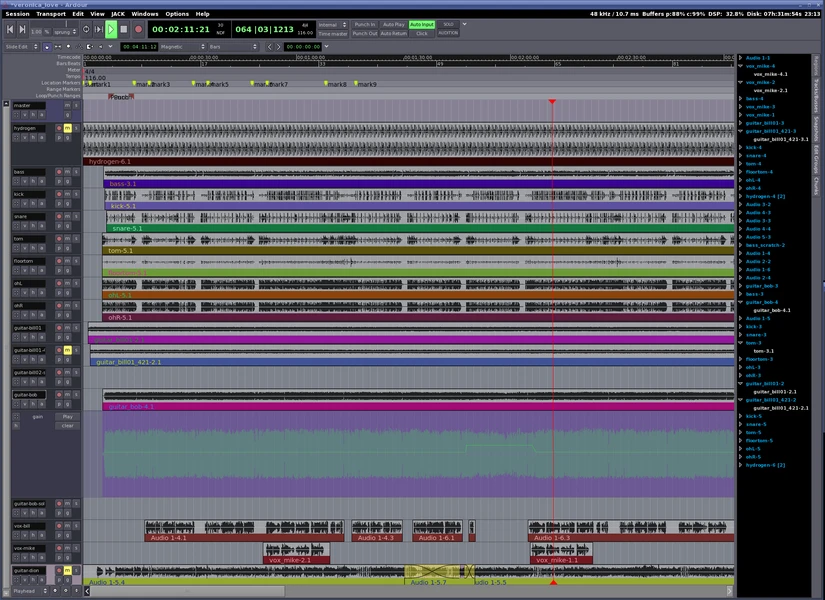
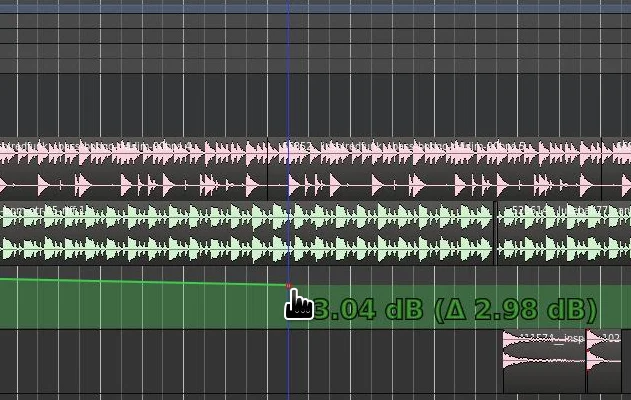
System Requirements
| Hardware Component | Minimum Required Specification |
|---|---|
| CPU | Dual-core Intel or AMD, 2 GHz or higher |
| RAM | 4 GB RAM (8 GB recommended for larger projects) |
| GPU | Any graphics card compatible with your OS |
| Hard Disk | 10 GB free space (project-dependent) |
| OS | Linux, Windows, macOS |
How to Install Ardour??
Note: While it rivals commercial DAWs in features, the team behind Ardour has chosen not to release precompiled binaries for free. This means users need to compile the software themselves from source code or obtain binaries from specific sources online.
Download the source code .zip file by visiting the official Ardour site or repository. Since precompiled binaries are not provided for free, you will need to compile the software yourself if you want to run it directly.
For Developers (Linux Compilation)
- Extract the
.zipsource archive. - Follow community guides to compile Ardour using terminal commands.
- Install any required dependencies for your Linux distribution.
For Users Wanting Binaries
- Windows
.exeand Linux.runbinaries can be found via the official Ardour site (for a donation) or trusted internet archives. - macOS users may need to compile from source or purchase the official binary package.
Note: We do not host any binaries on our servers. All information provided here is sourced from publicly available resources, respecting Ardour’s GNU GPL v2 licensing.
Installing Ardour on Windows
- Download the Binary
- Obtain the
.exefile from the Ardour official site (requires donation) (Recommended) or from an archive source. - Save it in a location you can easily access, e.g., your Downloads folder.
- Obtain the
- Run the Installer
- Double-click the
.exefile to start the installation. - If Windows prompts a security warning (User Account Control), click Yes to allow installation.
- Double-click the
- Choose Installation Directory
- When prompted, select the folder where you want Ardour to be installed.
- The default location is usually
C:\Program Files\Ardour.
- Select Components
- You can typically leave all default components selected.
- Click Next to proceed.
- Complete Installation
- Click Install and wait for the installer to copy all files.
- Once completed, click Finish.
- Run Ardour
- You can now open Ardour from the Start Menu or the desktop shortcut created during installation.
- Configure audio settings and MIDI devices as needed before starting your first project.
Installing Ardour on Linux Using .run
- Download the Binary
- Obtain the
.runfile from a trusted archive or the official Ardour site. - Save it to a folder, e.g.,
/home/username/Downloads.
- Obtain the
- Make the File Executable
- Open a terminal in the folder where the
.runfile is located. - Run the following command:
chmod +x Ardour-x.x.x.runReplacex.x.xwith the actual version number of the binary.
- Open a terminal in the folder where the
- Run the Installer
- In the terminal, execute the installer:
./Ardour-x.x.x.run - The installer will prompt you to choose an installation directory. You can leave it as default (usually
/opt/Ardour) or choose a custom path.
- In the terminal, execute the installer:
- Follow Installer Prompts
- Proceed through the installation steps in the terminal.
- The installer will copy the files to the chosen directory.
- Run Ardour
- Navigate to the installation directory and run Ardour:
./ardour5Or create a desktop entry for easier access.
- Navigate to the installation directory and run Ardour:
- Configure Audio & MIDI
- Before starting your first project, configure JACK, ALSA, or PulseAudio depending on your setup for optimal audio performance.
Notes
- These are unofficial binaries, so make sure you only download from trusted sources which is Ardour’s Official Website.
- We do not host any binaries on our server & thus they are also not verified by us thus we encourage official download only.
- For macOS, you’ll still need to compile from source or use official binaries.
Download Ardour DAW: Open Source Digital Audio Workstation for Professional Audio Production
Note: Below are the unofficial binaries of v6.8 avaialbe on internet archives , before downloading the unofficial builds, we highly recommend you to download the official binaries from the official site of Ardour , as the software is open source, we are just providing what is already available on the internet.
Conclusion
Ardour stands out as a robust and fully open source digital audio workstation. While the team has chosen not to provide free precompiled binaries, developers and advanced users can access source code to build the software themselves. Its flexibility, plugin support, and professional features make it an excellent alternative to commercial DAWs. Whether you are recording music, editing podcasts, or mastering tracks, Ardour gives you complete control over your audio production in a legal and open source framework.




