


File Info
| File | Details |
|---|---|
| Name | Anything LLM |
| Version | v1.8.4 (Latest) |
| License | Open Source (MIT) |
| Platforms | Windows (.exe), macOS (.dmg), Linux (.sh installer) |
| File Size | 335MB (may vary slightly according to OS) |
| Official Website | https://anythingllm.com |
| GitHub Repository | https://github.com/Mintplex-Labs/anything-llm |
Table of contents
Description
Anything LLM is a powerful, self-hosted chat interface designed to work with both local & remote LLMs like Ollama, OpenAI, Mistral, LLaMA, Claude, & more. This intuitive yet advanced interface brings modern AI chat functionality directly to your desktop, allowing you to interact with documents, retain chat memory, & use multiple models, all privately on your own machine.
Whether you’re a developer looking to work with local language models, a researcher needing secure AI tools, or a tech enthusiast building your own AI assistant, Anything LLM provides an all-in-one environment that is customizable, fast, and privacy-focused.
It supports document ingestion (PDFs, DOCX, MD, TXT), threaded chat memory, team workspaces, plugin support & chat analytics. It also connects seamlessly with Ollama to run models locally or integrate with cloud APIs like OpenAI, Anthropic & Groq.
Built for privacy, performance & full control, Anything LLM ensures that your data stays on your system while giving you a beautiful UI with enterprise-level features—for free.
Features
Simple Interface
AnythingLLM abstracts away complexity so you can leverage LLMs for any task—content generation, knowledge retrieval, tooling, automation, assistant workflows—without needing to be an AI engineer. Conversations, model switching, context management, and document interaction happen in a fluid interface designed for speed & clarity.
Completely Open Source & Free
Built on transparency, AnythingLLM is fully open source under the MIT license. You get enterprise-grade flexibility without vendor lock-in or recurring costs. Inspect it, fork it, contribute, or embed it, freedom is baked in.
Customizable & Extensible
Extend AnythingLLM to match your use case. Create custom agents, add data connectors (documents, databases, APIs), plug in business logic, or chain workflows. With community contributions and your own tweaks, there’s no limit to what AnythingLLM can become.
Multi-Model & Multi-Modal
Use text-only models or combine them with multi-modal capabilities—images, audio, and more within one unified interface. Swap between LLaMA, Mistral, Zephyr, OpenChat, or your own fine-tuned backbone effortlessly, and blend modalities for richer interactions.
Built-in Developer API
Beyond the UI, AnythingLLM exposes a powerful developer API. Embed LLM functionality into existing products, automate tasks, or build new services on top of it. It’s not just a chat app—it’s a foundation for intelligent features across your stack.
Growing Ecosystem
Tap into a growing ecosystem of plugins, integrations, and community extensions that enhance core functionality team collaboration, analytics, custom prompts, model orchestration, and more. Everything scales with your needs.
Privacy-Focused by Design
Privacy isn’t optional, it’s default. All data, context, and model computation can stay entirely on your machine. No telemetry leakage, no third party storage unless you explicitly configure it. You control the data, the models, & the flow.
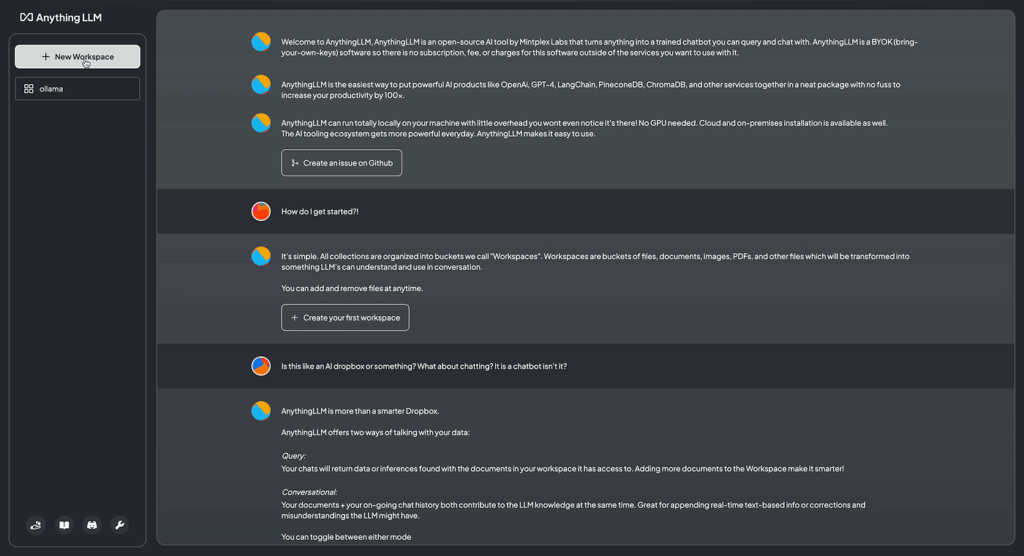
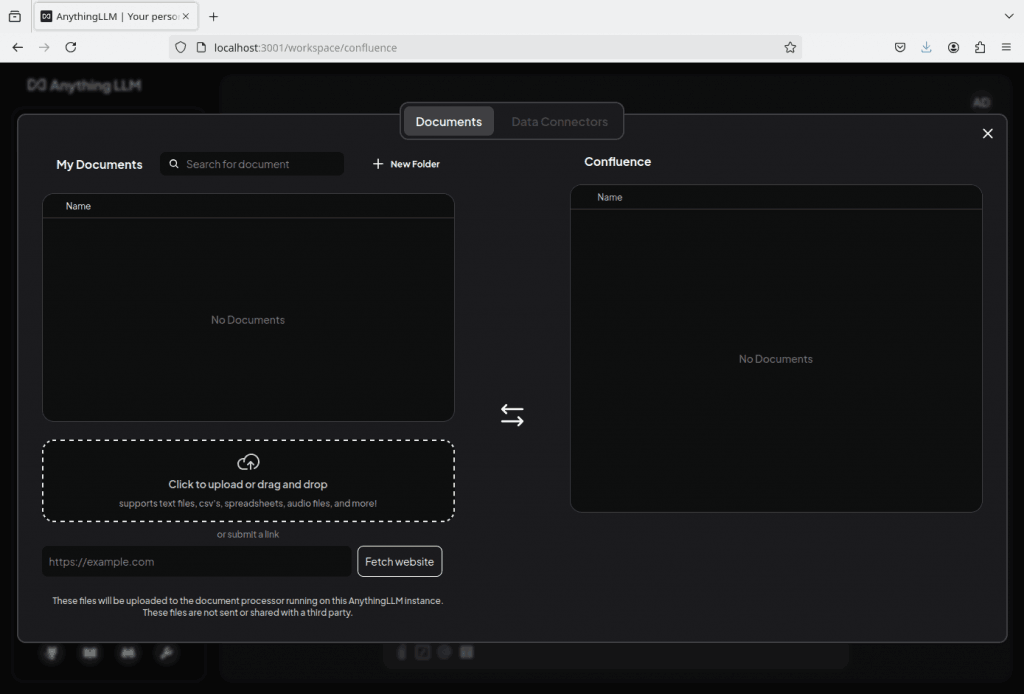
Screenshots
System Requirements
| OS | Minimum Requirements |
|---|---|
| Windows | Windows 10/11, 8GB RAM (16GB recommended), 2-core CPU, 1GB+ disk space |
| macOS | macOS 12+, Apple Silicon or Intel, 8GB RAM, 1GB+ disk space |
| Linux | Ubuntu 20.04+, Python 3.12+, Git, Pip, 8GB RAM, 1GB+ disk space |
| GPU | Optional – Compatible with CUDA (Nvidia), ROCm (AMD), or MPS (Apple Silicon) |
How to install??
Windows
- Scroll up & download the
.exeinstaller from the Download Section. - Run the
.exefile. - Follow the installation wizard steps.
- Once installed, launch Anything LLM from your Start Menu.
- Complete initial setup to configure your LLM backend (Ollama, OpenAI, etc).
macOS
- Scroll up & download the
.dmgfile. - Open the file & drag Anything LLM into the Applications folder.
- Launch the app (you may need to allow it in System Preferences).
- On first launch, set up your preferred LLM backend.
Linux
- Scroll up & download the
.shinstaller script. - Open your terminal & run:
chmod +x install-anything-llm.sh ./install-anything-llm.sh - Follow on-screen instructions.
- Once installed, run the app from terminal or application menu.
- Set up your LLM provider during initial configuration.




