


File Info
| File | Details |
|---|---|
| Name | Actual Budget |
| Version | v26.10.0 |
| Type | Personal finance and budgeting software |
| Size | 121MB (may vary by OS) |
| Developer | Actual Budget community |
| License | MIT License |
| Platforms | Windows, macOS, Linux |
| Github Repository | actual budget Github |
Table of Contents
Description
Planning a budget is a practical way to keep your finances under control, and there are plenty of apps that can help. However, many budgeting tools rely on subscriptions or cloud-based services to store and manage your financial data.
Actual Budget is worth a look if you want more control over your financial data. It is a free and open source personal finance app that lets you manage your money locally without needing a cloud account or subscription. Available for Windows, macOS and Linux, it helps you track spending, organize transactions, manage accounts and see where your money goes.
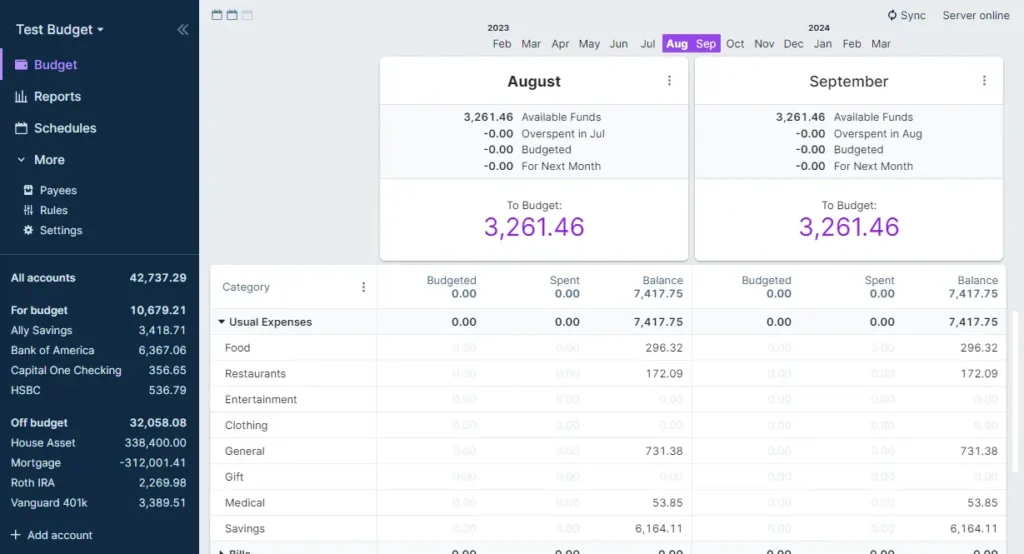
It uses a method called envelope budgeting, where you assign the money you already have to categories such as rent, groceries, bills and savings. It also includes financial reports, transaction imports and budget migration tools to help you get started with your existing data.
You can use the desktop app on its own, without setting up a server. If you want to access your budget across multiple devices, you can optionally configure a syncing server or use a managed hosting service. End-to-end encryption is also available for synced data.
Use Cases
- Allocate money for rent, groceries, bills, subscriptions, and other spending categories before you spend it.
- Record transactions and categorize purchases to understand where your money goes.
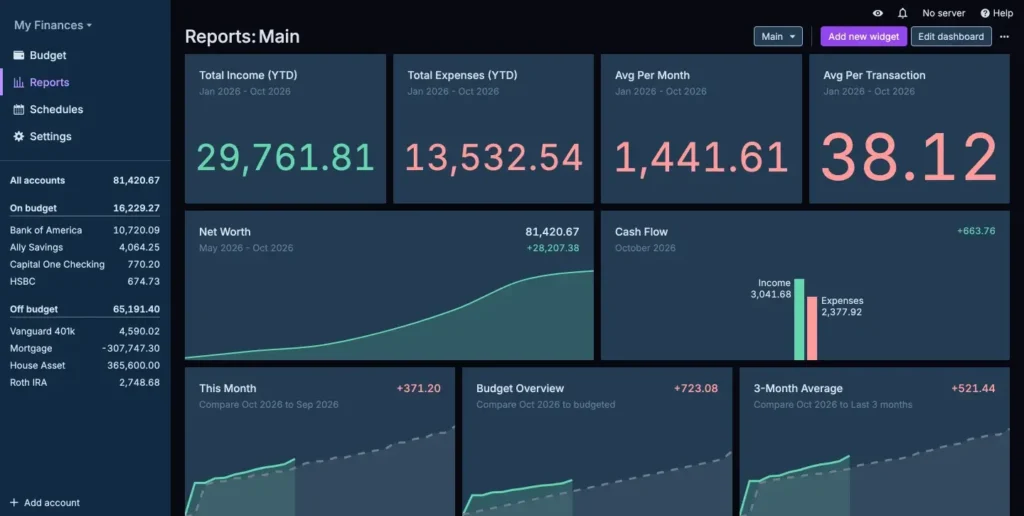
- Review account balances, cash flow, and net worth through reports.
- Import supported financial files or migrate an existing YNAB budget.
- Use the desktop app locally or choose your own server setup for multi-device access.
Screenshots
Features of Actual Budget
| Feature | Description |
|---|---|
| Envelope Budgeting | Assign available money to categories such as bills, groceries, savings, and entertainment. |
| Account Management | Keep your financial accounts organized in one place and track your overall balances. |
| Transaction Tracking | Add, edit, categorize, split, and transfer transactions through a streamlined interface. |
| Financial Reports | Review cash flow, net worth and other financial data with built-in reports or create custom reports. |
| Transaction Import | Import financial data from CSV, QIF, OFX, QFX, and CAMT.053 files. |
| Budget Migration | Import existing budgets from YNAB4 and nYNAB, with additional migration options available through the community. |
| Local-First Operation | Use the desktop app locally without needing to run your own server. |
| Multi-Device Sync | Synchronize changes across devices through an Actual server you run or a managed hosting service. |
| End-to-End Encryption | Optionally encrypt synced data so the server cannot read the encrypted financial information. |
| Bank Sync | Connect supported financial institutions through GoCardless in the UK and EU, or SimpleFIN in the US and Canada. Availability and provider terms apply. |
| Undo and Redo | Reverse changes and restore earlier edits when you make a mistake. |
| Dark Mode | Use a dark interface and adjust the app’s appearance to suit your preferences. |
| Developer API | Build custom integrations and importers using the API. |
You May Like: GnuCash: Free & Open-Source Accounting Software for Businesses and Individuals
System Requirements
| Requirement | Details |
|---|---|
| Operating System | Windows, macOS, or Linux supported by the available desktop release |
| Processor | Compatible with your operating system and desktop build |
| Memory | Sufficient to run the desktop app alongside your other applications |
| Internet Connection | Needed for downloading the app and optional online services; local budgeting can work offline |
| Server | Not required for local-only desktop use; required for server-based syncing and web access |
You May Like: Frappe Books: Open Source Accounting Software Without the Subscription
Installation Steps
You can get started with Actual Budget using its official desktop installer. You do not need Docker, a hosting account, or a server for the basic local-only setup.
- Download the version for your operating system
- Open the downloaded installer or package and follow the installation instructions for your platform.
- Launch Actual Budget once the installation is complete.
- Create a budget and start adding accounts, transactions and spending categories.
- Assign your available money to categories using the envelope budgeting method.
- If you already use another budgeting app, check the supported migration options to see whether you can import your existing budget.
If you want to use Actual Budget across multiple devices, You can set up a server using the official Docker installation guide and deploy it by following the official documentation. These are optional deployment methods, not prerequisites for installing the desktop app.
Download Actual Budget
For more versions, visit the release page of the software
A Budget You Can Keep Under Your Control
Actual Budget offers a practical way to plan spending, manage transactions and understand your finances without handing your budget over to a conventional cloud-based service. Its desktop app is a straightforward starting point, while self-hosting gives you the option to synchronize your data across devices.
If you want an envelope-based budgeting system and prefer having control over your financial data, Actual Budget is worth trying. You can start locally and explore its more advanced setup options only if you need them.




