


File Info
| File | Details |
|---|---|
| Name | OpenSwarm |
| Version | v1.0.0 |
| Type | Multi-Agent AI System |
| Developer | VRSEN |
| Size | 100-150MB (may vary by OS) |
| License | MIT License (Open Source) |
| Platforms | macOS • Windows • Linux |
| Interface | Terminal UI + FastAPI Backend |
| Primary Use | Research, slide decks, reports, videos, content generation, automation |
| AI Providers | OpenAI • Claude • Gemini • fal.ai • Composio |
| Github Repository | VRSEN/openswarm |
Table of Contents
Description
There are countless AI tools that still revolve around one assistant doing everything inside a chat window. OpenSwarm feels closer to assigning work across a small team.
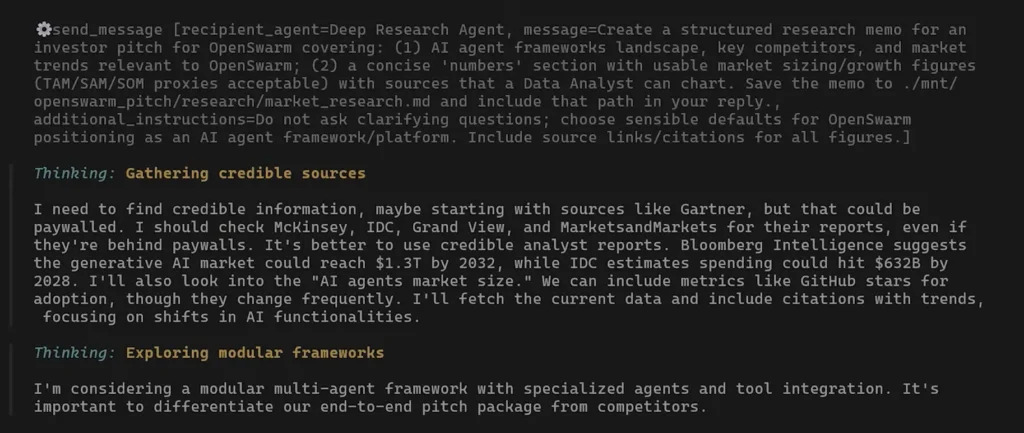
The research agent handles analysis. The slides agent builds presentations. The data analyst creates charts. Video and image agents manage media generation separately.
Single-agent systems tend to hallucinate once projects become larger or more visual. OpenSwarm keeps tasks separated, which usually makes the outputs feel more structured and usable. It also fits naturally beside tools like Claude Code instead of replacing them.
You might still use Claude Code for engineering work, debugging, or architecture decisions while OpenSwarm handles the surrounding deliverables like reports, presentations, marketing assets, research, documentation, and media generation.
Use Cases
- Create investor pitch decks from a single prompt
- Generate SEO blog pipelines with competitor research
- Build quarterly business reports with charts and summaries
- Produce AI-generated product launch videos
- Create marketing campaigns with timelines and assets
- Research competitors and summarize findings automatically
- Generate Word documents, PDFs, and presentations
- Analyze datasets and create visualizations
- Connect AI workflows with Gmail, Slack, GitHub, HubSpot, and more
- Build your own specialized AI swarm for a business workflow
Screenshots
Features of OpenSwarm
| Feature | Description |
|---|---|
| Multi-Agent Architecture | Multiple specialized AI agents coordinated together |
| One Prompt Workflow | Generate complete deliverables from a single request |
| Slides Generation | Creates polished HTML and PPTX presentations |
| Deep Research Agent | Web research with structured analysis and citations |
| Data Analysis | Charts, statistics, and structured reporting |
| Document Generation | Creates PDFs, documents, and formatted reports |
| AI Video Generation | Supports Sora, Veo, and Seedance workflows |
| AI Image Generation | Generate and edit images using Gemini and GPT Image |
| 10,000+ Integrations | Gmail, Slack, GitHub, HubSpot, and more through Composio |
| Fully Open Source | Fork, modify, and customize everything |
| Local Execution | Runs on your machine |
| FastAPI Backend | API server support for integrations and SaaS workflows |
| Docker Support | Deploy using Docker containers |
| Custom Swarms | Build your own specialized AI teams |
Related: Open Design: Open Source Claude Design Alternative
Meet the AI Agents
| Agent | What It Does |
|---|---|
| Orchestrator | Coordinates all other agents and routes tasks |
| Deep Research Agent | Researches topics and creates structured reports |
| Data Analyst Agent | Builds charts, analyzes data, and summarizes findings |
| Slides Agent | Creates presentations and exports PPTX decks |
| Docs Agent | Generates documents and PDFs |
| Image Generation Agent | Creates and edits images |
| Video Generation Agent | Produces AI-generated videos |
| Virtual Assistant | Handles productivity tasks and external integrations |
System Requirements
| Component | Requirement |
|---|---|
| Operating System | macOS / Windows / Linux |
| Node.js | v20+ |
| Python | Python 3.10+ |
| RAM | 8 GB recommended |
| Internet | Required for AI APIs |
Installation Steps For OpenSwarm
Windows
- Download the exe installer
- Run the installer like a normal Windows app
- Open OpenSwarm from the Start Menu or desktop shortcut
- Follow the setup wizard
- Add at least one AI provider API key (OpenAI or Claude)
macOS
- Download the dmg file.
- Open the app If macOS blocks it, go to:
- System Settings -> Privacy & Security
- Click “Open Anyway”, Complete the setup wizard and add your API provider key
Linux
- Download the app for linux
- Right-click the file -> Properties -> Permissions Enable “Allow executing file as program”
- Double-click the file to launch OpenSwarm
- Follow the setup wizard Add your AI provider key
Download OpenSwarm multi-agent system
How to Use OpenSwarm??
- Launch OpenSwarm
- Connect an AI provider
- Enter a task for eg “Analyze this CSV and create charts”
The orchestrator automatically routes work between agents.
Your Small AI production team
OpenSwarm is more like a small AI production team running beside your workflow.
You still bring the ideas and direction. It handles the research, decks, reports, charts, documents, and media generation. And because it is fully open source, you are not locked into someone else’s platform while doing it.




