

Every week there’s a new AI image model claiming to be next-gen. Some are genuinely impressive. Others look good in cherry-picked demos and fall apart the moment you try running them on an 8GB card.
If you actually own a decent GPU, You need something that runs on it.
So I filtered this down to a short list of open-source image generators that I’d realistically consider using on consumer hardware. Some are comfortable on 8–12GB VRAM. A few stretch into the 16–24GB range. None require absurd data-center GPUs.
This isn’t a list of everything available. It’s the ones that produce strong results, and make sense for creators and developers who want to run models locally.
Before we jump into the models, here’s how I’ve grouped them.
I split this list into tiers based on realistic VRAM needs. Tier 1 models are comfortable on 8–12GB GPUs. While Tier 2 works better around 16–24GB & Tier 3 pushes higher or needs optimization tricks.
Tier-1 Models (8-12GB VRAM)
1. Z-Image Turbo

Z-Image-Turbo comes from the broader Z-Image family, a 6B-parameter diffusion model built around a single-stream DiT architecture. That sounds technical, but here’s what matters: it’s fast, it’s efficient, and it produces surprisingly clean results for its size.
This is the distilled version of the base Z-Image model. It runs in just 8 steps, which means generation is quick without feeling low quality. When I look at outputs, the first thing that stands out is realism. Faces look natural. Lighting doesn’t feel plastic. Text rendering, especially English and Chinese, is better than I expected from an open model in this size range.
It ranked highly on independent text-to-image leaderboards and currently sits among the top open-source performers. But leaderboard numbers aside, what I care about is this: it doesn’t feel like a research toy. It feels usable.
If you’re building a product, prototyping visuals, or fine-tuning something for a niche style, this is a strong starting point.
Works well with ComfyUI and Diffusers-based pipelines.
Features of Z-Image-Turbo
- 6B parameter foundation model with distilled 8-step Turbo variant
- Strong photorealistic output
- Solid bilingual text rendering (English and Chinese)
- Fast inference due to few-step distillation
- Multiple variants: base, turbo, omni (gen + edit), and edit-focused model
- Supported by tools like stable-diffusion.cpp for low-VRAM setups
VRAM requirement:
- Fits comfortably within 16GB VRAM in standard setups
- Can run on lower VRAM (even around 4–8GB) with optimized runtimes like stable-diffusion.cpp, though with trade-offs
- Recommended: 12–16GB for smoother generation and larger resolutions
If you’re sitting on a 3060, 4060 Ti, or even a 3090/4090, this is absolutely within reach.
You can even try Z-image-base if you’ve 12GB+ VRAM. Its generations are really impressive.
2. FLUX.1 [Schnell]

If Z-Image-Turbo is about efficiency, FLUX.1 [Schnell] is about speed with serious output quality.
This 12B-parameter transformer is designed to generate high-quality images in as little as 1 to 4 steps & the results are surprisingly competitive with some closed-source systems.
What stands out most is prompt adherence. It handles structured prompts well, maintains composition better than many older diffusion models. It feels modern.
It’s released under Apache 2.0, which makes it usable for personal, research, and commercial projects. That alone makes it attractive for founders or teams experimenting with product integration.
It runs cleanly in ComfyUI and is supported in Hugging Face Diffusers, so deployment is straightforward if you’ve worked with modern pipelines before.
Features of FLUX.1 [Schnell]
- 12B parameter rectified flow transformer
- Generates high-quality images in 1–4 inference steps
- Strong prompt following and composition control
- Apache 2.0 license (commercial-friendly)
- Works with ComfyUI and Diffusers
- Also available via multiple hosted APIs if you want hybrid workflows
VRAM requirement:
- Realistically comfortable at 12–16GB VRAM for smooth local use
- Can run lower with CPU offloading, but expect slower generation
- Recommended: 16GB for consistent performance at higher resolutions
If you’re on a 4070, 4080, 3090, or 4090, this sits in a very usable zone. On 8GB cards, it’s possible with tweaks but this one feels better when it has breathing room.
3. Qwen-Image-2512 (Quantized / GGUF)

If you’ve been following high-end image models, you already know that the full Qwen Image 2512 model is massive. The original version demands 40GB+ of VRAM which is completely unrealistic for most creators.
That’s where the GGUF quantized versions change the game.
Instead of requiring enterprise GPUs, Qwen-Image (Quantized) runs on 8–12GB consumer GPUs while still delivering impressive photorealism and some of the best text rendering in open-source image generation.
This isn’t a “lite” model. It’s intelligently compressed.
Quantization reduces precision in less sensitive layers while preserving critical detail. The result? A model that still produces realistic human faces, clean typography, and rich environmental detail without needing a 4090 with 48GB VRAM.
For creators working on:
- YouTube thumbnails with readable text
- Posters and branding mockups
- Portrait-style photorealistic shots
- Product imagery with typography
Qwen-Image (Q4 or Q5 variants) is one of the strongest options you can run locally.
Features of Qwen-Image
- Excellent human realism (less plastic-looking faces)
- Strong multi-language text rendering
- Detailed natural elements (fur, foliage, lighting)
- High prompt adherence
- Works well inside ComfyUI with GGUF support
Recommended Quantization for Consumer GPUs, If you’re running:
- 8GB VRAM → Q4_0 or Q3_K_M
- 12GB VRAM → Q4_K_M (best balance)
- 16GB VRAM → Q5_K_M for near-original quality
VRAM Requirement
- Full model: ~40GB+ VRAM
- Quantized (Q4_K_M): ~12–14GB VRAM
- Lower quantizations: ~8–10GB VRAM possible
Note: Quality slightly decreases with heavier quantization, but for most real-world use cases, Q4_K_M offers an excellent balance between fidelity and performance.
4. Stable Diffusion 3.5 Medium

Stable Diffusion 3.5 Medium is about structured reliability. This model focuses on improved typography, stronger prompt understanding, and better multi-resolution coherence compared to previous SD generations.
What stands out most is compositional stability.
It handles complex prompts, multiple subjects, and layout-aware instructions more gracefully than older SDXL workflows. Text rendering is cleaner. Object placement is more predictable. It feels engineered for production use.
Released under the Stability Community License, it’s free for research, personal, and commercial use for individuals and organizations under $1M in annual revenue which makes it practical for indie founders and small AI teams building real products.
It integrates smoothly into ComfyUI and Hugging Face Diffusers, so if you’ve already worked with SD pipelines, this feels familiar, just more capable.
Features of Stable Diffusion 3.5 Medium
- MMDiT-X (Multimodal Diffusion Transformer architecture)
- Dual attention blocks for better structure
- Three text encoders (CLIP + T5-XXL stack)
- Improved typography and layout control
- Stronger multi-resolution handling (trained up to 1440px)
- Works with ComfyUI and Diffusers
- Quantization support via bitsandbytes
VRAM Requirement
Realistically comfortable at 12–16GB VRAM for smooth local use at higher resolutions.
With 4-bit quantization:
- Can run on 8–10GB
- Slight performance tradeoff
- Slower inference compared to full precision
Recommended:
- 12GB minimum for serious work
- 16GB ideal for consistent generation at 768px–1024px
If you’re on a 4070, 4080, 3090, or 4090 — this model sits in a very practical performance zone.
On 8GB cards, it’s possible with aggressive optimization, but this one performs best when it has some breathing room.
Related: Best Industry-Grade Open-Source Video Models That Look Scarily Realistic
Tier-2 Models (16-24GB VRAM)
5. FLUX.1 [dev]
![FLUX.1 [dev] generations](https://firethering.com/wp-content/uploads/2026/02/FLUX.1-dev-generations-1024x576.webp)
If FLUX.1 [Schnell] is built for speed… FLUX.1 [dev] is built for quality.
This 12B-parameter model focuses on higher fidelity output, stronger structure, and more refined details. It takes more steps than Schnell, but the tradeoff is noticeably better depth, lighting, and composition consistency.
It feels closer to a “serious creative engine” than a rapid generator.
Prompt adherence is strong. Complex instructions hold together better. Multi-subject compositions break less often. It performs competitively with many closed-source systems especially when given enough inference steps.
This version was trained using guidance distillation, which improves efficiency without sacrificing too much quality. And importantly, the weights are open which makes it valuable for experimentation and research workflows.
It runs well in ComfyUI and integrates cleanly with Diffusers. If you’ve already worked with FLUX models, deployment is straightforward.
Features of FLUX.1 [dev]
- 12B parameter rectified flow transformer
- Stronger detail and structure than Schnell
- Competitive prompt adherence
- Guidance-distilled training for better efficiency
- Open weights for research and workflow development
- Works with ComfyUI and Diffusers
- Available through hosted APIs if you prefer hybrid setups
VRAM Requirement
Realistically comfortable at 16–24GB VRAM for smooth 1024px generation.
Can run on:
- 12GB with CPU offloading (slower)
- 16GB workable
- 24GB ideal
Recommended:
- 16GB minimum
- 24GB for consistent high-resolution output
If you’re on a 3090, 4080, 4090, or similar — this model feels right at home.
On 8GB cards? It Won’t Perform Well. This is where we move beyond entry-level consumer territory.
Important Note on License
FLUX.1 [dev] is released under a Non-Commercial License.
That means:
- Fine for research, experimentation, internal testing
- Not for unrestricted commercial deployment
If you’re building a monetized product, check the licensing carefully.
6. FLUX.2 [dev]

FLUX.2 [dev] feels like a serious leap.
This is a 32B-parameter rectified flow transformer designed not just for text-to-image but also for image editing, character consistency, and multi-reference workflows.
And here’s what really makes it different:
You don’t need fine-tuning to maintain a character or object reference.
You can provide a reference image and guide style, character identity, or composition, all inside the same model. That alone makes it extremely attractive for creators building story-based visuals, product campaigns, or branded content pipelines.
This is not a casual generator. This is a creative engine.
It was trained using guidance distillation to keep it efficient relative to its size, but let’s be clear this is a heavyweight model meant for serious GPUs.
It works in ComfyUI and Diffusers, and 4-bit quantized versions make local deployment possible on high-end consumer cards like a 4090.
Features of FLUX.2 [dev]
- 32B parameter rectified flow transformer
- State-of-the-art open text-to-image quality
- Single and multi-reference image editing
- Character and style consistency without fine-tuning
- Strong realism, lighting, and scene depth
- Open weights for research and experimentation
- Compatible with ComfyUI and Diffusers
VRAM Requirement
Realistically comfortable at 20–24GB VRAM.
Can run on:
- 16GB with 4-bit quantization (tight but possible)
- 24GB ideal for stable 1024px+ generation
- 4090-class GPUs are the sweet spot
Not designed for:
- 8GB cards
- Entry-level builds
Licensing & Usage Note
FLUX.2 [dev] is released under a Non-Commercial License.
That means:
- Excellent for research, experimentation, internal tools
- Not freely usable for commercial deployment without proper licensing
If you’re building a monetized product, you’ll need to review the licensing terms carefully.
Tier-3 Models (24GB+ VRAM)
7. LongCat-Image

This is a 6B parameter open-source model that punches far above its size. Despite being dramatically smaller than many competitors, it competes closely with much larger systems in realism, text rendering, and editing performance.
What makes it stand out isn’t just generation quality.
It’s bilingual — built specifically to handle both English and Chinese text rendering with strong accuracy. And unlike many models that struggle with typography, LongCat performs consistently well when generating quoted text.
That makes it especially interesting for:
- Posters with readable typography
- Social media graphics
- Multilingual marketing assets
- Chinese-language content creators
For its size, it’s extremely capable.
Features of LongCat-Image
- Only 6B parameters (efficient design)
- Strong photorealism relative to model size
- Very good Chinese text rendering
- Competitive English text handling
- Dedicated image editing model (LongCat-Image-Edit)
- Turbo editing version with ~10x speed boost
- Full training code and open ecosystem
- Apache 2.0 license (commercial-friendly)
Editing Capabilities
It also has much more than image generation. The model also ships with:
- A dedicated editing model
- A distilled Turbo editing variant
- Strong instruction-following for transformations
For creators building pipelines (ads, content iteration, product edits), this matters more than raw parameter count.
VRAM Requirement
Text-to-Image:
- ~16–18GB VRAM comfortable
- Can run lower with CPU offloading (slower)
Image Editing:
- ~18GB recommended
Recommended:
- 24GB is Great for this one
- 4090-class GPUs run this smoothly
Because of its efficiency, it’s actually lighter than FLUX.2 despite being competitive in some areas.
Related: Next-Gen AI Models Powering Video, Audio & World-Scale Creative Generation in 2026
Bonus: Heavyweight Power Model
GLM-Image
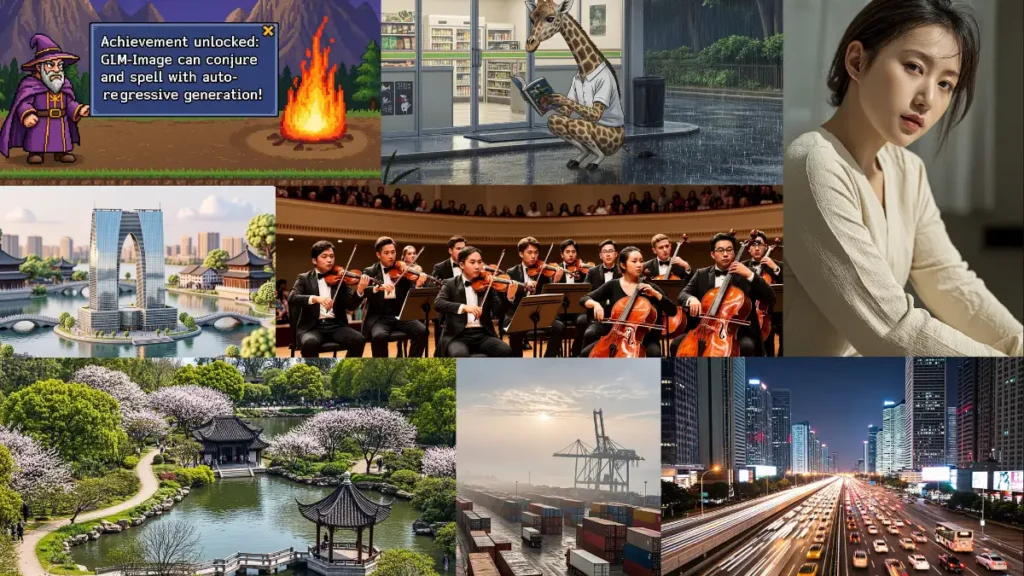
GLM-Image is about precision. This model uses a hybrid architecture combining an autoregressive generator with a diffusion decoder. That design gives it something most open models struggle with: Extremely strong text rendering and knowledge-dense generation.
Where many models fall apart with:
- Infographics
- Posters with lots of readable text
- Layout-heavy magazine designs
- Instructional visuals
- Information-dense scenes
GLM-Image holds structure remarkably well.
It doesn’t just generate pretty images, it understands complex instructions.
Features of GLM-Image
- Hybrid autoregressive + diffusion architecture
- Strong semantic understanding
- Excellent long-text rendering inside images
- High-fidelity detail and texture generation
- Supports text-to-image and image-to-image in one model
- Multi-subject and identity-preserving workflows
- MIT License (commercial-friendly)
VRAM Requirement
This is not lightweight.
- ~23–24GB VRAM recommended
- Can run with CPU offloading (slower)
- High runtime cost compared to simpler diffusion models
This is 4090 / 3090 territory.
Not built for 8GB or 12GB cards.
Related: Open-Source AI Music Generators That Create Studio-Quality Songs
Wrapping Up
Open-weight image generators are no longer the “weaker alternative.”
In many cases, they’re technically competitive with closed systems, sometimes even ahead in areas like text rendering, editing control, or workflow flexibility.
The real difference today isn’t capability.
It’s convenience.
Closed models win on instant access and zero hardware setup.
Open models win on control, customization, transparency, and long-term flexibility.
If you have the hardware or you’re building something serious, open weights give you freedom:
- Run everything locally
- Fine-tune to your niche
- Control data flow
- Build products without API lock-in
- Experiment without restrictions
Both ecosystems have their place.