


File Information
| File | Details |
|---|---|
| Name | Super Productivity: Advanced Todo & Time Tracking App |
| Version | v16.9.4 |
| File Formats Provided | .exe • .dmg • .deb • .AppImage |
| Platforms | Windows • macOS • Linux |
| Size | 199MB (exe) • 203MB (dmg) • 127MB (AppImage) • 99MB (deb) |
| License | Open Source (MIT License) |
| Official Repository | GitHub Super-Productivity |
| Official Site | Super Productivity |
| Category | Productivity • Task Management • Time Tracking |
Table of contents
Description
Super Productivity is a powerful, open-source productivity app that combines task management, timeboxing, and time tracking into a single, privacy-friendly tool.
It’s designed for people who want more than a simple todo list. You can plan your day with timeboxes, track how long tasks actually take, build healthy work habits, and even sync tasks from tools like Jira, GitHub, GitLab, & Trello.
Despite being feature-rich, Super Productivity stays lightweight & works offline. Your data stays fully under your control.
Use Cases
- Plan daily work using timeboxing
- Track time spent on tasks and projects
- Create timesheets and work summaries
- Manage tasks from Jira or GitHub in one place
- Build healthier work routines with breaks and focus tools
- Use a privacy-first alternative to cloud-only productivity apps
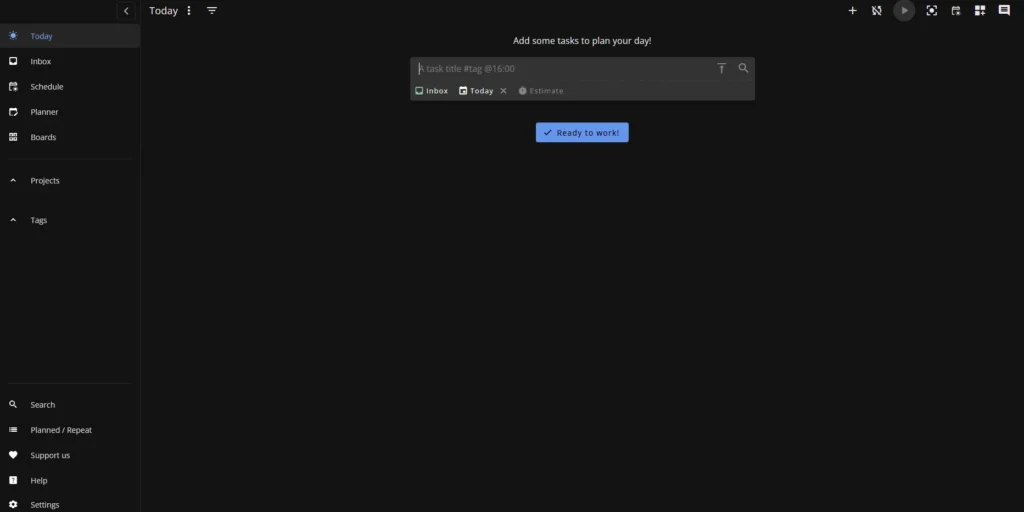
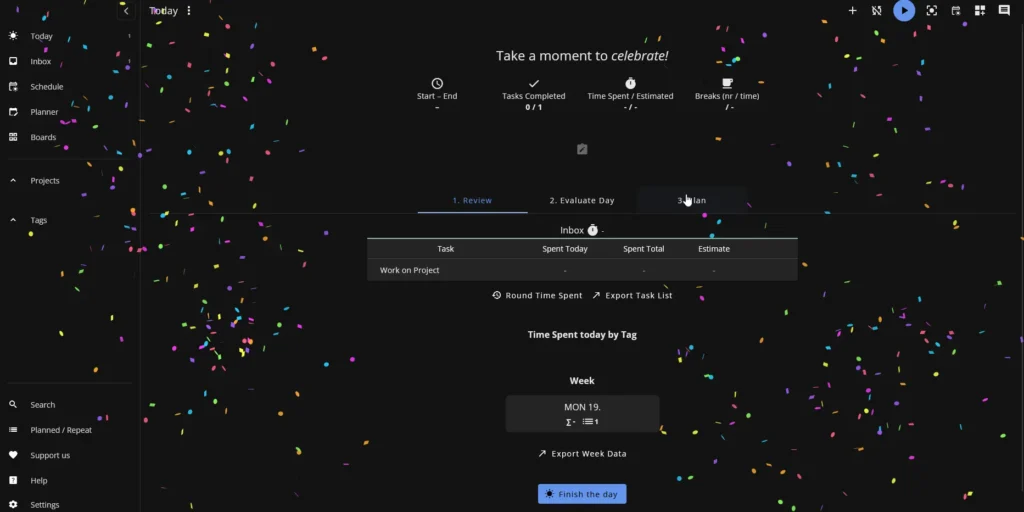
Screenshots
Features of Super-Productivity
| Feature | Description |
|---|---|
| Powerful Task Management | Quickly capture ideas with fast add, break work into subtasks, attach notes, and set deadlines to keep everything organized. |
| Calendar Integration | Pull tasks from your calendar into one unified daily view so nothing slips through the cracks. |
| Flexible Boards & Views | Switch between Kanban, Eisenhower matrix, compact lists, or custom layouts without disrupting your workflow. |
| Focus Mode & Pomodoro | Work distraction-free using built-in focus sessions, automatic breaks, and clear progress tracking. |
| Projects, Tags & Smart Filters | Organize tasks your way using projects, folders, tags, and saved views that match your routine. |
| Plugin & Extension Support | Expand functionality with plugins and automations to build a productivity system that fits your needs. |
| Smart Repeating Tasks | Create intelligent recurring tasks for habits or routine work with fine-grained scheduling options. |
| Quick Time Tracking | Track time effortlessly with one click or keyboard shortcuts — no complicated setup required. |
| Developer Tool Integrations | Sync issues and tasks from GitHub, GitLab, and Jira to keep development work in one place. |
| Offline-First & Private | Works fully offline with no accounts or tracking — your data stays on your device. |
| Procrastination Support Tools | Built-in techniques help you get started when motivation is low and tasks feel overwhelming. |
| Keyboard-Centric Workflow | Designed for speed with extensive keyboard shortcuts for nearly every action. |
| Cross-Device Sync | Sync data across desktop, web, and mobile using WebDAV or Dropbox. |
| Work Logs & Productivity Insights | Instantly generate work reports, timesheets, and productivity metrics. |
| Data Freedom | Export your data anytime in common formats like JSON or CSV |
| Open Source & Free | Fully transparent, community-driven, and free to use with an active open-source ecosystem. |
System Requirements
| Requirement | Details |
|---|---|
| OS | Windows 10+ • macOS 11+ • Modern Linux distros |
| Architecture | x64 (varies by OS) |
| RAM | 4 GB recommended |
| Disk Space | ~200 MB |
How to Install Super Productivity??
Windows (.exe)
- Download the Windows
.exeinstaller - Double-click the file
- Follow the setup steps
- Launch Super Productivity from the Start Menu
macOS (.dmg)
- Download the macOS
.dmgfile - Open it
- Drag Super Productivity into the Applications folder
- Launch it from Applications
(Right-click → Open if macOS blocks it)
Linux (.deb)
- Download the
.debpackage - Double-click to open with your package manager
- Install and launch from your app menu
Linux (.AppImage)
- Download the
.AppImagefile - Right-click the file and choose Properties
- Open the Permissions tab
- Enable “Allow executing file as program”
- Close the window
- Double-click the AppImage to launch it
Download Super Productivity: Advanced Todo, Timeboxing & Time Tracking App
Conclusion
Super Productivity is a rare productivity tool that balances power, privacy & flexibility. It helps you plan better, work more intentionally, and understand where your time actually goes.
If you want a serious, open-source alternative for task management and time tracking that adapts to your workflow, Super Productivity is well worth trying.




