


File Information
| Name | Easy Dataset: Application for Creating Fine-Tuning Datasets for LLMs |
|---|---|
| Version | v1.5.1 (Stable Release) |
| File Size | Windows: ~262MB (exe) • macOS: ~321 MB (DMG) • Linux: ~261 MB (.AppImage) |
| Platforms | Windows • macOS • Linux |
| License | Open Source (GPL 3.0 License) |
| Official Repository | easy-dataset github |
| Official Site | Easy-Dataset |
Table of contents
Description
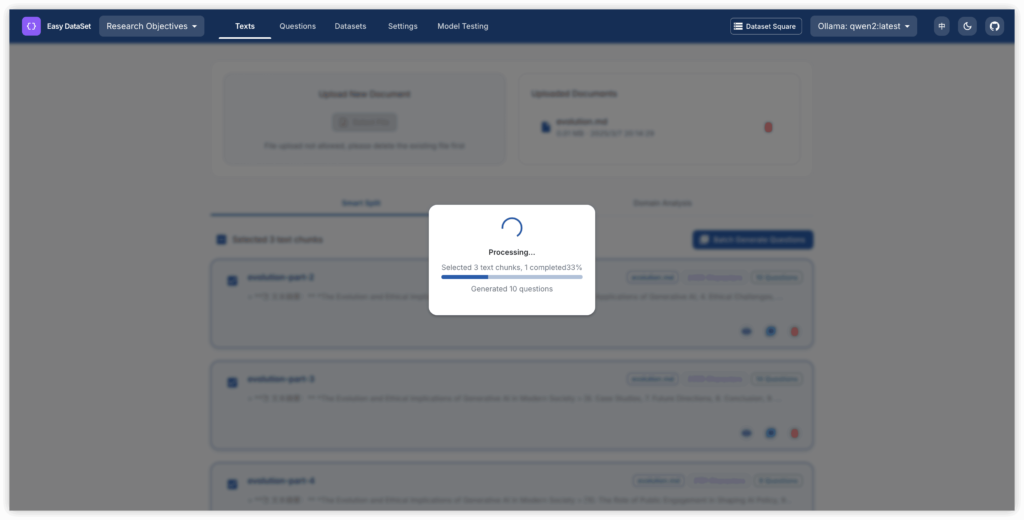
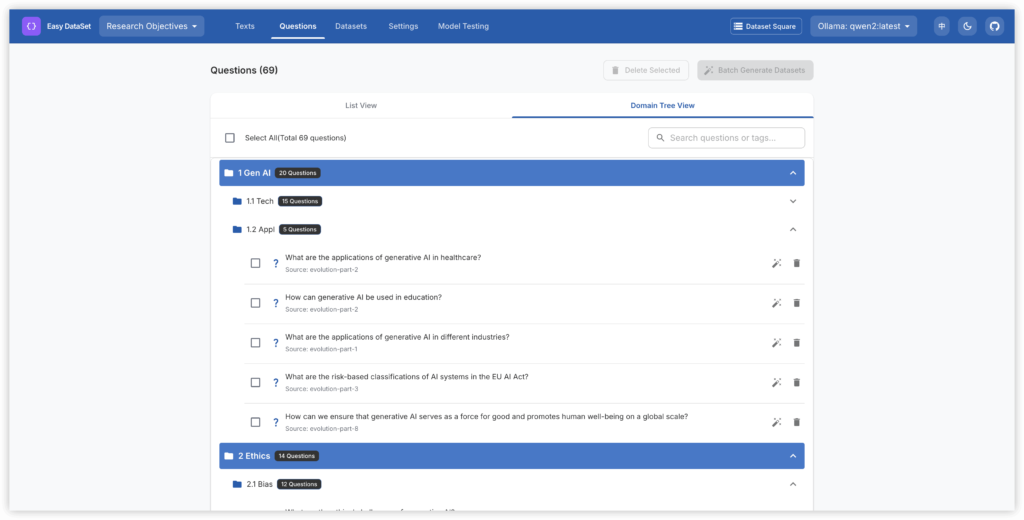
Easy Dataset is a specialized application designed to create fine-tuning datasets for Large Language Models (LLMs). With its intuitive interface, users can upload domain-specific documents, efficiently split content, generate relevant questions, and produce high-quality training data suited for model fine-tuning.
This application effectively transforms specialized knowledge into structured datasets that are compatible with all LLM APIs following the OpenAI format. Easy Dataset streamlines the fine-tuning process, making it both simple and efficient for developers and researchers alike.
Features of Easy Dataset
| Feature | Description |
|---|---|
| Intelligent Document Processing | Supports intelligent recognition of various formats including PDF, Markdown, and DOCX. |
| Intelligent Text Splitting | Utilizes multiple text splitting algorithms with customizable visual segmentation options. |
| Intelligent Question Generation | Extracts relevant questions from each text segment to enhance training data. |
| Domain Labels | Constructs global domain labels for datasets with advanced understanding capabilities. |
| Answer Generation | Leverages LLM APIs to generate insightful answers and Chain of Thought (COT) for better context. |
| Flexible Editing | Provides the ability to edit questions, answers, and datasets at any stage of the fine-tuning process. |
| Multiple Export Formats | Exports datasets in various formats (Alpaca, ShareGPT, multilingual-thinking) and file types (JSON, JSONL). |
| Wide Model Support | Compatible with all LLM APIs that adhere to the OpenAI format. |
| User-Friendly Interface | An intuitive UI crafted for both technical and non-technical users. |
| Custom System Prompts | Allows users to add custom prompts to guide model responses effectively. |
Advantages of Using Easy Dataset
- Streamlined Dataset Creation: Convert complex domain knowledge into structured datasets easily.
- Versatile Format Support: Handle multiple document types without hassle.
- Enhanced AI Training: Intelligent question generation and answer provision boost model fine-tuning effectiveness.
- User-Friendly Experience: An intuitive interface caters to users of all technical backgrounds.
- Open Source Freedom: Enjoy the benefits of an open-source tool without the restrictions of proprietary software.
Screenshots
System Requirements
| Platform | Minimum Specification |
|---|---|
| Windows | Windows 10 or newer, 4 GB RAM (8 GB recommended), Intel/AMD processor, 200 MB free disk space |
| macOS | macOS 10.12 or newer, Intel or Apple Silicon, 4 GB RAM, 200 MB free disk space |
| Linux | Modern Linux distribution, 64-bit processor, 4 GB RAM (8 GB recommended), 200 MB free disk space |
How to Install Easy Dataset??
Before installation, scroll down to the Download Section and select the correct installer for your platform.
Windows (exe)
- Download the Windows installer
.exe. - Double-click to run the installer.
- Follow the prompts in the installation wizard and complete the setup.
- Launch Easy Dataset from the Start Menu.
macOS (DMG)
- Download the macOS package
.dmg. - Open the package and drag Easy Dataset into your Applications folder.
- Once installed, launch Easy Dataset from Applications.
- If macOS Gatekeeper alerts you, right-click to allow it to open.
Linux (AppImage)
- Download the
.AppImagefile for Linux. - Make it executable:
chmod +x easy-dataset.AppImage. - Run it:
./easy-dataset.AppImage. - The AppImage runs without requiring full installation, ideal for testing or multi-distro use.
Download Easy Dataset: Simplify Fine-Tuning for Large Language Models
Conclusion
Easy Dataset offers a powerful and efficient solution for creating fine-tuning datasets for Large Language Models (LLMs). By simplifying the process of transforming domain knowledge into structured datasets, it enables users to enhance their AI models seamlessly.
With features like intelligent document processing, customizable text splitting, and automatic question generation, this application caters to both technical and non-technical users. Its open-source nature not only fosters collaboration and community support but also ensures that you maintain control over your data.
Whether you’re a researcher, developer, or educator, Easy Dataset is your go-to tool for optimizing the fine-tuning process. Download Easy Dataset today and take your model training to the next level with confidence and ease!




