back to top
HomeAppsAndroid AppsLoop Habit Tracker: Free & Open-Source Habit Tracker App for Android

Loop Habit Tracker: Free & Open-Source Habit Tracker App for Android

- Advertisement -

File Information

NameLoop Habit Tracker – Free Open Source Habit Tracker for Android
Versionv2.3.1 (Stable)
File Size10.2MB
PlatformAndroid
LicenseOpen Source (GNU GPL v3)
Official RepositoryGitHub Loop Habit Tracker
DeveloperÁlinson Santos Xavier

Description

Loop Habit Tracker is a free, open-source Android application designed to help users build and maintain positive habits over time. It focuses on simplicity, privacy, & long-term habit formation.

Missing a day doesn’t instantly break your progress, and long-term consistency is rewarded more than short streaks. This makes Loop ideal for users who want sustainable habit growth without pressure.

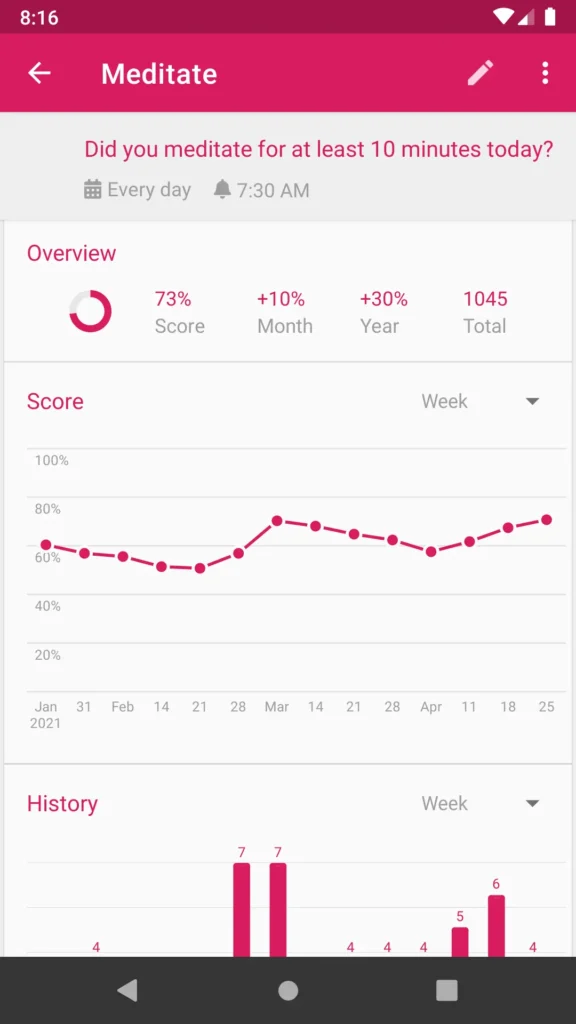
Loop works entirely offline, requires no account, and never sends your data anywhere. Detailed graphs and statistics allow you to track your progress visually, helping you understand how your habits evolve over weeks, months, and years.

Screenshots
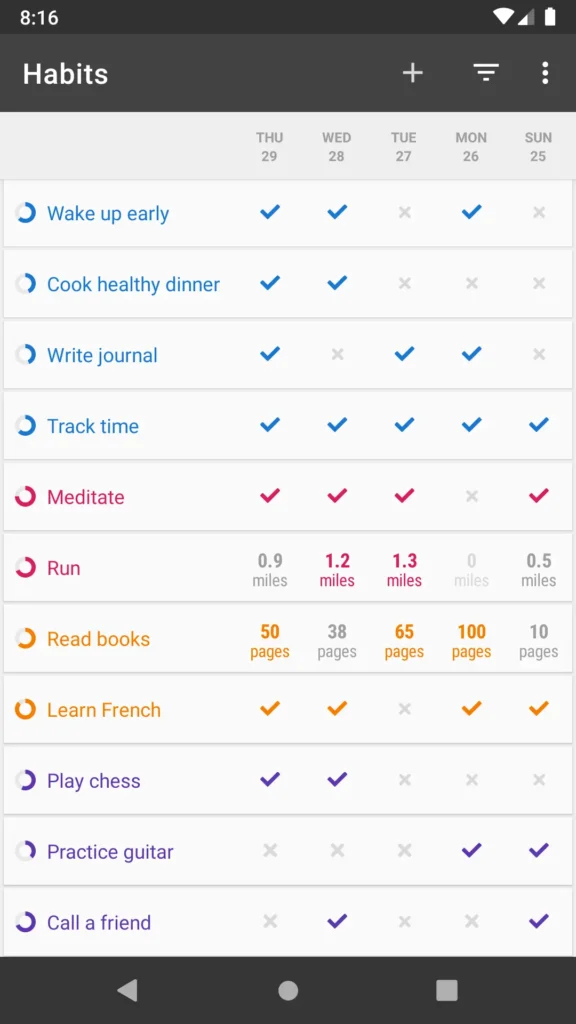
Features of Loop Habit Tracker

FeatureDescription
Minimal & Lightweight UIClean, fast, and distraction-free interface optimized even for older Android devices
Flexible SchedulingSupports daily habits, alternate days, and custom weekly schedules
Smart RemindersIndividual notifications for each habit at your chosen time
Home Screen WidgetsTrack and update habits directly from Android home screen widgets
Data ExportExport habit data to CSV or SQLite formats for analysis or backup
Fully OfflineNo internet connection or account required
Ad-Free & Open SourceNo ads, no tracking, no in-app purchases (GPLv3 licensed)

System Requirements

PlatformMinimum Specification
AndroidAndroid 5.0 or newer
Storage~10 MB free space

How to Install Loop Habit Tracker App??

  1. Download the latest APK from the download section below.
  2. Enable “Install unknown apps” in Android settings (if required)
  3. Install the app.
  4. Launch Loop Habit Tracker from your app drawer.

Download Loop Habit Tracker App For Android

Advantages of Using Loop Habit Tracker

  • 100% Free & Open Source: No ads, no hidden costs
  • Privacy-First Design: Your data never leaves your device
  • Realistic Habit Tracking: No streak anxiety or punishment-based tracking
  • Offline-Friendly: Works anywhere, anytime
  • Lightweight & Fast: Perfect for low-end and older Android devices
  • Community-Driven Development: Transparent development with community contributions

Conclusion

Loop Habit Tracker is an excellent choice for anyone serious about building long-term habits without distractions or privacy concerns. If you value simplicity & control over your data, Loop Habit Tracker is absolutely worth trying.


Don’t miss any Tech Story

Subscribe To Firethering NewsLetter

You Can Unsubscribe Anytime! Read more in our privacy policy

LEAVE A REPLY

Please enter your comment!
Please enter your name here

YOU MAY ALSO LIKE
RapidRAW mobile app

RapidRAW APK: RAW Photo Editor for Android

0
Mobile photo editing apps usually force you to choose between simplicity and control. RapidRAW tries to give you both. Built as a modern RAW photo editor, RapidRAW brings many of the tools photographers normally expect from desktop software directly to Android. You can edit RAW images non-destructively, apply advanced color grading, work with masks, correct lenses, reduce noise, and export finished photos without altering the original files. What makes RapidRAW particularly interesting is its focus on performance. The editing engine is GPU-accelerated, allowing adjustments to feel responsive even when working with high-resolution images. At the same time, the interface stays clean and approachable instead of overwhelming users with complicated workflows. If you're editing photos from a DSLR, mirrorless camera, or a smartphone that captures RAW images, RapidRAW offers a capable mobile editing experience.
Sefirah for Android

Sefirah for Android: Open-Source Phone Link Alternative for Windows

0
Sefirah is an open-source Android companion app designed to keep your phone and Windows PC connected over your local network. Once paired, you can share clipboard content, transfer files, mirror your phone screen, view notifications on your desktop, control media playback, and even access Android storage directly from Windows Explorer. The experience feels closer to having both devices working as one system. Because communication happens directly between your devices, most features continue working without internet access as long as both devices remain connected to the same local network.
PDF Toolkit A Privacy-First Offline PDF App for Android

PDF Toolkit: A Privacy-First Offline PDF App for Android

0
PDF Toolkit is one of those Android apps that feels simple but very useful. You install the APK, open it, and everything runs directly on your device. The app covers most of the stuff people actually need including merging PDFs, splitting files, compressing documents, converting images to PDF, extracting pages, signing files, adding annotations, and even scanning documents with automatic edge detection. It does not require internet permission. Most alternatives push everything through cloud APIs or lock basic tools behind subscriptions. There is also proper OCR support. The Play Store build uses Google ML Kit for smaller downloads, while the open source builds use Tesseract OCR so the entire stack stays fully offline and open source.