
File Information
| Attribute | Details |
|---|---|
| Name | Keyviz 2.0 – Ultimate Keystroke Visualizer |
| Version | v1.0.6 (Stable Release) |
| Type | Free Open-Source Visualization Software |
| Size | 13.8MB |
| Platforms | Windows |
| License | Open-Source (MIT) |
| Primary Function | Real-time Keystroke and Mouse Action Visualization |
Table of contents
Description
Imagine you’re giving a programming tutorial, recording a screencast, or collaborating with teammates online. Wouldn’t it be incredible if your audience could instantly see every keystroke and mouse movement you’re making? Keyviz 2.0 turns this imagination into reality!
This groundbreaking software is more than just a keystroke visualizer, it’s a communication tool that bridges the gap between your actions and your audience’s understanding. Whether you’re a developer explaining complex coding techniques, a content creator sharing software tutorials, or a professional conducting remote training, Keyviz ensures that no subtle action goes unnoticed.
Screenshots

Features of Keyviz
| Feature | Detailed Description |
|---|---|
| Advanced Mouse Action Tracking | Go beyond simple clicks! Capture intricate interactions like Cmd + Click, Alt + Drag, and complex multi-key combinations that traditional screen recording tools miss completely. |
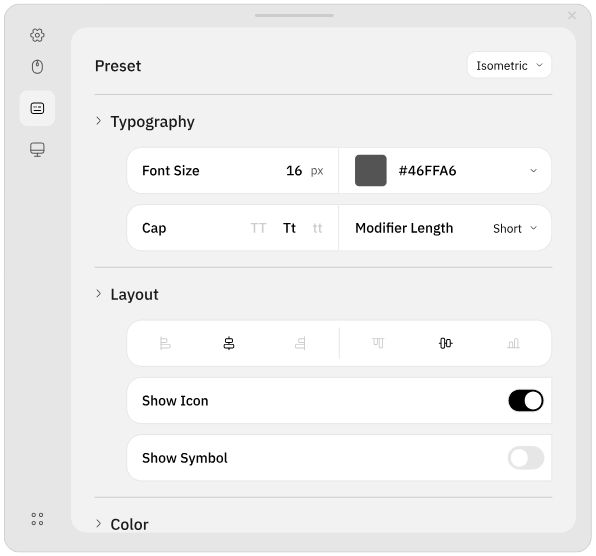
| Hyper-Customizable Visualization | Transform your keystroke display from boring to brilliant. Customize every visual aspect – from color schemes and key sizes to animation styles and border designs. Make your screen sharing as unique as your workflow. |
| Intelligent Key Filtering | Don’t want to clutter your screen with every single keystroke? Keyviz offers smart filtering options that allow you to display only meaningful shortcuts and critical key combinations. |
System Requirements
| Platform | Minimum Specification |
|---|---|
| Windows | Windows 7 or newer, Intel/AMD 64-bit, 4 GB RAM (8 GB recommended), OpenGL/DirectX compatible GPU, 200 MB free disk space |
How to Install Keyviz??
Before installation, scroll down to the Download Section and get the correct installer or source code for your platform.
- Download the Portable Zip file
- Unzip the downloaded file using 7zip or Winrar.
- Run the installer and follow the prompts.
- Launch Keyviz and start visualizing keystrokes and mouse actions.
Download Keyviz: An Open-Source Keystroke Visualizer for Windows
Conclusion
Keyviz is a powerful, free, and open-source tool that lets you visualize your keystrokes and mouse actions in real-time, making it perfect for screencasts, presentations, collaborations, or tutorials. With customizable visuals & easy-to-use configuration options. Keyviz enhances audience engagement and provides a professional touch to any demonstration.