

I like Claude Code. But for some of my personal projects, the last thing I want is my code touching a cloud server I don’t control. So I went looking for an open source alternative and found this absolute beast.
It’s called Goose. Honestly surprised it took me this long to find it.
So what is Goose exactly?
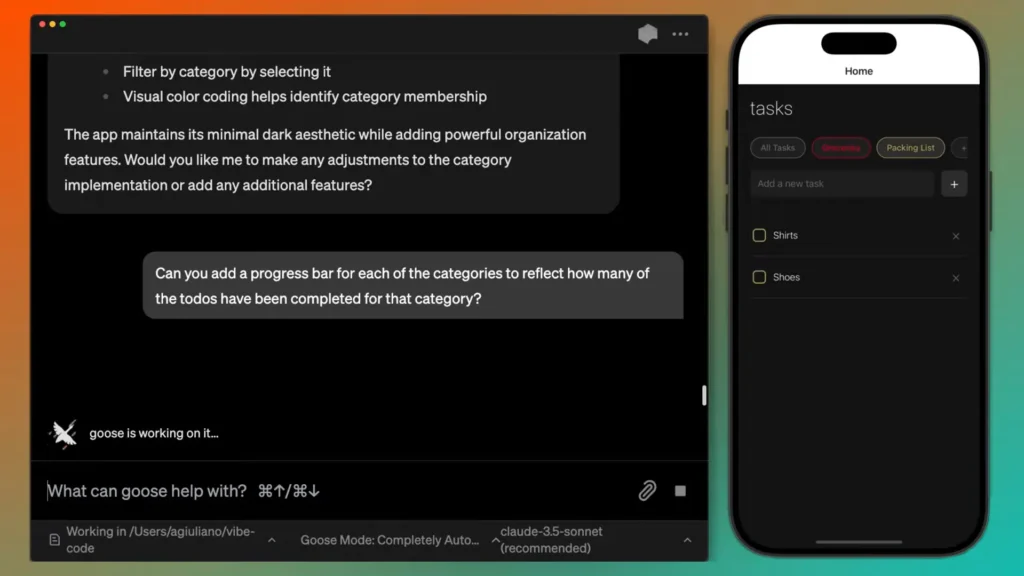
Think of it as an AI agent that lives on your machine. Not a chatbot that gives you code suggestions. An actual agent that can create files, edit code, run commands, debug errors, and work through multi-step tasks on its own.
The part that makes it different from most AI coding tools is the model flexibility. Goose doesn’t care what LLM you use. Connect it to Claude, GPT-4, Gemini, Groq or if you want everything fully local with zero internet, plug in an Ollama model like GLM-5 or Kimi K2. Your choice, your data.
How it’s different from Claude Code
Claude Code is built around Anthropic’s own models and needs an account to run even with local models. Goose has none of that, its fully open source, no account needed. The difference seems small. In practice for personal projects it changes everything.
| Feature | Claude Code | Goose |
|---|---|---|
| Requires account | Yes | No |
| Fully local option | Partial | Yes |
| Model flexibility | Limited | Any LLM or Ollama |
| Open source | No | Yes (Apache 2.0) |
| Approval gates | Yes | Minimal |
| Internet required | Yes | Only if using cloud models |
| Desktop app | Yes | Yes |
| CLI support | Yes | Yes |
| Cost | Paid | Free |
Your model, your choice
Goose doesn’t care what model you use. Connect it to Claude, GPT-4, Gemini, or Groq if you want cloud performance. Or point it at a local Ollama model if you want everything staying on your machine. Both work. It just depends on your hardware and what you actually need from the session.
I personally use GLM-5 for most of my personal projects. Is it as good as Claude Opus? No. But it’s good enough for what I’m building, it runs locally, and my code never leaves my machine. That tradeoff works for me.
The part I actually appreciate though is how easy it is to switch. If I hit something complex that needs heavier reasoning I just change the model in settings and keep going. No reinstalling, no reconfiguring, no starting over. Same session, different model.
That kind of flexibility is rare in coding tools. Most lock you in. Goose just gets out of the way.
Getting started is simpler than you think
Goose installs like any normal app, download the binary for your system, open it, connect your model of choice and you’re running. Desktop app if you prefer a visual interface, CLI if you like staying in the terminal. Both work the same way.
Why I chose Goose for personal projects
Simple reason. I didn’t want my code leaving my system. I just have projects where the idea itself is something I want to keep to myself until it’s ready. That’s it.
Goose gives me that. My code stays on my machine, my ideas stay in my head, and I still get an AI agent that can actually work through problems autonomously.
Everyone has their own reasons for caring about this. Maybe it’s a client project with an NDA. Maybe it’s something you’re building that you don’t want anyone seeing yet. Maybe you just like knowing exactly where your data goes.
Whatever the reason, if you’ve been looking for an open source alternative to Claude Code that actually works, this one is worth trying.