
File Information
| Property | Details |
|---|---|
| Name | AppFlowy |
| Version | 0.5.5 |
| License | AGPL v3 (Open Source) |
| Platform | Android & iOS |
| File Type | .apk (Android), .zip (iOS Source Code) |
| File Size | Android: ~126 MB, iOS Source: ~150 MB |
| Developer | AppFlowy Team & Community Contributors |
| Official Website | appflowy |
| Source Code | AppFlowy |
Table of contents
Description
AppFlowy is an open-source productivity app that brings the power of Notion to everyone without limits, subscriptions, or privacy concerns. Designed for Android, iOS, Windows, macOS & Linux, AppFlowy helps you take notes, manage projects, write documents, and organize your workspaces with full data ownership.
Built using Flutter and Rust, AppFlowy delivers a clean, responsive & secure experience with end-to-end flexibility. It’s perfect for individuals, teams, or developers who want a self-hosted Notion alternative with no vendor lock-in.
AppFlowy empowers you to customize your workflow exactly how you want — all while keeping your data safe, local, and private.
AppFlowy gives you full control over your workspace and data. You can host your content, modify the interface, and even extend features using open plugins and APIs.
Whether you’re a student organizing study notes, a developer managing projects, or a team collaborating remotely, AppFlowy adapts to your workflow.
Features of Appflowy
| Feature | Description |
|---|---|
| Open Source Freedom | 100% free, transparent, and customizable. Your data, your control. |
| Offline Mode | Work anywhere, anytime — even without internet access. |
| Rich Text Editor | Create beautiful documents with markdown, tables, tasks & more. |
| Task Management | Create Kanban boards, to-do lists, and track progress efficiently. |
| Cross-Platform | Works seamlessly across Android, iOS, Windows, macOS, and Linux. |
| Secure by Design | No data sharing or tracking — complete local data storage. |
| Extensible Framework | Developers can add plugins and integrate tools easily. |
| Team Collaboration | Real-time editing and workspace sharing (beta). |
| Clean & Intuitive UI | Built using Flutter for a smooth and modern experience. |
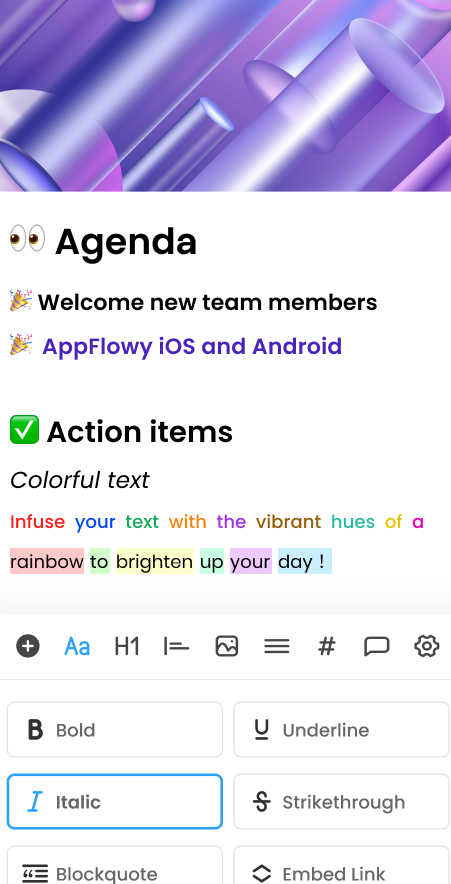
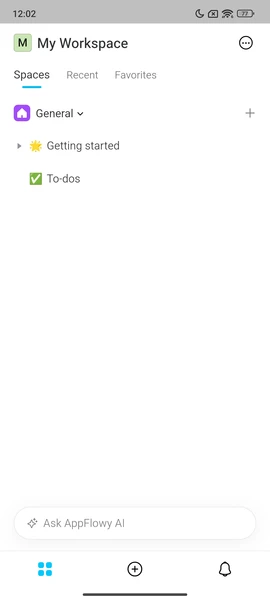
Screenshots
System Requirements
| Platform | Minimum Requirements |
|---|---|
| Android | Android 8.0 (Oreo) or higher, 3 GB RAM, 100 MB storage |
| iOS | iOS 13.0 or later (buildable via Xcode), 3 GB RAM |
| Tools (iOS) | macOS 10.15+ with Xcode & Flutter SDK installed |
How to Install Appflowy App??
For Android (.apk)
- Download the AppFlowy
.apkfile. - On your Android device, open Settings → Security → Install unknown apps and enable permission.
- Locate the downloaded APK file in your Downloads folder.
- Tap to install and follow the on-screen instructions.
- Launch AppFlowy and start creating your workspace instantly.
For iOS (Source Code .zip)
- Download the AppFlowy Source Code (.zip) file.
- Extract it on your Mac system.
- Open the project in Xcode.
- Make sure Flutter SDK and dependencies are installed.
- Connect your iPhone or use a simulator, then click Run in Xcode.
- AppFlowy will compile & launch — ready for your first project!
Download Appflowy: Open Source Notion Alternative for Android & iOS
Unlike most productivity tools that store your data in the cloud, AppFlowy puts you in charge. It’s built by a community of developers who believe in transparency, privacy & open innovation.
AppFlowy provides all the power of Notion, ClickUp, or Evernote, but without any subscription — making it a perfect choice for individuals, students & professionals who value data freedom