
File Information
| Name | RapidRAW – GPU-Accelerated RAW Image Editor |
|---|---|
| Version | v1.5.0 |
| File Size | Windows: ~20 MB (.exe) • macOS: ~20 MB (.dmg) • Linux: ~20 MB (.AppImage/.deb) |
| Platforms | Windows • macOS • Linux |
| License | Open Source (AGPL-3.0 License) |
| Official Repository | RapidRAW |
Table of contents
Description
RapidRAW is a high-performance, GPU-accelerated RAW photo editor designed for photographers who want a clean, fast, and intuitive editing experience. Lightweight and feature-rich, RapidRAW offers a modern alternative to Adobe Lightroom, enabling photographers to edit RAW images without sacrificing performance.
Built with Rust and React, RapidRAW focuses on speed, creativity, and non-destructive editing, making it perfect for professional workflows or enthusiasts who want an efficient photo editing solution.
Features of RapidRaw
| Feature Category | Features |
|---|---|
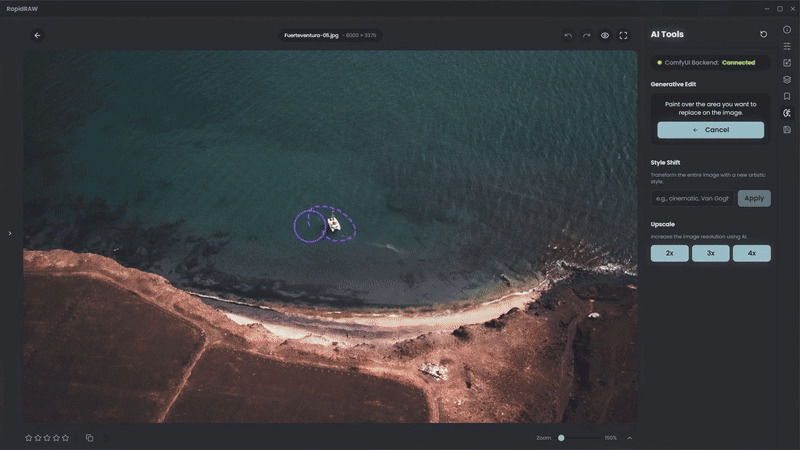
| Core Editing Engine | GPU-accelerated processing with custom WGSL shader, full RAW support via rawler, 32-bit precision, non-destructive workflow (.rrdata sidecar files), AI-powered masking (subject, sky, foreground), generative edits with optional ComfyUI backend |
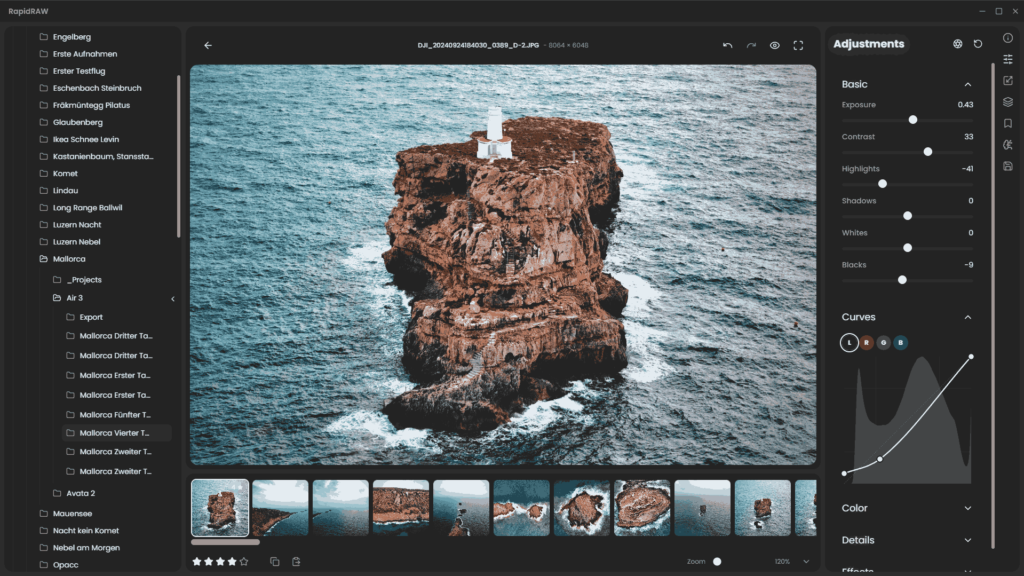
| Professional Adjustments | Exposure, Contrast, Highlights, Shadows, Whites, Blacks, Tone Curves (Luma, RGB), Color Grading (Temperature, Tint, Vibrance, Saturation, HSL mixer), Sharpening, Clarity, Structure, Noise Reduction, LUTs, Dehaze, Vignette, Film Grain simulation |
| Library & Workflow | Image library management, folder tree, batch operations, import/copy/move/rename/duplicate images, filmstrip view, EXIF data viewer |
| Productivity & UI | Undo/Redo history, preset system, copy/paste settings, resizable panels, multiple themes with smooth animations, panorama stitcher, export control for formats, quality, naming, metadata, resizing |
Screenshots
System Requirements
| OS | Minimum Requirements |
|---|---|
| Windows | Version: 10 or newer, Processor: x64, Memory: 4GB recommended, Disk Space: 500MB+, GPU: OpenGL 2.1 compatible |
| macOS | Version: 13 (Ventura) or newer, Processor: Intel or Apple Silicon, Disk Space: 500MB+ |
| Linux | Modern distro (Ubuntu 22.04+, Fedora, Arch), Processor: x86_64 or ARM64, Memory: 4GB+, GPU: OpenGL 2.1 compatible |
How to Install RapidRaw??
Windows
- Download the Installer
- Grab the latest
.exerelease from the download section below.
- Grab the latest
- Run the Installer
- Double-click the
.exefile and follow the on-screen instructions.
- Double-click the
- Run the Application
- Launch RapidRAW from the Start Menu or Desktop shortcut.
- Security Warning (if any)
- Windows Defender SmartScreen may warn you. Click More info → Run anyway to proceed.
macOS
- Download the Application
- Download the
.dmgfor your Mac architecture (Intel x64 or Apple Silicon ARM64) from the download section below.
- Download the
- Install the App
- Open the
.dmgfile and drag RapidRAW.app into the Applications folder.
- Open the
- Remove Quarantine (if required)
- If macOS reports the app as corrupted, open Terminal and run:
xattr -dr com.apple.quarantine /Applications/RapidRAW.app
- If macOS reports the app as corrupted, open Terminal and run:
- Launch the App
- Open RapidRAW from the Applications folder.
Linux
Option 1: Using AppImage (Recommended for all distributions)
- Download the
.AppImagefor your architecture (x86_64 or ARM64) from the download section below. - Make it executable:
chmod +x RapidRAW-*.AppImage - Run the application:
./RapidRAW-*.AppImage
Option 2: Using DEB (Debian/Ubuntu)
- Download the
.debfile for your system. - Install the package:
sudo dpkg -i rapidraw-*.debsudo apt-get install -f # To fix any missing dependencies- Launch RapidRAW from your applications menu or by running:
rapidraw
Download RawRapid: The Best Free Lightroom Alternative for Windows, macOS & Linux
Conclusion
RapidRAW is the ultimate free Lightroom alternative for Windows, macOS, and Linux. It combines speed, creativity, GPU acceleration, and non-destructive editing into a compact, easy-to-use package. Perfect for photographers who value performance and workflow efficiency, RapidRAW is one of the best free RAW editors available today.
Download RapidRAW now and experience high-performance RAW editing without compromise.