
File Information
| Property | Details |
|---|---|
| App Name | PPSSPP – PSP Emulator |
| Developer | Henrik Rydgård & Open Source Community |
| License | Open Source (GPLv2 or later) |
| Version | 1.20.3 |
| File Size | Android (40 MB) • iOS (20 MB) |
| Supported OS | Android 5.0+ • iOS 12.0+ |
| Architecture | ARM64 / x64 |
| Category | Emulator / Gaming |
| Github Repository | Github/ppsspp |
| Official Site | ppsspp |
Table of contents
Description
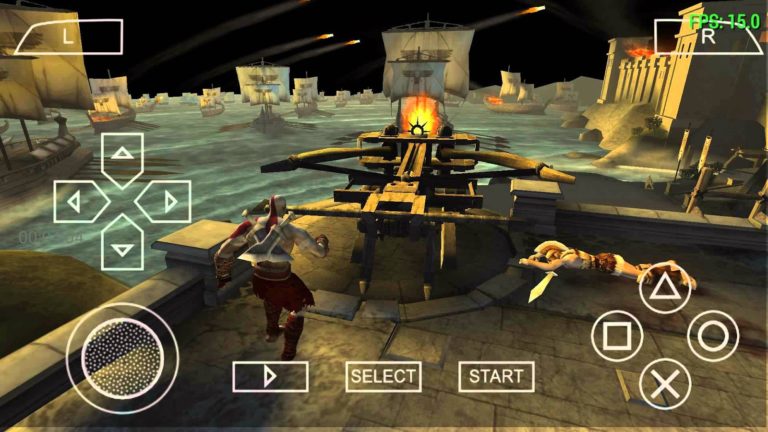
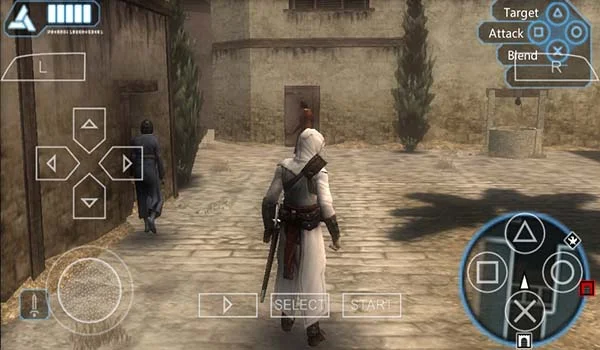
If nostalgia hits hard, PPSSPP is the emulator that brings classic PSP games back to life on your phone. On Android or iOS, you can relive your favorite titles in high definition with enhanced graphics, sharper textures, and customizable controls. The joy of replaying God of War, Tekken, or Persona with modern screen resolution and optional filters makes the experience feel fresh again.
The app is built for both performance and flexibility. You can import your own PSP game files (ISO or CSO), use save states so you can quit any moment and pick up right where you left off, map external controllers or wear Bluetooth ones, adjust rendering options, texture scaling, and even tweak brightness or color to suit your device or mood.
On iOS, PPSSPP now has an official App Store version which was a big deal because emulators were heavily restricted there for years. It works well on recent iPhones & iPads though there are limitations: no just-in-time (JIT) compilation because of Apple’s rules, which can affect performance in some demanding titles. Still, it runs smoothly on most modern devices.
If you want full control, privacy, and to play your PSP games whenever you want, PPSSPP is the best free choice. Scroll down to the Download section & follow the install steps to get started.
Features of PPSSPP
| Feature | What It Lets You Do |
|---|---|
| HD Resolution & Texture Upscaling | Makes games look sharper than on original PSP hardware |
| Save States & Load Anytime | Save at any moment & return later without losing progress |
| Custom Controls & External Gamepads | Map touch buttons or use Bluetooth controllers or keyboard |
| Graphics Enhancements | Adjust filters, texture scaling, anisotropic filtering, color brightness |
| Wide Game Compatibility | Runs almost all PSP game titles, with ongoing updates for better support |
| Homebrew & Demos | Play free games & user-made titles along with your own legal PSP backups |
| Cross-Platform Performance | Work well on Android & iOS devices, optimized for different hardware |
| Free & Open Source | Fully community-driven with transparent code |
Screenshots
System Requirements
| Platform | Minimum Requirements |
|---|---|
| Android | Android 5.0 or later · 2GB RAM · GPU with OpenGL ES 2.0+ support · Some titles require more |
| iOS | iOS 12.0 or later · iPhone or iPad with modern hardware (A12/Bionic or newer gives best performance) |
| Device Storage | Secure space for PSP ROMs & saves (ISO/CSO files) · Small storage for emulator itself |
How to Install PPSSPP In Android OR iOS??
For Android
- Extract the rar file (No Password)
- Install the app & grant necessary permissions (storage, gamepad input).
- Import your own legally obtained PSP game files (ISO or CSO).
- In settings, adjust resolution / rendering mode / texture settings depending on your device.
- Use save states liberally so you can experiment without fear.
- Optional: connect a Bluetooth controller for more authentic controls.
For iOS (IPA)
- Download the PPSSPP.ipa file.
- Use AltStore, Sideloadly, or TrollStore to install it on your iPhone or iPad.
- Once installed, open PPSSPP.
- Add your PSP game files via the file manager or external drive.
- Customize controls, resolution, and save states and enjoy!
Download PPSSPP App
For Android & Other OS pls visit the official Site of PPSSPP
Conclusion
PPSSPP brings your PSP library back to life, making every mission, combo, and boss fight smoother and sharper than ever.
Whether you’re reliving childhood classics or discovering hidden gems, PPSSPP is your gateway to the golden age of handheld gaming, right in your pocket.