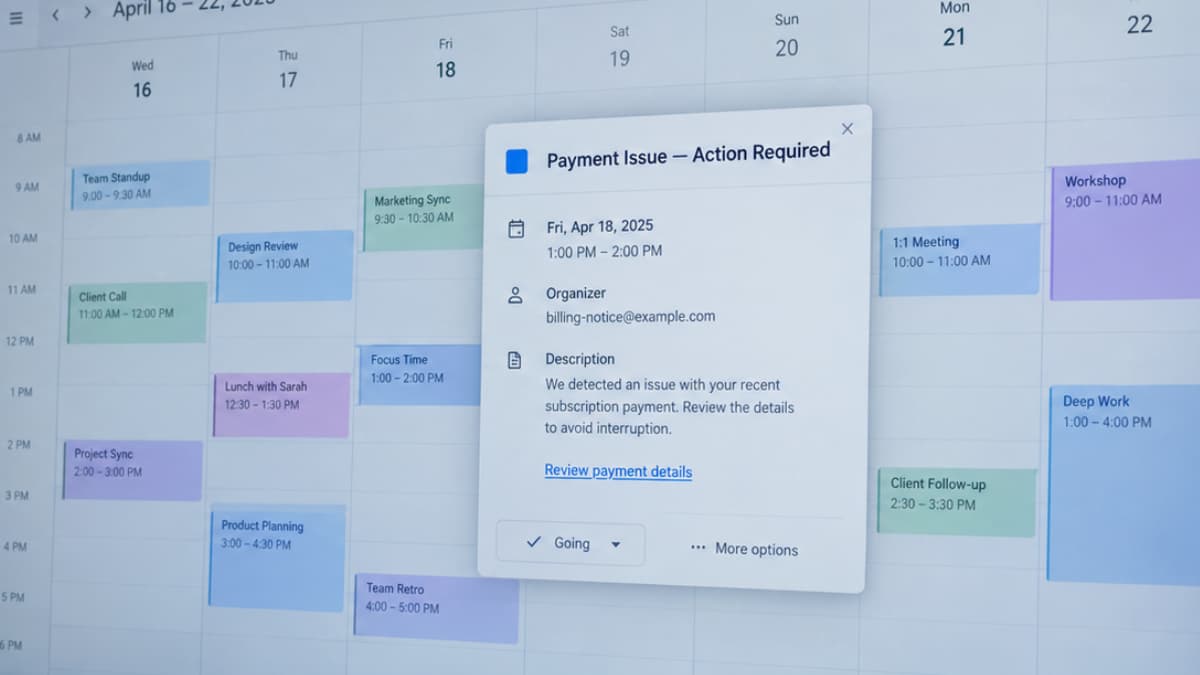

Most people know not to click a suspicious link in an email. But what if the email disappears and the suspicious link stays on your calendar?
That is the problem with calendar invite phishing. Attackers hide malicious links, QR codes or fake payment notices inside meeting invitations that can be added to a calendar automatically. Even if an email security tool catches the original message, the calendar event may remain, leaving the trap in a place people rarely think to check.
Cybersecurity firm Sublime Security has reported a sharp rise in these attacks, including campaigns that use familiar services such as Google Calendar to make their invitations appear more trustworthy.
The problem isn’t just how the invitation gets past your defences. It’s what happens after the email is gone.
Table of Contents
How a Calendar Invite Becomes a Phishing Trap
A calendar invitation can look like an ordinary meeting reminder, but its contents can do much more than tell you when to show up.
Attackers can use an .ics file, the standard format for exchanging calendar events, to deliver a message built around a fake payment, an overdue invoice or a suspicious subscription renewal. The event might include a link to a counterfeit sign-in page, a QR code that leads to one or a phone number that sends the recipient to a fraudulent support agent.
The trick is to make the request feel routine. A notice about a payment problem can appear to be a legitimate business reminder, while a calendar notification gives it another chance to catch someone’s attention. Instead of questioning an unexpected email, the recipient may see the event as something they need to resolve before a meeting or deadline.
Some calendar services also add incoming invitations automatically, depending on the user’s settings. That means the event can appear before the recipient has deliberately opened or accepted it. In certain configurations, attachments and other invitation details can appear there too. Sublime Security documents examples of these attacks.
The invitation doesn’t need a sophisticated exploit. It needs someone to trust the reminder enough to click, scan or call.
The Security Gap Between Your Inbox and Your Calendar
The problem isn’t necessarily that an email filter failed to spot a suspicious message. In some cases, the filter can catch the email and the malicious invitation can still remain on the calendar.
That’s because email and calendar events are often handled as separate objects. When an email client processes an .ics attachment, it may create a calendar event containing the same details, links or attachments. Quarantining the original message doesn’t automatically undo that action.
Sublime Security documented this behaviour in both Google Workspace and Microsoft 365 environments. Its research found that calendar entries could survive even when the associated emails were blocked or moved to junk. The company says this happens because many email security tools don’t also remove the calendar events created by those messages. Sublime’s technical explanation describes the gap and how its own system handles remediation.
That leaves security teams with two separate tasks. They need to detect the malicious message, then make sure the event it created is removed from the user’s calendar. Sublime has even released an open-source toolkit to help organizations using certain other email security and calendar platforms remove those leftover events.
For users, the practical lesson is: deleting a suspicious email doesn’t guarantee that every trace of it has disappeared. If the invitation has already landed on your calendar, check and remove that event too.
Also Read: Are AI Chats Private? What the Claude Diary Case Reveals
Calendar Phishing Attacks Are Rising Across Multiple Campaigns
The problem isn’t limited to one security company’s findings. Check Point Research has tracked a large phishing campaign targeting Microsoft 365 users with fake calendar invitations. The messages pose as meeting requests or payment notifications, using malicious .ics attachments or links that lead to fake Microsoft sign-in pages.
In its October 15, 2026 report, Check Point said a detection layer built specifically for these attacks had flagged 302,386 unique phishing emails across more than 40,000 organizations. The researchers also recorded more than 740,000 emails in the first two weeks of October, with nearly 200,000 on October 8 alone. These figures come from Check Point’s own detection systems, not a count of all calendar phishing worldwide.
Sublime Security has reported a separate surge in calendar-based attacks. Its telemetry showed a steep rise through the summer, with the company estimating that September’s volume would be roughly 33,000% higher than May’s. That September figure was a projection based on activity observed during the first half of the month, not a final global tally.
The two reports track different datasets, so their numbers shouldn’t be combined. What they show is that attackers are using routine calendar workflows to deliver credential-stealing lures at scale and that invitations deserve the same scrutiny as messages arriving directly in the inbox.
Also Read: Canadian Developer Builds AI Camera to Track Police Cars, Then Officers Visit His Home
What You Can Do to Protect Yourself
For individuals, the first step is to treat unexpected calendar invitations with the same caution as suspicious emails. A familiar company name or a polished meeting reminder doesn’t prove the event is legitimate. Be especially wary of urgent payment notices, unexpected subscription renewals and requests to sign in or call a number to resolve a problem.
If an invitation looks suspicious, don’t follow its links, scan its QR codes or call the numbers listed in it. Verify the claim through the company’s official website or a contact method you already trust. If the event has already appeared on your calendar, remove it and report the message through your email or calendar provider’s available reporting tools.
It’s also worth reviewing how your calendar handles invitations from unknown senders. Depending on the service, you may be able to prevent events from appearing automatically or have them added only after you respond. The exact controls vary by platform, so check the settings for the calendar you use.
Organizations have another responsibility to make sure their security systems handle the calendar event as well as the email that delivered it. Sublime’s open-source ICS phishing toolkit provides scripts for teams using Proofpoint, Mimecast or Abnormal Security alongside Google Workspace or Microsoft 365. It can help find and remove calendar events associated with messages those systems have already quarantined.
The goal is to close the gap between detecting a phishing message and cleaning up what it leaves behind. Otherwise, a threat can disappear from the inbox without disappearing from the user’s day.