
File Information
| Property | Details |
|---|---|
| Name | Grocy Mobile |
| Version | Android: 2.10.3, iOS: 2.10.3 |
| File Size | Android APK: 17–20 MB (depending on architecture), iOS ZIP: 3MB |
| Platform | Android, iOS |
| License | Open Source (MIT License) |
| Official Repository | grocy-mobile |
Table of contents
Description
Grocy Mobile is a free open-source companion app for Grocy, the popular self-hosted grocery & household management system. Designed to help you efficiently manage your groceries, household items, and shopping tasks directly from your smartphone or tablet, Grocy Mobile brings powerful features in a sleek interface for Android & iOS users.
This app is not standalone — it requires a running Grocy server instance to function. However, Grocy Mobile allows you to interact seamlessly with your server, scan barcodes, manage stock, and organize your shopping lists — all from the convenience of your mobile device.
Whether you want to manage your pantry, track expiration dates, or plan shopping trips with offline support, Grocy Mobile makes household management intuitive, efficient, and enjoyable.
Grocy Mobile is built with modern mobile technologies:
- Android: Native app that communicates with your self-hosted Grocy server using the official API. Supports barcode scanning, batch processing, and intuitive stock management.
- iOS: Built using SwiftUI 3 & Multiplatform App frameworks. Requires iOS 15.0 or newer and macOS Monterey 12.0 for compilation. Provides offline shopping list support and Quick-Scan mode with barcode scanning.
Contributors:
- Patrick Zedler
- Dominic Zedler (original contributor)
Grocy Mobile aims to replicate the power of the Grocy web interface on mobile devices while maintaining offline capabilities, speed, and user-friendly design
Features of Grocy Mobile
| Feature | Description |
|---|---|
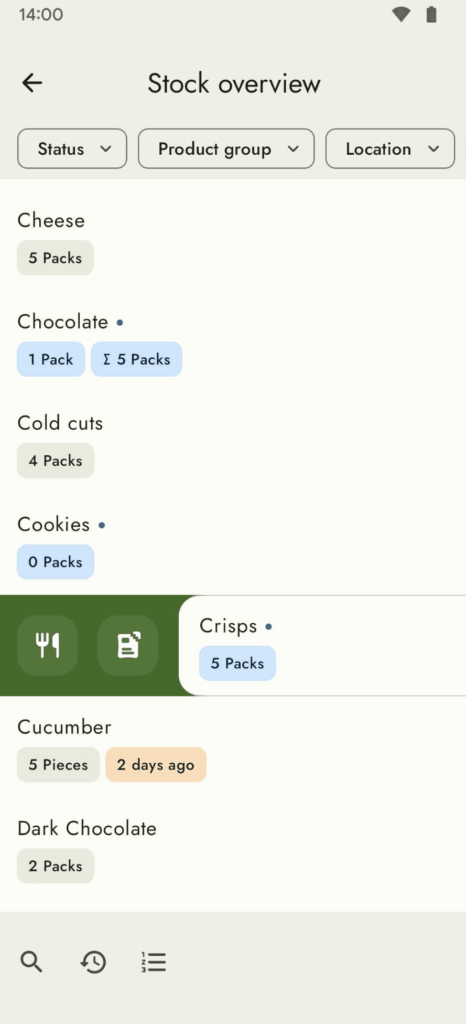
| Stock Overview | Track your groceries, household items & quantities |
| Shopping Lists | Offline support, in-store mode with big UI elements |
| Barcode Scanning | Fast and accurate product addition using camera |
| OpenFoodFacts/OpenBeautyFacts | Automatic product data integration |
| Master Data Editing | Enter, edit, or delete products & items |
| Dark Mode & Dynamic Colors | Comfortable viewing in any light condition |
| No Ads or Analytics | Fully privacy-respecting experience |
| Quick-Scan Mode | Add products quickly using barcode scanning (iOS) |
| Offline Support | Shopping lists & data stored locally for offline use |
| Multi-Platform | Works on Android, iPhone, iPad, & macOS devices |
| Siri Support (Planned) | Voice commands & widget integration (iOS) |
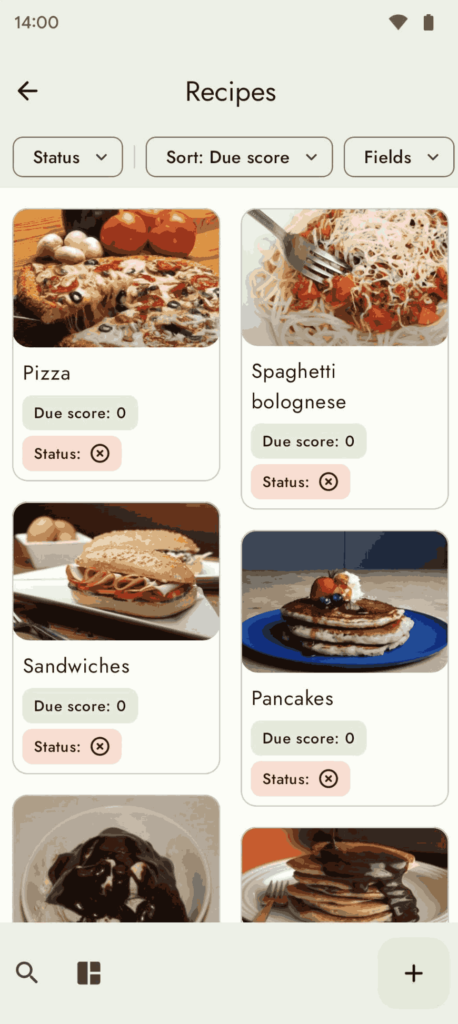
Screenshots
System Requirements
| Platform | Minimum Requirements |
|---|---|
| Android | Android 5.0 Lollipop or higher |
| iOS | iOS 15.0 or newer |
| macOS | macOS Monterey 12.0 or newer |
| Grocy Server | Version 3.1.3 or higher for connecting with app |
How to Install Grocy App??
Android APK Installation:
- Download the APK file.
- Enable installation from unknown sources in your Android settings.
- Open the APK and follow the prompts to install.
- Launch Grocy Mobile and connect to your running Grocy server or try the demo option.
iOS/macOS Installation (ZIP):
- Download
Grocy.Mobile.2.10.3-macOS.zip. - Extract the ZIP file anywhere on your system.
- Open the extracted folder and run the app using the provided executable.
- Connect to your self-hosted Grocy server by entering the server URL in app settings.
Note: Grocy Mobile requires an active Grocy server instance. You can test features using the demo option available in the login screen.
Grocy Mobile: Open Source Grocery & Household Management App for Android & iOS
Conclusion
Grocy Mobile is the perfect companion for home inventory management, making it easy to track groceries, manage household stock, create shopping lists, and scan barcodes, all without any ads or unnecessary analytics. Start using Grocy Mobile today and bring ultimate control to your household management right from your pocket.